
Car Gauge Pro (OBD2 + Enhance)
Screenshots

Description
About Car Gauge Pro (OBD2 + Enhance) Feature
Car Gauge Pro (OBD2 + Enhance) is a professional-grade automotive diagnostic and monitoring application designed for vehicle owners and enthusiasts. By connecting to a standard OBD2 adapter plugged into a car's onboard diagnostic port, the app transforms a smartphone or tablet into a sophisticated real-time dashboard. It goes beyond basic code reading, offering deep insights into vehicle performance, health, and efficiency through a comprehensive suite of gauges, graphs, and diagnostic tools. The 'Enhance' aspect signifies its advanced capabilities, including performance logging, custom dashboard creation, and support for enhanced manufacturer-specific parameters, making it a powerful tool for both everyday monitoring and in-depth automotive analysis.
Chapter 1: Function
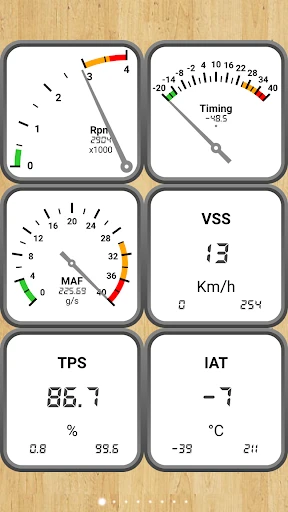
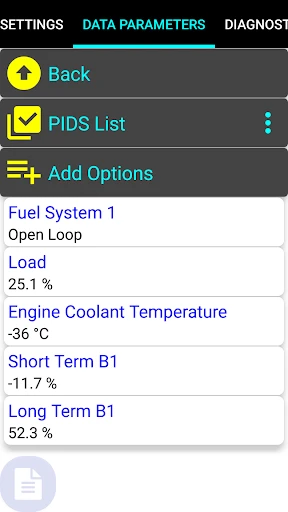
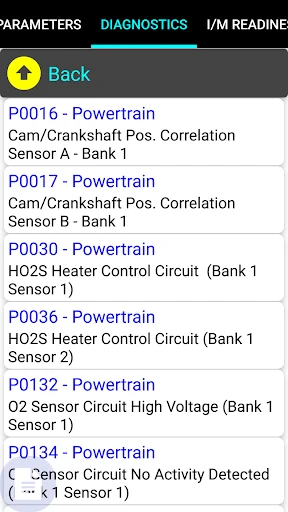
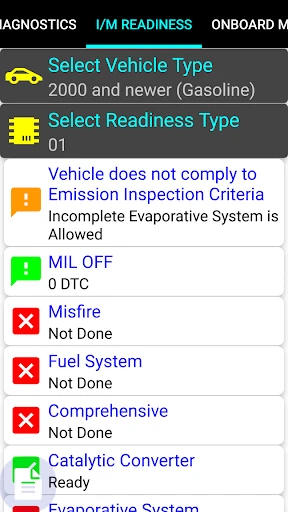
Car Gauge Pro operates by establishing a connection between the user's vehicle and mobile device via a compatible Bluetooth or Wi-Fi OBD2 adapter. Its core functionality revolves around real-time data acquisition and display. The app reads and interprets a vast array of data parameters from the vehicle's Engine Control Unit (ECU), presenting them as customizable digital gauges, such as for RPM, coolant temperature, vehicle speed, and fuel economy. It performs standard OBD2 diagnostics, allowing users to read, clear, and monitor diagnostic trouble codes (DTCs). Advanced features include trip logging with detailed statistics, the ability to create and save multiple dashboard layouts tailored to different needs, and graphing of sensor data over time. Furthermore, it supports enhanced mode for accessing manufacturer-specific PID data on many vehicles, providing information beyond standard OBD2 protocols for a more detailed analysis.
Chapter 2: Value
The primary value proposition of Car Gauge Pro lies in its empowerment of the vehicle owner with professional-level diagnostic information and monitoring capabilities at a fraction of the cost of dedicated hardware. Its key advantage is depth and customization. Unlike simpler OBD2 apps, it offers extensive configurability; users can design their own dashboard with precisely the gauges they need, arranged as they prefer, turning any device into a custom heads-up display. The support for enhanced parameters is a significant differentiator, offering insights specific to one's car brand that are typically only available to dealerships, which is invaluable for troubleshooting nuanced issues or performance tuning. The comprehensive data logging and graphing functions provide objective, historical records of vehicle behavior, essential for diagnosing intermittent problems or tracking changes after modifications. By demystifying the data from the ECU, it promotes proactive vehicle maintenance, potentially saving users from costly repairs through early detection of anomalies. It also enhances driving efficiency by providing real-time feedback on fuel consumption and engine load, encouraging economical driving habits. For the price of an app and a simple adapter, it delivers functionality that bridges the gap between casual car owners and professional mechanics or performance enthusiasts.
Chapter 3: Scenarios
Car Gauge Pro serves a diverse range of users across everyday and specialized scenarios. The primary target group includes DIY mechanics and car enthusiasts who perform their own maintenance and modifications. They use the app to diagnose check engine lights, monitor sensor readings during test drives to pinpoint issues like misfires or overheating, and log data before and after installing new parts to verify performance gains. Everyday drivers concerned with vehicle health and fuel economy utilize it as a preventive maintenance tool, keeping an eye on vital parameters during daily commutes to catch potential problems early. It is also valuable for used car buyers, allowing them to perform a basic pre-purchase diagnostic scan and check for hidden fault codes or monitor live data during a test drive. Performance drivers and racers use its logging and real-time display features to track lap times correlated with engine data, monitor critical temperatures and pressures on the track, and fine-tune their vehicle's setup. Finally, it serves as an educational tool for automotive students or curious owners wanting to learn more about how their vehicle's systems operate and interact in real-time.
Uninstall Instructions
For step-by-step guidance on how to safely remove this application from your device, please refer to our 《Uninstall Instructions》 document.
Pros
- displays real-time engine data via OBD2 on CarPlay
- customizable digital dash with unique analog-style gauges
- logs and exports detailed trip data for performance analysis
- supports enhanced PID for specific vehicle manufacturer data
- heads-up display (HUD) mode projects info onto windshield
Cons
- requires a compatible ELM327 OBD2 adapter for connection
- advanced PID features may need per-vehicle configuration
- CarPlay functionality depends on a wired connection
- real-time HUD mode can drain phone battery quickly
- interface has a steeper learning curve than basic OBD apps
Frequently Asked Questions
What is Car Gauge Pro and what does it do?
Car Gauge Pro is a professional-grade automotive diagnostic and monitoring app. It connects to your vehicle's OBD2 port via a compatible Bluetooth or Wi-Fi adapter. Its core functions include reading and clearing diagnostic trouble codes, displaying real-time sensor data (like RPM, speed, coolant temp), performing advanced diagnostics, and logging trip data. It positions itself as a tool for car enthusiasts and DIY mechanics to understand their vehicle's health and performance.
Is Car Gauge Pro free to use or does it have in-app purchases?
Car Gauge Pro typically operates on a freemium model. The app can be downloaded for free, offering basic OBD2 functions like reading codes and viewing some live data. To unlock advanced features such as enhanced diagnostics, full sensor suites, data logging, and performance metrics, a one-time purchase or a subscription within the app is required. The specific pricing tiers are detailed on the app's official store page.
What equipment do I need to use this app with my car?
To use Car Gauge Pro, you need a compatible OBD2 ELM327-based Bluetooth or Wi-Fi scan tool. The app itself does not include this hardware. You must purchase a separate adapter, plug it into your vehicle's OBD2 port (usually under the dashboard), and pair it with your phone or tablet. Ensure your vehicle is model year 1996 or newer, as that is the standard for OBD2 compliance in many regions.
Can Car Gauge Pro read manufacturer-specific codes and data?
Yes, Car Gauge Pro supports reading a wide range of generic OBD2 codes (P0, P2, U codes) and many manufacturer-specific codes (e.g., P1, P3 series). Its enhanced diagnostics feature can access deeper vehicle modules for advanced troubleshooting. However, the depth of manufacturer-specific data coverage can vary depending on your car's make, model, year, and the capabilities of your OBD2 adapter.
How do I clear a check engine light or reset an adaptation?
The app can clear generic diagnostic trouble codes and turn off the associated warning light (like Check Engine) if the underlying issue is resolved. For advanced resets (e.g., throttle adaptation, oil service lights), the capability depends on your specific vehicle's protocols. Navigate to the 'Fault Codes' section, view the codes, and use the clear function. For complex procedures, consult your vehicle's service manual, as incorrect resets can affect performance.
App Info
Technical Info
Recommended For You

Pose Tool 3D
Comics

WhatsApp Business
Communication

Color by Letter: Sewing game
Art & Design

NHRA.TV
Auto & Vehicles

Storytel - Audiobooks & Books
Books & Reference

Mens Hairstyles And Haircuts
Art & Design

Session - Private Messenger
Communication

UKG Dimensions
Business

Mary Kay® MirrorMe™
Beauty

Shiftsmart - Find Work
Business

NotanIzer
Art & Design

Figma: view. comment. mirror.
Art & Design

Adblock Browser: Fast & Secure
Communication

N5_Theme for Car Launcher app
Auto & Vehicles

TeslaMirror
Auto & Vehicles

@Voice Aloud Reader (TTS)
Books & Reference

Driving Instructor-Theory Test
Auto & Vehicles

Bible Launcher-KJV & Prayer
Books & Reference

Autolink
Auto & Vehicles

BimmerCode for BMW and MINI
Auto & Vehicles