
Amazon Seller
Screenshots


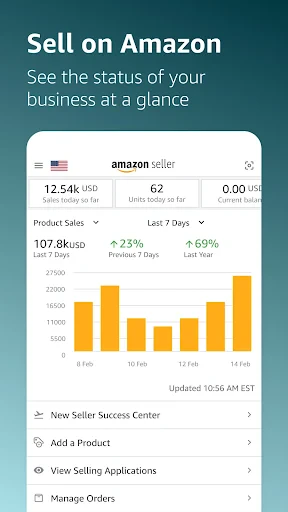


Description
About Amazon Seller App Features
The Amazon Seller mobile application is an official tool provided by Amazon, designed to empower third-party sellers by placing essential account management and sales operations directly into their hands. It serves as a portable command center for individuals and businesses selling products on Amazon's global marketplaces. By delivering real-time data and key functionalities to a smartphone, the app bridges the gap between sellers and their online businesses, enabling management from anywhere at any time. It is tailored to streamline the selling process, offering insights and controls that help sellers stay responsive to market dynamics, customer needs, and daily operational tasks without being tethered to a desktop computer.
Chapter 1: Function
The Amazon Seller app provides a comprehensive suite of core functions for managing an Amazon seller account. Users can list new products by scanning barcodes or entering details manually, and effortlessly edit existing listings. Order management is central; sellers can view, confirm, ship, and track orders, with integrated tools for purchasing shipping labels and printing packing slips directly from a mobile device. The app facilitates inventory monitoring, allowing for stock level checks and adjustments. Crucially, it offers real-time access to performance metrics, including sales dashboards, payment information, and customer messages. Push notifications alert sellers to new orders, customer inquiries, and important account updates, ensuring they never miss critical activities. These combined features consolidate the primary workflow of an Amazon seller into a single, mobile-friendly interface.
Chapter 2: Value
The primary value proposition of the Amazon Seller app lies in its empowerment of sellers through mobility, immediacy, and enhanced operational efficiency. Its key advantage is the liberation of the seller from a fixed location, transforming downtime into productive time and allowing for rapid response to orders and customer communications, which can directly improve customer satisfaction and metrics. The real-time access to sales data and performance analytics enables informed, on-the-go decision-making regarding inventory, pricing, and promotions. By integrating shipping label purchases and order fulfillment steps, it simplifies the logistics chain, reducing errors and saving valuable time. Furthermore, the app democratizes marketplace management, making it equally accessible for solo entrepreneurs and larger teams. It reduces administrative overhead by centralizing critical tasks, thereby allowing sellers to focus more on strategic growth activities like sourcing new products or marketing. Ultimately, it serves as a force multiplier, helping sellers stay competitive in the fast-paced Amazon ecosystem by keeping them constantly connected and in control of their business health from anywhere in the world.
Chapter 3: Scenarios
The Amazon Seller app is ideally suited for a diverse range of users within the e-commerce landscape. Its primary target groups include individual entrepreneurs and small business owners who manage their Amazon stores single-handedly and require the flexibility to operate outside a traditional office. It is equally valuable for staff members in larger e-commerce companies responsible for daily operations like order fulfillment and customer service. The app shines in everyday scenarios such as a seller checking morning sales while having coffee, purchasing shipping labels and confirming shipments immediately after orders are received during a commute, quickly responding to urgent customer messages outside of business hours, or monitoring flash sale performance while away from the desk. It is also indispensable for sellers who travel frequently, attend trade shows for sourcing, or need to manage inventory across multiple locations. For any seller prioritizing agility and constant connectivity to their Amazon business, this app transitions from a convenience to an essential operational tool.
Uninstall Instructions
For step-by-step guidance on how to safely remove this application from your device, please refer to our 《Uninstall Instructions》 document.
Pros
- integrates inventory and ads in a single dashboard
- automated repricing responds to competitor pricing changes
- profit calculation includes Amazon fees and shipping costs
- real-time alerts for negative feedback or stockouts
- supports bulk editing for listings across global marketplaces
Cons
- steep learning curve for new sellers due to feature density
- requires maintaining a healthy IPI score for full functionality
- advanced analytics locked behind higher subscription tiers
- mobile app lacks some bulk action features of desktop
- direct API linking needed for non-Amazon logistics data
Frequently Asked Questions
What is Amazon Seller app and what does it do?
Amazon Seller is a mobile application designed for individuals and businesses selling products on Amazon. Its core functions allow sellers to manage their storefronts, track sales and orders, respond to customer messages, and monitor inventory levels directly from a mobile device. It provides key insights into business performance and facilitates on-the-go store management.
Is the Amazon Seller app free to use?
Yes, the Amazon Seller mobile app is free to download and use. However, selling on Amazon itself requires a professional selling plan subscription or per-item selling fees, which are separate from the app. The app is a tool to access your existing seller account; it does not incur additional charges for its basic functionality.
What devices and systems support the Amazon Seller app?
The Amazon Seller app is available for both iOS and Android devices. You can download it from the Apple App Store for iPhones/iPads (requires iOS 13.0 or later) and from the Google Play Store for Android phones/tablets (requires Android 6.0 or later). It is optimized for mobile use and does not support desktop operating systems.
How do I handle customer returns or issues through the app?
The app provides access to manage customer orders and communication. You can view return requests and authorization details under the 'Orders' section. For specific issues or disputes, you can contact Seller Support directly through the app's 'Help & Support' menu. The app guides you through Amazon's standardized return and refund policies for sellers.
Can I create new product listings using the Amazon Seller app?
Yes, you can create and manage product listings directly within the app. The 'List a Product' feature allows you to add new items by scanning a barcode, entering product details manually, or copying from existing offers. It supports adding images, setting prices, and managing inventory for most standard product categories sold on Amazon.
App Info
Technical Info
Recommended For You

Skype
Communication

Face Shape & Color Analysis
Beauty

JOB TODAY: Hire & Find Jobs
Business

Rhinoplasty App: Nose Editor
Beauty

True Talk - Global Wifi Calls
Communication

TurboScan™ Pro: PDF scanner
Business

Face Swap Magic: AI Avatars
Art & Design

Tracer (Donation Package)
Art & Design

NIV Bible
Books & Reference

Learn Drawing
Art & Design

AI Video - AI Video Generator
Art & Design

Barnes & Noble NOOK
Books & Reference

Daily Bible Study: Audio, Plan
Books & Reference

EAGLE Security UNLIMITED
Communication

Smarty Men Jacket Photo Editor
Beauty

Maverik Rewards
Business

Madison Reed App - Hair Color
Beauty

Sketchbook
Art & Design

Inbox Homescreen
Communication

Whova - Event & Conference App
Business