
Papercopy - Tracer
Screenshots



Description
About Papercopy - Tracer Feature
Papercopy - Tracer is a specialized mobile application designed to transform physical documents into clean, editable, and organized digital files. It goes beyond basic scanning by incorporating intelligent tracing and enhancement features, allowing users to capture text, drawings, and diagrams from paper sources with high accuracy. The app serves as a digital bridge, turning cluttered desks and physical notes into searchable, shareable, and storable digital assets. Its core philosophy centers on preserving the original intent and layout of paper documents while granting them the versatility of digital data. Ideal for students, professionals, and creatives, Papercopy - Tracer addresses the common need to digitize handwritten or printed materials efficiently, making information retrieval and management seamless and effortless.
Chapter 1: Function
Papercopy - Tracer functions primarily as an intelligent document capture and processing tool. Its operation begins with using the device's camera to take a photo of a physical document, whether it's a printed report, a handwritten note, a textbook page, or a sketched diagram. The app then automatically detects the document edges, corrects perspective, and enhances the image by adjusting contrast, brightness, and removing shadows. The standout 'Tracer' feature actively analyzes the captured image to isolate text and line art from the background. It can convert handwritten or printed text into selectable and editable digital text through Optical Character Recognition (OCR). For drawings and diagrams, it can create vector-like outlines, simplifying and clarifying the original sketch. Users can then export the results in various formats, including PDF, JPEG, or editable text files, to cloud storage or other applications.
Chapter 2: Value
The value proposition of Papercopy - Tracer lies in its precision and utility-focused design, which offers significant advantages over generic scanning apps. Its key advantage is the dedicated 'tracing' engine, which does not merely scan but interprets and refines the content. This ensures that digitized documents are not just images but become functional data. For text, this means editable and searchable content, drastically reducing the time needed for manual transcription. For graphics, it means obtaining clear, simplified versions of sketches suitable for further digital editing or presentation. This intelligent processing saves users considerable time and effort in post-capture cleanup. Another major value is its organizational capability; the app helps users build a structured digital archive from disparate paper notes, reducing physical clutter and preventing loss of important information. Furthermore, by enhancing readability and offering versatile export options, it facilitates seamless sharing and collaboration in academic and professional settings. The app delivers a high degree of accuracy in OCR and tracing, even with moderately challenging handwriting or complex diagrams, providing reliable results that users can trust. Ultimately, it empowers users to maintain a fluid workflow between the physical and digital worlds, boosting productivity and preserving creative and intellectual work with fidelity.
Chapter 3: Scenarios
Papercopy - Tracer primarily targets students, researchers, professionals, and creatives who regularly interact with physical documents and notes. Students can use it to digitize lecture notes from whiteboards or textbooks, creating searchable study guides and archiving important reference materials. Researchers find it invaluable for capturing excerpts from library books, journal articles, or conference posters, building a personal digital research database. Office professionals and managers can quickly digitize meeting notes, brainstorming sketches on whiteboards, or printed memos, integrating them into digital project management tools and ensuring no idea is lost. Designers, architects, and engineers can capture hand-drawn sketches, floor plans, or circuit diagrams, using the tracer function to obtain clean outlines that can be imported into CAD or graphic design software for further refinement. In everyday use, a teacher might scan a student's handwritten assignment for digital feedback, a journalist might digitize interview notes for easy quoting and article drafting, or a hobbyist might preserve and share hand-drawn artwork. The app is essential in any scenario where information originates on paper but needs to be utilized, shared, or stored in the digital realm.
Uninstall Instructions
For step-by-step guidance on how to safely remove this application from your device, please refer to our 《Uninstall Instructions》 document.
Pros
- instantly matches handwritten notes to exact textbook pages
- high-accuracy OCR works on low-quality paper photos
- offline processing ensures privacy for study materials
- creates direct links between personal notes and source material
- minimalist interface avoids clutter during study sessions
Cons
- requires pre-loaded digital textbook files for matching
- handwriting recognition struggles with highly cursive scripts
- no collaborative features for shared note verification
- reference library limited to user's own uploaded books
- page matching fails with heavily annotated source material
Frequently Asked Questions
What is Papercopy - Tracer and what does it do?
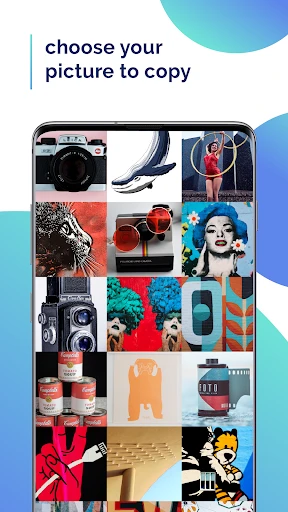
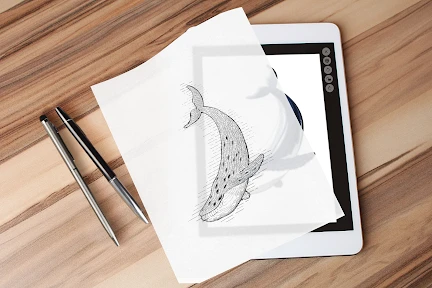
Papercopy - Tracer is a mobile utility app designed for digital tracing and sketching. Its core function is to allow users to place a physical drawing or image behind their device's screen and trace over it by using the screen as a backlight. This transforms your phone or tablet into a portable lightbox. It is primarily positioned as a simple, accessible tool for artists, hobbyists, and students to create sketches, practice drawing, or transfer designs without specialized equipment.
Is Papercopy - Tracer free to use, or does it have in-app purchases?
Papercopy - Tracer typically operates on a freemium model. The app can be downloaded and used with basic functionality for free. However, advanced features such as higher brightness levels, color filter adjustments for better contrast, the ability to import and layer digital photos, or an ad-free experience are usually unlocked through one-time or subscription-based in-app purchases. Check the app's product page for the current pricing structure.
What devices and systems are compatible with this app?
Papercopy - Tracer is developed for iOS and Android mobile devices. It requires a device with a screen that can emit sufficient backlight for tracing, meaning smartphones and tablets are suitable. Specific system version requirements (e.g., iOS 13.0+ or Android 8.0+) are listed on the official app store pages. It does not require connection to any additional external hardware. Performance may vary based on individual device screen brightness and clarity.
How does the tracing feature work technically?
The app technically maximizes your device's screen brightness to create an even, white light source. Some versions may include features to adjust color temperature or add color filters to enhance the visibility of the underlying paper sketch. It does not use the device's camera to scan or project images digitally; it relies purely on the physical backlighting effect. For digital tracing, you can import a photo into the app, dim it, and trace directly on your screen with a compatible stylus or finger.
Can I use Papercopy - Tracer without an internet connection?
Yes, the core tracing functionality of Papercopy - Tracer works offline once the app is installed. The backlight feature is a local function of your device. However, an internet connection might be required for initial download, restoring in-app purchases, accessing cloud-saved photo libraries for import, or viewing tutorial content within the app. No relevant information suggests the core tracing tool itself requires constant online access.
App Info
Technical Info
Recommended For You

AutoZen-Car Dashboard&Launcher
Auto & Vehicles

Autolist: Used Car Marketplace
Auto & Vehicles

K MANGA
Comics

Webmotors: comprar carro
Auto & Vehicles

Mirror Plus - HD Mirror app
Beauty

VistaCreate: Graphic Design
Art & Design

Color Wheel
Art & Design

Videa: AI Video Maker, Effects
Art & Design

CARFAX - Shop New & Used Cars
Auto & Vehicles

Fiverr - Freelance Service
Business

Zoom for Chromebook
Business

ReadEra Premium – ebook reader
Books & Reference

GigSmart Get Gigs
Business

CallApp: Caller ID & Block
Communication

Tattoo Maker - Tattoo Design
Art & Design

Visible mobile
Communication

Everand: Ebooks and audiobooks
Books & Reference

Zangi Private Messenger
Communication

AI Hairstyle Try On・Wigs・Bangs
Beauty

Hallow: Prayer & Meditation
Books & Reference