
StoryFont for Instagram Story
Screenshots

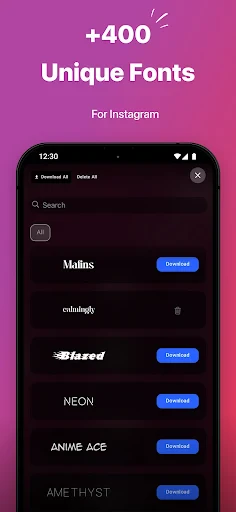
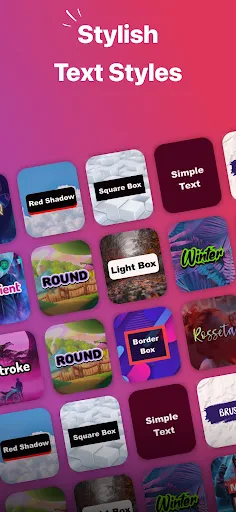


Description
About StoryFont for Instagram Story Feature
StoryFont for Instagram Story is a specialized mobile application designed to enhance the visual appeal of Instagram Stories by providing users with a vast and diverse collection of stylish fonts and text customization tools. In the highly visual and fast-paced environment of Instagram, standing out is key. This app addresses the limitation of Instagram's native text options, empowering users to add unique typography, creative text effects, and personalized touches to their Stories. It serves as a dedicated toolkit for anyone looking to elevate their social media content, transform plain text into eye-catching graphics, and communicate with greater stylistic impact directly within the Instagram platform.
Chapter 1: Function
StoryFont for Instagram Story specializes in expanding the typographic possibilities for Instagram content creators. Its core function revolves around providing an extensive library of hundreds of fonts, ranging from elegant scripts and bold display faces to playful handwritten styles and modern minimalist typefaces. The app allows users to generate custom text with these fonts directly within its interface. Users can type their desired message, choose from the diverse font collection, and adjust colors using a comprehensive palette or gradient options. Additional functional tools include the ability to add shadows, backgrounds, and outlines to text, as well as adjust letter spacing and alignment. Once the design is finalized, the app facilitates seamless export, enabling users to save the created text as an image or copy it directly to the clipboard for immediate pasting into the Instagram Stories editor. This streamlined process bypasses the need for complex graphic design software.
Chapter 2: Value
The primary value proposition of StoryFont for Instagram Story lies in its ability to democratize sophisticated graphic design for everyday social media users. Its key advantage is the significant enhancement of brand identity and personal aesthetic on a popular platform. For influencers, small businesses, and content creators, consistent and attractive typography strengthens recognition and engagement. The app saves considerable time and resources by offering a simple, mobile-first solution that eliminates the need to use desktop software like Photoshop for basic text graphics. Furthermore, the sheer variety and regular updates of its font library provide continuous creative inspiration, preventing content from becoming stale. Unlike Instagram's built-in tools, which offer limited font choices, StoryFont provides depth and specialization, allowing for true customization that aligns with specific themes, moods, or promotional campaigns. This focus on a single, high-demand feature—Instagram Story text—ensures a user experience that is intuitive, fast, and purpose-built. By elevating the quality of a fundamental Story element, the app helps users increase the perceived value of their content, potentially leading to higher view retention, swipe-up rates, and overall follower interaction, all through the power of well-designed typography.
Chapter 3: Scenarios
StoryFont for Instagram Story primarily targets Instagram users for whom Stories are a vital channel of communication and expression. Key user groups include social media influencers and digital marketers who require branded, attention-grabbing text to announce new content, promote partnerships, or highlight key messages in their narratives. Small business owners and entrepreneurs utilize the app to create professional-looking promotional Stories for product launches, flash sales, or event announcements without needing a graphic designer. Everyday users seeking to personalize their Stories for life events—such as birthdays, travel updates, or personal milestones—also benefit from the app's easy-to-use creative tools. Common use cases involve creating bold title cards for Story highlights, designing eye-catching quotes to share, adding elegant captions to photo diaries, and crafting clear, stylized calls-to-action for website links. In any scenario where standard Instagram text feels insufficient to convey a specific tone or capture audience attention, StoryFont provides the necessary toolkit for enhanced visual storytelling.
Uninstall Instructions
For step-by-step guidance on how to safely remove this application from your device, please refer to our 《Uninstall Instructions》 document.
Pros
- generates custom fonts from handwriting samples
- seamless one-tap copy to Instagram Stories
- offline processing ensures user handwriting privacy
- avoids common overused default font library
- minimalist interface focused solely on font creation
Cons
- requires manual sample drawing for each character
- no direct in-app posting to other social platforms
- handwriting recognition can struggle with stylized scripts
- lacks advanced text editing or effects tools
- font smoothing may reduce original handwriting charm
Frequently Asked Questions
What is StoryFont for Instagram Story?
StoryFont is a mobile app designed specifically for enhancing Instagram Stories. Its core function is to provide a wide variety of unique and stylish fonts, text effects, and typography tools. It allows users to easily customize the text in their Stories, moving beyond Instagram's default fonts to create more eye-catching and personalized content. The app focuses on quick editing and seamless sharing back to Instagram.
Is StoryFont free to use or does it have in-app purchases?
StoryFont typically operates on a freemium model. The app can be downloaded for free, offering access to a basic selection of fonts and features. To unlock the full library of premium fonts, advanced text animations, and all editing tools, it requires a subscription or a one-time in-app purchase. The specific pricing tiers and subscription details are available within the app's settings or on its official store page.
How does StoryFont work with Instagram?
You create your text directly within the StoryFont app. After choosing a font, adding effects, and customizing the layout, the app exports your design as an image or video to your device's camera roll. You then open Instagram, create a new Story, and select the edited media from your gallery to upload. StoryFont does not post directly to Instagram; it functions as a standalone design tool for content preparation.
What are the unique features of StoryFont?
StoryFont differentiates itself by offering an extensive, curated collection of fonts not available on Instagram, including cursive, bold, and decorative styles. Key features often include advanced text formatting (shadow, outline, background color), animated text effects for dynamic Stories, and the ability to create multi-text layouts with precise positioning. It focuses on simplicity and speed for social media content creation.
Can I use StoryFont on an Android device or iPad?
StoryFont is primarily developed for iOS and is available on the Apple App Store for iPhone. Compatibility with iPad may vary, and it is typically optimized for the smartphone experience. As of the last update, there is no dedicated Android version. Users should check the App Store listing for the most current information on supported devices and operating system requirements.
App Info
Technical Info
Recommended For You

CastChat - Match & Voice Chat
Communication

Invoice Simple: Invoice Maker
Business

Messages - Text SMS App
Communication

BimmerLink for BMW and MINI
Auto & Vehicles

Draw Cartoons 2 PRO
Art & Design

Diamond Painting by Number
Art & Design

USPS MOBILE®
Business

Future Self Face Aging Changer
Art & Design

Grubhub for Drivers
Business

Toonsutra: Webtoon & Comics
Comics

Car Key: Smart Car Remote Lock
Auto & Vehicles

CarMax: Used Cars for Sale
Auto & Vehicles

Etsy Seller: Manage Your Shop
Business

Glam AI
Beauty

Bible Chat: Holy Bible Study
Books & Reference

Daily Bible Devotion & Prayer
Books & Reference

TrueCar Used Cars and New Cars
Auto & Vehicles

Joyread
Books & Reference

2ndLine - Second Phone Number
Communication

Oremus - Catholic Bible&Prayer
Books & Reference