
BlueDriver OBD2 Scan Tool
Screenshots


Description
About BlueDriver OBD2 Scan Tool Features - Your Professional Automotive Companion
BlueDriver OBD2 Scan Tool is a professional-grade automotive diagnostic application that pairs with a dedicated Bluetooth OBD2 scanner. Designed for both car enthusiasts and everyday vehicle owners, it transforms a smartphone or tablet into a powerful diagnostic computer. The app connects seamlessly to the BlueDriver scanner, which plugs into a vehicle's standard OBD2 port, providing deep insights into the car's health. It goes beyond reading and clearing basic check engine light codes, offering advanced features like live data graphing, smog check readiness status, and manufacturer-specific repair reports. This combination of hardware and software delivers professional-level diagnostics in a user-friendly, portable package, empowering users to understand and maintain their vehicles with greater confidence and knowledge.
Chapter 1: Function
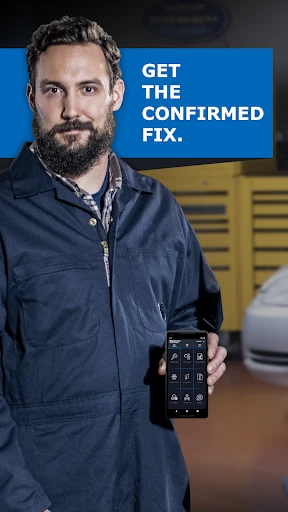
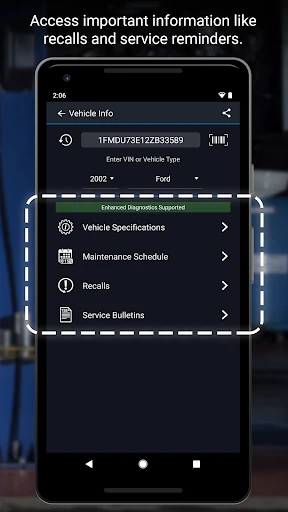
The core function of the BlueDriver OBD2 Scan Tool is to provide comprehensive vehicle diagnostics through a seamless hardware-software ecosystem. The companion BlueDriver Bluetooth scanner plugs into the vehicle's OBD2 port, establishing a wireless connection to the mobile app. Once paired, the app reads and clears generic and manufacturer-specific diagnostic trouble codes (DTCs) that trigger the check engine light. Beyond code handling, it displays real-time sensor data, allowing users to monitor parameters like engine RPM, coolant temperature, and fuel system status. A standout feature is its ability to graph live data for precise troubleshooting. Furthermore, the app performs system tests, such as checking emission monitor readiness for smog inspections. It generates detailed repair reports with verified fixes from a vast database, offering potential solutions for identified issues, which elevates it from a simple code reader to a true diagnostic assistant.
Chapter 2: Value
The primary value proposition of the BlueDriver OBD2 Scan Tool lies in delivering professional-grade diagnostic capabilities at a consumer-friendly price point and with exceptional ease of use. Its key advantage is the depth and reliability of its data, which rivals expensive shop-grade tools. Unlike many basic code readers, BlueDriver provides access to manufacturer-specific codes and data for most cars, offering precise problem identification. The app's curated database of verified fixes, compiled from millions of repairs, translates raw codes into actionable intelligence, saving users significant time and money on troubleshooting. The intuitive interface presents complex data through clear visuals like graphs and summaries, making it accessible to non-experts. The wireless Bluetooth design enhances convenience and safety, allowing users to monitor live data from the driver's seat during a test drive. This combination empowers vehicle owners to perform preliminary diagnostics, verify repair shop recommendations, and maintain their cars proactively. The value extends beyond emergency fixes to fostering a deeper understanding of vehicle health, promoting preventative maintenance, and ultimately providing peace of mind through knowledge and control over automotive expenses.
Chapter 3: Scenarios
The BlueDriver OBD2 Scan Tool primarily serves three user groups. First, it is ideal for DIY car enthusiasts and hobbyists who perform their own maintenance and repairs. They use it to diagnose check engine lights, monitor sensor data during modifications, and verify repair success. Second, it is invaluable for everyday vehicle owners who seek transparency and cost savings. When the check engine light illuminates, they can use BlueDriver to identify the issue before visiting a mechanic, avoiding unnecessary repairs and gaining leverage in service discussions. It is also used for pre-purchase inspections of used vehicles. Third, it serves professional mechanics and technicians as a portable, supplementary tool for quick diagnostics and second opinions. Common use cases include reading and clearing fault codes, performing a smog readiness check before an official inspection, monitoring live data to diagnose intermittent issues like rough idling, and using the generated repair reports as a starting point for troubleshooting. It transforms any driveway or garage into an instant diagnostic bay.
Uninstall Instructions
For step-by-step guidance on how to safely remove this application from your device, please refer to our 《Uninstall Instructions》 document.
Pros
- scans both generic and manufacturer-specific vehicle codes
- provits repair reports with verified fixes from community data
- live data graphing for precise monitoring of sensor readings
- performs active tests like commanding component activation
- no subscription required for core diagnostic functions
Cons
- requires a dedicated bluetooth obd2 dongle for connection
- advanced features have a steeper learning curve for novices
- vehicle-specific coverage depth varies by make and model year
- real-time data streaming depends on phone hardware stability
- labs features like smog readiness need specific drive cycles
Frequently Asked Questions
What is the BlueDriver OBD2 Scan Tool app?
BlueDriver is a professional-grade automotive diagnostic app that pairs with a dedicated Bluetooth OBD2 scanner. It reads and clears check engine lights, retrieves manufacturer-specific codes, and provides detailed repair reports. The app transforms your smartphone into a advanced scan tool, offering functions like live data graphing and smog check readiness monitoring. It is designed for car owners and DIY enthusiasts seeking deeper vehicle insights beyond basic code readers.
Is the BlueDriver app free to use?
The BlueDriver app is free to download. However, its core functionality requires the purchase of a proprietary BlueDriver Bluetooth OBD2 scanner, which is sold separately. The app itself does not have in-app purchases or subscription fees. All features, including advanced diagnostics and repair reports, are unlocked once the app is paired with the dedicated BlueDriver hardware device.
What vehicles and devices are compatible with BlueDriver?
The BlueDriver scanner and app work with most gasoline vehicles sold in the USA, Canada, and Europe from 1996 and newer, compatible with OBD2 protocols. It supports iOS and Android smartphones and tablets. The app requires Bluetooth connectivity and permissions for Bluetooth pairing and data storage. It is not compatible with motorcycles, heavy-duty diesel trucks, or some electric/hybrid vehicles.
How does BlueDriver differ from other OBD2 apps?
BlueDriver's unique feature is its ability to read both generic and manufacturer-specific diagnostic trouble codes for many car makes. It provides verified Fix Reports with possible causes, parts, and labor estimates sourced from a professional database. Unlike many apps, it offers bidirectional control for some systems (like resetting ABS lights) and generates professional-style PDF reports, setting it apart from basic code readers.
What support is available if the device or app fails?
BlueDriver offers customer support via email and an online knowledge base. The physical scanner has a limited warranty, details of which are provided with purchase. For app issues, standard troubleshooting includes checking Bluetooth permissions, iOS/Android compatibility, and ensuring a proper OBD port connection. There is no direct phone support. Repair guidance is diagnostic only; the company does not provide hands-on mechanical repair services.
App Info
Technical Info
Recommended For You

Marvel Unlimited
Comics

Diamond Painting by Number
Art & Design

OBDeleven VAG car diagnostics
Auto & Vehicles

ThinkDiag+
Auto & Vehicles

Visual Voicemail
Business

Logo Maker : Logo Creator
Art & Design

Metro
Communication

Trace Drawing-Sketch and Paint
Art & Design

WoAD
Communication

Blink Charging Mobile App
Auto & Vehicles

Fable: Books & TV
Books & Reference
KeyConnect Digital Car Key
Auto & Vehicles

BikeWale- Bikes & Two Wheelers
Auto & Vehicles

Invitation Maker & Card Design
Art & Design

PSA | Card Grading Service
Books & Reference

Protection 360™
Business

AR Drawing: Sketch, Art, Paint
Art & Design

Meta Business Suite
Business

GoodNovel - Web Novel, Fiction
Books & Reference

PaperColor
Art & Design