
LinkedIn: Jobs & Business News
Screenshots



Description
About LinkedIn: Jobs & Business News Feature
LinkedIn: Jobs & Business News is the official mobile application of the world's largest professional network. It transcends being a mere job search platform, evolving into an essential tool for career development, industry networking, and business intelligence. The app seamlessly integrates a user's professional identity, real-time industry updates, and a global job market into a single, accessible interface. It serves as a digital hub where professionals can manage their career trajectory, connect with peers and leaders, stay informed about market trends, and discover new opportunities. By bridging the gap between talent and opportunity, and between information and insight, the LinkedIn app has become indispensable for millions seeking to advance their careers and grow their professional influence in today's dynamic economy.
Chapter 1: Function
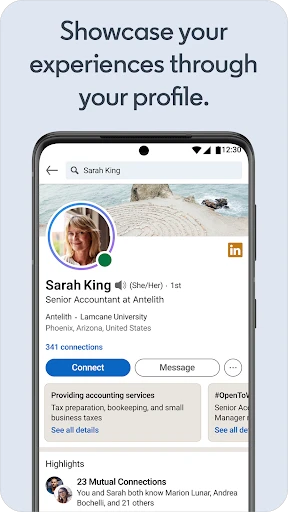
The LinkedIn app's core functionality revolves around three interconnected pillars: profile, network, and opportunities. At its heart is the digital profile, a living resume where users showcase their experience, skills, and accomplishments. This profile facilitates connections, allowing users to build and nurture a network of colleagues, industry professionals, and companies. The app's powerful job search engine enables users to find and apply for positions tailored to their profile, with features like easy apply and job alerts. Beyond this, the integrated feed delivers a personalized stream of news, insights, and discussions from one's network and followed thought leaders, fostering knowledge sharing. Additional functions include direct messaging for communication, notifications for profile views and network activity, and learning courses through LinkedIn Learning integration, providing a comprehensive suite for professional self-management.
Chapter 2: Value
The primary value of the LinkedIn app lies in its unparalleled capacity to consolidate and amplify professional capital. It democratizes access to opportunities and insights that were once limited by geography or network size. For job seekers, its algorithm-driven job matching and the ability to see who has viewed their profile provide a significant competitive edge, transforming a passive resume into an active personal marketing tool. For professionals not actively seeking jobs, the app offers immense value through continuous learning and visibility; sharing insights on the feed can establish thought leadership, while engaging with content keeps one abreast of industry shifts. For businesses and recruiters, it is a vital talent sourcing and branding platform. The app's key advantages include its massive, quality user base of professionals, the deep integration between a user's profile and opportunity discovery, and the real-time pulse on business news. This creates a virtuous cycle: a robust profile attracts better connections and opportunities, which in turn enhance the profile's value. Ultimately, the app transforms isolated professional endeavors into a connected, dynamic ecosystem, making career growth a more strategic and networked process.
Chapter 3: Scenarios
The LinkedIn app serves a diverse spectrum of professional user groups across various everyday scenarios. Active job seekers are primary users, utilizing the app daily to search for new openings, apply with one click, and research companies and interviewers. Students and recent graduates use it to build their initial professional network, find internships, and follow companies of interest. Established professionals leverage the app to stay informed; they scroll their feed during their commute to catch up on industry news, share their own articles to build their professional brand, and congratulate connections on work anniversaries or new roles. Sales and business development personnel use it to research prospects and find warm introductions through their network. Recruiters and hiring managers rely on it extensively to source candidates, review profiles, and post job advertisements. Freelancers and consultants use the platform to showcase their portfolio, gather testimonials, and find new clients. In essence, any scenario requiring professional networking, knowledge acquisition, reputation management, or opportunity discovery is a fitting use case for the LinkedIn app, making it a constant companion throughout the modern professional's career journey.
Uninstall Instructions
For step-by-step guidance on how to safely remove this application from your device, please refer to our 《Uninstall Instructions》 document.
Pros
- prioritizes professional networking over social features
- job search integrates directly with user's profile and network
- industry-specific news feed curated for career development
- inmail enables direct contact with recruiters and hiring managers
- profile functions as a live
- searchable professional resume
Cons
- core messaging requires a premium subscription for full access
- news feed can become cluttered with promotional content
- persistent notifications for profile views and network updates
- advanced job filters and applicant insights are paywalled
- requires active profile maintenance for optimal algorithm visibility
Frequently Asked Questions
What is LinkedIn and what are its core functions?
LinkedIn is a professional networking and career development platform. Its core functions include allowing users to create professional profiles, connect with colleagues and industry peers, search and apply for jobs, share and engage with industry-related content, and access business news. It serves as a digital resume, a job board, and a platform for professional knowledge sharing and networking.
Is LinkedIn free to use, and what are the in-app purchases?
LinkedIn offers a free basic version with core features like profile creation, networking, job search, and news feed access. It provides optional premium subscriptions (e.g., Premium Career, Sales Navigator, Recruiter Lite) with advanced tools like InMail messaging, detailed insights on job applicants or companies, and enhanced visibility. These subscriptions are billed monthly or annually.
How does LinkedIn protect user privacy and data?
LinkedIn allows users to control profile visibility through privacy settings, choosing what information is public or visible to connections. It uses security measures to protect data and provides options to manage data sharing and advertising preferences. Users can review LinkedIn's Privacy Policy for detailed information on data collection, usage, and protection practices.
Can I use LinkedIn on multiple devices and operating systems?
Yes, LinkedIn is accessible via its official website and mobile apps for iOS (iPhone/iPad) and Android devices. The app is optimized for smartphones and tablets. It synchronizes user data across devices, allowing seamless access to messages, notifications, and profile updates. A stable internet connection is required for full functionality.
What should I do if I encounter problems with job applications or messaging?
For technical issues with job applications or messaging, first check your internet connection and app updates. Ensure your profile information is complete. If problems persist, use the Help Center within the app or website for troubleshooting guides. For unresolved issues, you can contact LinkedIn Customer Support through the provided channels for account-specific assistance.
App Info
Technical Info
Recommended For You

My Bible - Verse+Audio
Books & Reference

TruckSmarter Load Board & Fuel
Business

Video Call
Communication

Cloned Voices
Comics

Magnificat Lenten 2025
Books & Reference

Security Camera Mod Minecraft
Books & Reference

Selfie Camera - Photo Effects
Beauty

ReadEra – book reader pdf epub
Books & Reference

AppSheet
Business

AR Drawing - Sketchar App
Art & Design

eHub
Business

Discord - Talk, Play, Hang Out
Communication

Vivaldi Color Analysis
Beauty

KJV Bible: Audio+Verse
Books & Reference

Chevron
Auto & Vehicles

Beauty Makeup Editor & Camera
Beauty

WebNovel
Books & Reference

Logo Maker And Logo Creator 3D
Art & Design

PENUP – Drawing-sharing SNS
Art & Design

Crafto
Art & Design