
Sling: Employee Scheduling App
Screenshots



Description
About Sling Employee Scheduling App Feature
Sling is a modern, cloud-based employee scheduling and workforce management application designed to streamline the complex process of creating, managing, and communicating work schedules. It serves as a centralized platform that bridges the gap between managers and staff, transforming scheduling from a time-consuming administrative task into a strategic, efficient, and collaborative operation. By integrating scheduling with time tracking, task management, and team communication, Sling provides a comprehensive solution for businesses of various sizes, particularly in industries like retail, hospitality, healthcare, and food service, where shift-based labor is prevalent. The app aims to reduce scheduling conflicts, control labor costs, improve compliance, and enhance overall workforce productivity.
Chapter 1: Function
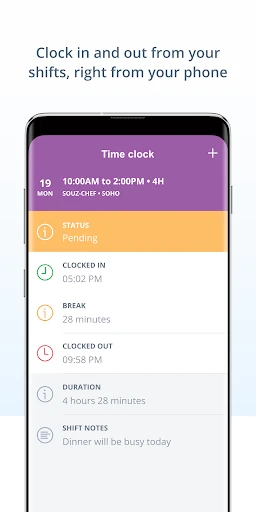
Sling's core functionality revolves around intelligent scheduling and team coordination. The app allows managers to create schedules swiftly using intuitive drag-and-drop tools, templates, and copy-paste functions. It incorporates employee availability, time-off requests, and required skill sets to prevent conflicts and ensure proper shift coverage. The schedule is instantly published to a shared cloud calendar accessible to all team members via their mobile devices or computers. Integrated time clock features enable employees to clock in and out directly from the app, with geofencing capabilities to verify location. Furthermore, Sling facilitates team communication through a built-in messaging system for announcements and shift swaps, and includes task management modules for assigning and tracking daily duties. Labor cost forecasting and reporting tools help managers stay within budget by providing real-time insights into scheduled versus actual hours.
Chapter 2: Value
The primary value proposition of Sling lies in its ability to save significant administrative time and reduce labor costs while improving operational transparency and employee satisfaction. For managers, the app automates the tedious aspects of scheduling, cutting down hours of work to minutes. Its conflict detection and availability tracking prevent overstaffing, understaffing, and scheduling errors that lead to overtime or compliance issues. The real-time labor cost forecasts empower managers to make informed decisions that align with budgetary constraints. For employees, Sling offers unprecedented clarity and control over their work lives. They can view their schedules anytime, set availability preferences, request shift swaps or time off directly in the app, and receive instant notifications of any changes, which greatly reduces confusion and last-minute communication breakdowns. The integrated messaging and task management foster a more connected and accountable team environment. By consolidating scheduling, time tracking, and communication into a single, user-friendly platform, Sling eliminates the need for multiple disjointed systems, reduces errors, and creates a more harmonious and efficient workplace. Its data-driven insights also support long-term workforce planning and optimization.
Chapter 3: Scenarios
Sling is ideally suited for managers, business owners, and shift-based employees across various service-oriented industries. Restaurant managers can use it to schedule servers, cooks, and hosts while managing peak dining hours and tracking labor costs against sales. Retail store supervisors benefit from creating schedules for sales associates and cashiers, handling seasonal staffing changes, and communicating promotions or tasks. In healthcare, clinic administrators can coordinate shifts for nurses and support staff, ensuring 24/7 coverage while respecting complex availability and certification requirements. For employees, such as a part-time barista or a freelance fitness instructor, Sling provides a single source of truth for their shift timings, allows them to easily pick up available shifts to earn extra income, and request time off for personal commitments without back-and-forth emails. Small business owners with limited administrative resources find immense value in Sling's automation, which allows them to focus on core business activities rather than manual scheduling. The app effectively serves any scenario where coordinating multiple people's time, skills, and availability is critical to daily operations.
Uninstall Instructions
For step-by-step guidance on how to safely remove this application from your device, please refer to our 《Uninstall Instructions》 document.
Pros
- visual drag-and-drop scheduling reduces planning time
- real-time shift swap board minimizes manager intervention
- automated overtime alerts ensure labor law compliance
- integrates payroll data directly from scheduled hours
- mobile availability submission for hourly staff flexibility
Cons
- steep learning curve for non-visual planning methods
- limited offline functionality for on-the-floor edits
- advanced reporting requires separate subscription tier
- complex team hierarchies need manual setup initially
- sms notification credits deplete quickly for large teams
Frequently Asked Questions
What is Sling and what are its core functions?
Sling is a cloud-based employee scheduling application designed for businesses. Its core functions include creating, managing, and distributing work schedules, tracking employee time and attendance, and facilitating team communication. It positions itself as a tool to streamline workforce management, reduce scheduling conflicts, and improve labor cost control.
Is Sling free to use, and what are the in-app purchase options?
Sling offers a free version with basic scheduling and messaging features. For advanced functionality like labor cost forecasting, advanced time tracking, and integration with payroll systems, it provides paid subscription plans (Sling Premium and Sling Business). These are in-app purchases with monthly or annual billing. Specific pricing details are available on their official website or within the app.
What devices and systems does the Sling app support?
The Sling app is available for both iOS and Android mobile devices via their respective app stores. It also offers a web-based dashboard accessible from most desktop or laptop browsers. This allows managers and employees to access schedules, communicate, and manage tasks across multiple platforms seamlessly.
How does Sling handle shift swaps and time-off requests?
Sling features tools for employee self-service regarding shift management. Employees can request time off or propose shift swaps directly within the app. Managers receive notifications and can approve or deny these requests within the platform, which helps streamline the process and maintain an updated schedule for all team members.
What should I do if I encounter a technical issue with the app?
For technical support or account issues, Sling provides customer support primarily through online channels. You can access help articles and FAQs within the app or on their website. For direct assistance, users typically need to submit a support request via email or a contact form on Sling's official support page. There is no information provided about phone-based support.
App Info
Technical Info
Recommended For You

Everand: Ebooks and audiobooks
Books & Reference

Hairstyles for short hair
Beauty

Fiverr - Freelance Service
Business

SelfComic: Super Saiyan Photo
Comics

Speak and Translate Languages
Communication

Our Daily Bread
Books & Reference

CCW – Concealed Carry 50 State
Books & Reference

IAA Buyer Salvage Auctions
Business

Bible Offline-KJV Holy Bible
Books & Reference

HD Camera for Android
Beauty

FPL
Business
NavRadio+
Auto & Vehicles

Mirror Plus - HD Mirror app
Beauty

KakaoTalk : Messenger
Communication

AUTODOC: buy car parts online
Auto & Vehicles

ThriftBooks: New & Used Books
Books & Reference

FOREO For You
Beauty

Messages - sms text message
Communication

TMCARS
Auto & Vehicles

TeamSpeak 3 - Voice Chat
Communication