
Sketchbook
Screenshots



Description
About Sketchbook Feature
Sketchbook is a professional-grade digital drawing and painting application developed by Autodesk, designed for artists, designers, and creative enthusiasts. It offers a natural and intuitive sketching experience that closely mimics traditional media, all within a streamlined and distraction-free interface. Available across multiple platforms including mobile devices and desktop computers, Sketchbook provides a powerful yet accessible toolkit for creating everything from quick concept sketches to intricate finished artworks.
Chapter 1: Function
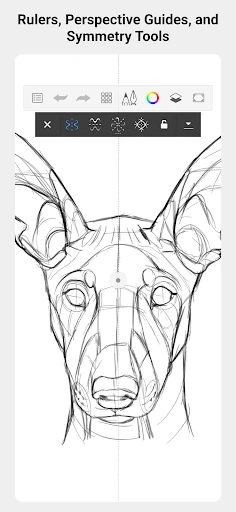
Sketchbook's core functionality revolves around providing a comprehensive digital canvas with a vast array of realistic brushes, including pencils, markers, inks, and airbrushes, each with customizable settings for size, opacity, and texture. The app supports layers with blending modes, allowing for complex compositions and non-destructive editing. Key tools include predictive stroke smoothing for clean lines, a versatile symmetry tool, and perspective guides for technical drawing. It offers a full suite of selection and transformation tools, along with gradient fills and advanced color palettes. The interface is highly customizable, with floating palettes that can be hidden to maximize drawing space, and it supports pressure-sensitive styluses for precise control on compatible devices.
Chapter 2: Value
The primary value of Sketchbook lies in its perfect balance of professional capability and user-friendly design. Unlike many complex digital art suites, Sketchbook presents its powerful features in an organized, accessible manner, significantly reducing the learning curve for newcomers while still satisfying the demands of professional artists. Its key advantages include a completely free core version with no subscriptions, offering a full feature set without watermarks or limitations, which is rare in the professional software market. The app's engine is optimized for performance, ensuring smooth brush strokes and responsive interaction even on older devices. Its cross-platform compatibility, with seamless sync via Autodesk account, allows artists to start a sketch on a phone and finish it on a desktop, fostering a fluid creative workflow. Furthermore, its commitment to a distraction-free, full-screen canvas environment helps artists focus purely on the creative process, mimicking the immersion of a physical sketchbook. This combination of zero cost, high performance, professional tools, and thoughtful design makes it an invaluable tool for fostering creativity and skill development.
Chapter 3: Scenarios
Sketchbook caters to a diverse range of users across various scenarios. Professional illustrators and concept artists utilize it for client work, storyboarding, and creating detailed digital paintings, leveraging its layer management and high-fidelity brushes. Designers use it for UI/UX mockups, fashion sketches, and industrial design concepts, often employing its perspective and symmetry tools. Students and hobbyists find it an ideal platform for learning drawing fundamentals, practicing sketches, and creating personal art without financial barrier. In everyday use, a commuter might use Sketchbook on a tablet to quickly capture a scene or idea during their journey. A teacher might use it to create visual aids or diagrams. Its portability makes it perfect for travel journals and on-location sketching. Ultimately, Sketchbook serves anyone with a need to visualize ideas, from structured professional projects to spontaneous creative expression, acting as a versatile digital companion to the traditional paper sketchbook.
Uninstall Instructions
For step-by-step guidance on how to safely remove this application from your device, please refer to our 《Uninstall Instructions》 document.
Pros
- offers a natural pencil and brush feel with minimal lag
- layer system supports complex
- professional-grade illustrations
- interface stays unobtrusive
- maximizing canvas workspace
- completely free with no ads or subscription requirements
- copic color library integration aids precise color selection
Cons
- advanced blending modes are limited compared to desktop rivals
- no vector or shape toolset for scalable graphic design
- cloud sync and collaboration features are relatively basic
- some pro features require a separate desktop version
- large canvas with many layers can strain older tablets
Frequently Asked Questions
What is Autodesk SketchBook and what can I do with it?
Autodesk SketchBook is a professional-grade digital drawing and painting application. Its core function is to provide a natural and intuitive sketching experience with a wide array of realistic brushes, layers, and tools. It is positioned for artists, designers, and hobbyists for creating illustrations, concept art, and sketches. Unique features include its streamlined, distraction-free interface, predictive stroke smoothing, and a full suite of perspective drawing guides. Basic usage involves using stylus or touch input to draw on a canvas with customizable brushes and layer management.
Is SketchBook free to use, and are there in-app purchases?
Yes, Autodesk SketchBook is completely free to download and use. There are no subscriptions, in-app purchases, or ads. All features, including the full brush library, layer tools, and perspective guides, are unlocked upon download. This model was adopted after Autodesk made the app free for all users in 2018. No additional equipment is mandatory, though it is optimized for use with a stylus on tablets for the best experience.
On which devices and operating systems does SketchBook run?
SketchBook has broad adaptation across multiple platforms. It is available as a native application for Windows 10+, macOS 10.14+, iOS 12.0+, and Android 8.0+. This allows for workflows across desktop and mobile devices. The app is optimized for touchscreens and stylus input, including support for Apple Pencil on iPad and various active pens on Android and Windows devices. It does not require an online connection for core functionality.
How does SketchBook handle layer limits and file exports?
SketchBook supports multiple layers, but the maximum number depends on your device's hardware, specifically its RAM and resolution. On newer, more powerful devices, you can have significantly more layers. The app exports projects in its native .SKB format for future editing and supports standard image formats like PNG, JPG, PSD (Photoshop), and TIFF for sharing. Export resolution is limited by your device's capabilities and canvas dimensions.
Can I recover a drawing if the app crashes or I forget to save?
SketchBook has an automatic recovery feature. It periodically saves your work in the background. If the app closes unexpectedly, it will typically prompt you to restore the recovered file upon reopening. However, for definitive safety, users should manually save their work frequently. For after-sales or support, Autodesk provides online resources, including a knowledge base and community forums. There is no direct phone support for the free app.
App Info
Technical Info
Recommended For You

Shipt: Shopper and Driver
Business

Carly — OBD2 car scanner
Auto & Vehicles

ReShot : AI Photo Generator
Art & Design

CL Theme Card
Auto & Vehicles

CDisplayEx Comic Reader
Comics

Alight Mobile
Business

Instawork: Be your own boss
Business

MangaRise - Manga Reader
Comics

Comics Price Guide
Comics

Thunderbird: Free Your Inbox
Communication

CastChat - Match & Voice Chat
Communication

Logos Bible Study App
Books & Reference

Carmin
Auto & Vehicles

Al QURAN - القرآن الكريم
Books & Reference

Biblia Católica en español
Books & Reference

PCGS CoinFacts - U.S. Coin Val
Books & Reference

Aosu
Communication

5 Calls: Contact Your Congress
Books & Reference

NDI HX Camera: Easy Streaming
Communication

EasyTether Pro
Communication