
Personal stickers StickerMaker
Screenshots


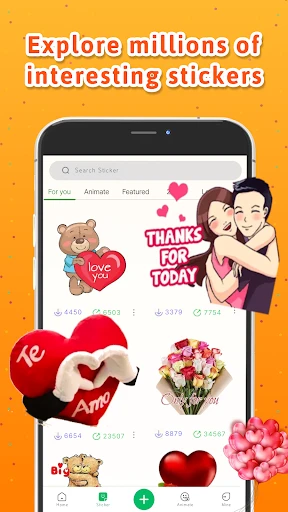


Description
About Personal Stickers StickerMaker Feature
Personal Stickers StickerMaker is a user-friendly mobile application designed for creating custom stickers from personal photos. It empowers users to transform any image, including pictures of themselves, pets, or favorite characters, into expressive stickers for use in messaging apps. The app simplifies the sticker creation process with intuitive tools for cropping, outlining, and adding text, eliminating the need for advanced graphic design skills. By bridging personal expression and digital communication, it turns everyday moments into shareable visual elements, enhancing the fun and personality of online conversations.
Chapter 1: Function
The core function of Personal Stickers StickerMaker is to facilitate the easy creation of custom sticker packs. Users begin by selecting a photo from their gallery or taking a new picture. The app then provides automatic and manual tools to cut out the subject from the background. Key features include a precise eraser for fine-tuning edges, a brush to restore accidentally removed parts, and the ability to add a solid or transparent outline around the sticker for better visibility. Once the image is cut out, users can add text with various fonts and colors. Finally, the completed stickers are organized into a personal pack, which can be directly exported and integrated into popular messaging platforms like WhatsApp, Telegram, or iMessage. The entire process is streamlined into a few simple steps, making sticker creation accessible to everyone.
Chapter 2: Value
The primary value proposition of Personal Stickers StickerMaker lies in its empowerment of personal digital expression. In a world of generic emojis, this app allows users to inject their unique identity and humor into conversations. Its key advantages are multifaceted. First, it offers remarkable ease of use; the cutting tools are intuitive, often requiring just a few taps to isolate a subject, which lowers the barrier to content creation significantly. Second, it provides high utility by seamlessly linking the creation process with export functionality to major chat apps, ensuring the stickers are ready to use immediately. Third, it fosters creativity and emotional connection. Users can create stickers of family members, pets, or inside jokes, making digital communication feel more personal and engaging. Compared to downloading pre-made sticker packs, this app offers unlimited, deeply personalized options. Furthermore, it operates efficiently, not requiring complex sign-ups or subscriptions for basic functions, presenting a straightforward value of turning personal media into a versatile communication asset. It transforms users from passive consumers of digital content into active creators, adding a new, personalized layer to daily digital interaction.
Chapter 3: Scenarios
The primary target users for Personal Stickers StickerMaker are individuals who actively use messaging apps and seek to personalize their chats. This includes teenagers and young adults who enjoy expressing themselves with unique visuals, as well as friends and family groups who want to create stickers featuring their inside jokes or group photos. Pet owners are another significant user group, frequently making stickers of their cats, dogs, or other pets to share in conversations. Content creators and small community managers might use it to develop branded sticker packs for their followers. In everyday use, a user might quickly create a sticker from a funny selfie to react to a friend's message on WhatsApp. A parent could make a sticker pack of their child's drawings to share with relatives. During a group trip, friends could create stickers from their shared photos to use in their travel group chat. The app serves these varied scenarios by providing a quick, on-the-go tool to convert personal moments into a fun, shared communication currency, enriching both casual and close-knit digital dialogues.
Uninstall Instructions
For step-by-step guidance on how to safely remove this application from your device, please refer to our 《Uninstall Instructions》 document.
Pros
- creates custom stickers from any photo instantly
- removes image backgrounds automatically with one tap
- exports packs directly to WhatsApp and Telegram
- requires no design skills for basic sticker creation
- offers a vast library of editable template shapes
Cons
- advanced editing tools require a paid subscription
- free version includes watermark on exported stickers
- limited text and drawing customization options
- can struggle with complex backgrounds in auto-removal
- sharing only integrates with select messaging apps
Frequently Asked Questions
What is StickerMaker and what does it do?
StickerMaker is a mobile app for creating custom stickers for messaging apps. Its core function is to let you easily design personal stickers from your own photos or images. You can cut out subjects, add text and drawings, then export the stickers directly to platforms like WhatsApp, Telegram, or iMessage. It positions itself as a simple, all-in-one tool for personalized digital expression without needing design skills.
Is StickerMaker free to use with in-app purchases?
StickerMaker is free to download and use for basic sticker creation, which includes cropping, adding text, and exporting. It offers optional in-app purchases, typically for premium features like advanced editing tools, exclusive sticker packs, or removing watermarks. The app may display ads in the free version. Specific pricing for purchases is detailed within the app's store listing.
What devices and systems does StickerMaker support?
StickerMaker is primarily designed for smartphones. It is available for both iOS and Android operating systems. You can download it from the Apple App Store and Google Play Store. The app is generally adapted for use on phones and tablets. It does not require additional external hardware to function, operating solely on your mobile device.
How do I use StickerMaker's core feature to make a sticker?
The core feature involves a simple process: First, select a photo from your gallery. Use the automatic or manual cutting tool to isolate the main subject. Then, you can add borders, text, or decorative elements. Finally, export the finished sticker. The app automatically formats it for supported messaging platforms, and guides you through the steps to add it to your sticker library in apps like WhatsApp.
Can I use StickerMaker stickers on all messaging apps?
StickerMaker primarily supports major platforms like WhatsApp, Telegram, Facebook Messenger, and iMessage. The export and integration process is optimized for these. However, functionality for other, less common messaging apps may be limited or require manual saving and uploading. The app's instructions focus on the supported platforms, and compatibility cannot be guaranteed for all third-party chat applications.
App Info
Technical Info
Recommended For You

Beauty Camera: Selfie Editor
Beauty

Tracer (Donation Package)
Art & Design

Reolink
Communication

TapRead - Romance Stories
Books & Reference

GoDaddy Studio: Create & Grow
Art & Design

FedEx Mobile
Business

Cars Mod for Minecraft PE 2025
Auto & Vehicles

Outlined Watch Face
Art & Design

BookTok- Read Good Novel
Books & Reference

Shopify Point of Sale (POS)
Business

Car Scanner ELM OBD2
Auto & Vehicles

Pentacomix
Comics

iFnovel - Books,Web Novel
Books & Reference

Readink - Read Good Web Novel
Books & Reference

Spanish English Translator
Books & Reference

Good Morning Wishes
Communication
NetShare - no-root-tethering
Communication

VirtuNum - Virtual Number
Communication

マンガほっと -話題の漫画や人気コミックが読めるマンガアプリ
Comics

FoxFi Key (supports PdaNet)
Communication