AR Drawing Sketch Paint
Screenshots
Description
About AR Drawing Sketch Paint Features – From Virtual Tracing to Real-World Creation
AR Drawing Sketch Paint is an innovative mobile application that leverages augmented reality (AR) technology to transform the process of learning and practicing drawing. It projects virtual images onto real-world paper, allowing users to trace over them easily. This app bridges the gap between digital inspiration and physical art creation, making drawing accessible to individuals of all skill levels. By using the smartphone's camera, it provides a guided, interactive experience that simplifies complex sketches and fosters artistic confidence.
Chapter 1: Function
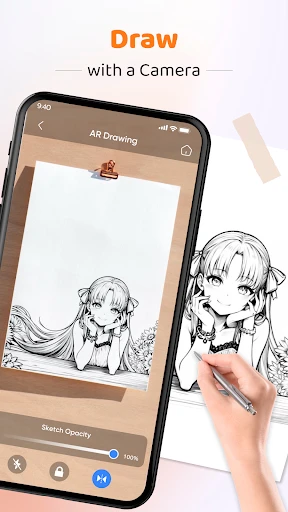
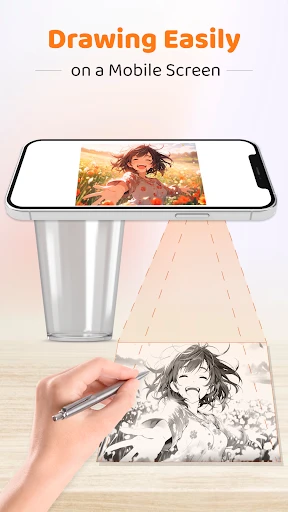
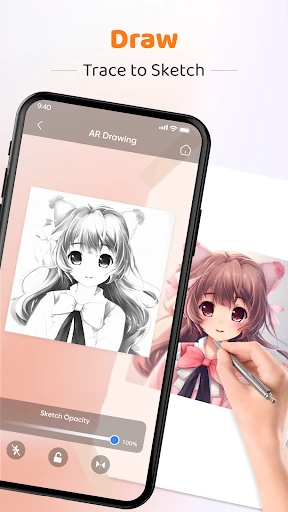
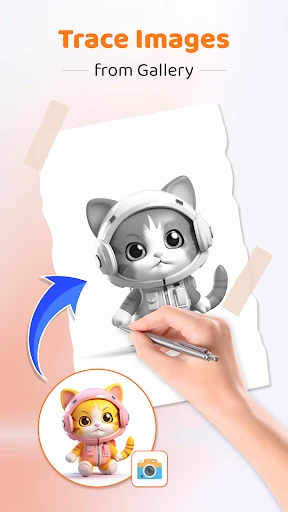
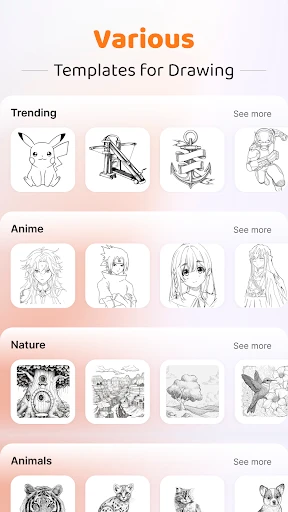
The core function of AR Drawing Sketch Paint is its AR tracing capability. Users select an image from the app's library or their own photo gallery. The app then uses the phone's camera to display this image as a semi-transparent overlay on the live view of a physical sheet of paper placed on a table. By aligning the virtual image with the paper, users can trace the outlines directly with a pencil or pen. The app offers tools to adjust the image's opacity, size, and orientation for optimal tracing. Additionally, it includes basic drawing tutorials, a collection of traceable templates ranging from simple shapes to intricate portraits, and the ability to save progress. Essentially, it acts as a digital projector and a portable reference library, all within a single mobile device.
Chapter 2: Value
The primary value of AR Drawing Sketch Paint lies in its ability to democratize art creation and significantly lower the barrier to entry for drawing. Its key advantage is the intuitive, hands-on learning method it provides. Unlike watching passive video tutorials, this app offers active, guided practice, which accelerates skill development in hand-eye coordination and line control. For beginners, it eliminates the initial intimidation of a blank page and the frustration of incorrect proportions, providing immediate, satisfying results that build motivation. For more experienced users, it serves as a valuable tool for practicing complex compositions, transferring sketches onto different mediums, or quickly outlining ideas for further refinement. The app's value extends beyond mere tracing; it is an educational scaffold that teaches fundamental artistic principles through direct application. Furthermore, its portability and convenience are major advantages, replacing the need for physical lightboxes or projectors. By merging the digital and physical worlds, AR Drawing Sketch Paint makes the artistic process more engaging, accessible, and enjoyable, fostering creativity and artistic growth in a supportive, error-forgiving environment.
Chapter 3: Scenarios
AR Drawing Sketch Paint primarily targets amateur artists, hobbyists, and children interested in learning to draw. It is ideal for parents seeking educational and creative tools for their kids, providing a fun, screen-interactive activity that results in tangible artwork. Adults exploring a new creative outlet after work or seeking a relaxing, meditative hobby will find the app's guided process perfect for stress relief and mindful creation. It is also highly useful for students in introductory art classes who need extra practice with forms and proportions. In everyday use, a child might use it to trace their favorite cartoon character onto paper for coloring. A DIY enthusiast could employ it to sketch precise designs on furniture or walls for a home project. An individual preparing a handmade greeting card could trace elegant lettering or floral patterns effortlessly. Teachers might incorporate it into classroom activities for art lessons. Essentially, any scenario where one wishes to accurately replicate or learn to draw an image on a physical surface becomes a perfect use case for this app, turning everyday moments into opportunities for creative expression.
Uninstall Instructions
For step-by-step guidance on how to safely remove this application from your device, please refer to our 《Uninstall Instructions》 document.
Pros
- projects virtual sketches onto real-world surfaces for guidance
- combines AR tracing with layered digital painting tools
- uses device camera for real-time perspective and lighting adjustment
- allows practice on any physical paper via AR overlay
- exports creations as layered PSD files for professional editing
Cons
- requires a well-lit
- stable environment for accurate AR projection
- advanced layer features need a subscription to unlock
- AR calibration can drift on older device models
- lives as a mobile tool
- not replacing desktop-grade software
- physical paper alignment can be finicky for beginners
Frequently Asked Questions
What is AR Drawing Sketch Paint and what does it do?
AR Drawing Sketch Paint is a drawing application that utilizes augmented reality (AR) technology. Its core function is to assist users in sketching by allowing them to trace over real-world images or templates viewed through their device's camera. It positions itself as a tool for learning drawing techniques, practicing outlines, and creating art based on reference images. Basic usage involves placing a phone or tablet on a stand, selecting an image, and tracing its projected lines onto physical paper.
Is AR Drawing Sketch Paint free to use or does it have in-app purchases?
The app is typically free to download and use with basic functionality. However, it often includes in-app purchases. These purchases may unlock premium features such as a larger library of drawing templates, advanced AR tools, removal of advertisements, or access to more detailed tutorials. The specific pricing and what is included in the free version can vary, so checking the current offerings within the app store listing is recommended.
What devices and systems are compatible with this AR drawing app?
AR Drawing Sketch Paint requires a device with a camera and sensors capable of supporting augmented reality features. It is primarily designed for iOS and Android smartphones and tablets. Compatibility depends on the device's AR capabilities and operating system version. Generally, newer mid-range and flagship models from the last few years are supported. The app description in your specific app store (Google Play or Apple App Store) provides the most accurate and updated list of compatible devices and required OS versions.
How does the AR tracing feature work, and what do I need?
The AR tracing feature works by using your device's camera to overlay a selected image onto your view of real-world paper. You need a stable setup: a phone/tablet, a stand or stack of books to hold it steady above the paper, and good lighting. The app calibrates the image's size and position. You then look at the screen and trace the projected lines onto the physical paper beneath. No special paper or stylus is technically required, but a stylus can improve precision.
Can I use my own images for tracing in the app?
Yes, a key feature of AR Drawing Sketch Paint is the ability to import and use your own photos or images for tracing. This is typically done through the device's photo gallery. The app will convert the image into a traceable outline. There may be limitations on file size or format, and complex images might require manual adjustment of contrast or brightness within the app to create a clear outline suitable for tracing. This feature greatly expands the app's utility beyond its built-in template library.
App Info
Technical Info
Recommended For You

Skype
Communication

PhiApp
Beauty

Smarty Men Jacket Photo Editor
Beauty

Fuel Forward
Auto & Vehicles

Motive Driver
Business

Pixel Studio PRO: editor
Art & Design

ヘア&ビューティーサロン検索/ホットペッパービューティー
Beauty

Kelley Blue Book: We Know Cars
Auto & Vehicles

Easy Pose - 3D pose making app
Art & Design

Messenger SMS & MMS
Communication

Instawork: Be your own boss
Business

Drawing Apps: Draw, Sketch Pad
Art & Design

Google Pixel Watch
Communication

[KNA003] SHADOW
Art & Design

Logo Maker : Logo Creator
Art & Design

Hinovel
Books & Reference

AlfaOBD
Auto & Vehicles

PCGS CoinFacts - U.S. Coin Val
Books & Reference

ReadEra Premium – ebook reader
Books & Reference

Bible Chat: Holy Bible Study
Books & Reference