
ADP Mobile Solutions
Screenshots

Description
About ADP Mobile Solutions Features – Streamlining Workforce Management on the Go
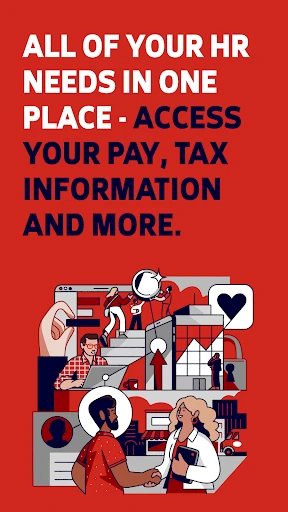
ADP Mobile Solutions is an official mobile application developed by ADP, a global leader in human capital management. Designed for employees and managers, it provides secure, convenient access to critical work-related information and functions directly from a smartphone or tablet. The app serves as a personal and professional hub, transforming how users interact with their payroll, benefits, and time data, thereby enhancing the overall employee experience through digital empowerment.
Chapter 1: Function
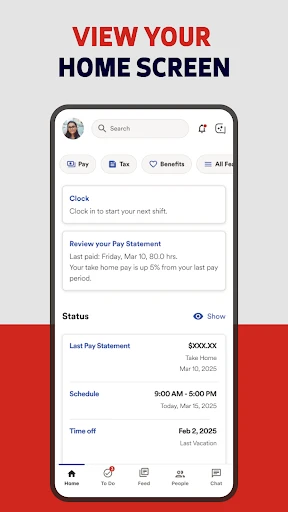
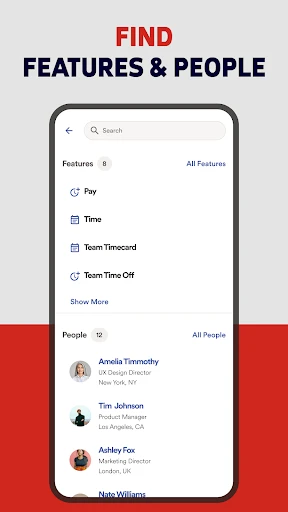
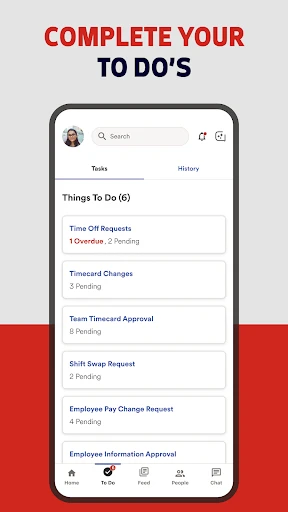
ADP Mobile Solutions consolidates essential workforce functions into a single, accessible platform. Its core functionality revolves around three key areas: payroll, time, and benefits. Users can effortlessly view and download current and past pay statements with detailed breakdowns. For time management, the app allows hourly employees to clock in and out, review timesheets, and request time off, while managers can approve these requests remotely. Additionally, employees have secure access to their benefits information, including plan details and coverage. The app also facilitates easy retrieval of important tax documents like W-2s and provides direct access to company directories and announcements. Robust security features, including biometric login, ensure that sensitive personal and financial data remains protected at all times.
Chapter 2: Value
The primary value proposition of ADP Mobile Solutions lies in its ability to democratize access to human resources and payroll services, offering unparalleled convenience and fostering a transparent, self-service work environment. For employees, the app eliminates the need to contact HR or payroll departments for routine inquiries, saving time and reducing administrative bottlenecks. The immediate access to pay stubs and tax documents empowers financial planning and simplifies tax preparation. For managers, the value is operational efficiency; approving time-off requests and managing team attendance from anywhere ensures business continuity and agile team management. The app's integration with ADP's broader enterprise systems guarantees data accuracy and real-time synchronization, serving as a reliable single source of truth. Furthermore, its user-friendly interface and personalized dashboard enhance engagement by putting individuals in control of their work-life data. By providing these tools on a mobile device, ADP extends the workplace beyond the office, supporting modern, flexible, and remote work models. This not only improves employee satisfaction but also strengthens the overall administrative backbone of an organization, making HR processes more efficient and data-driven.
Chapter 3: Scenarios
ADP Mobile Solutions is ideally suited for two primary user groups within organizations that use ADP's services: all employees and people managers. For the general workforce, especially hourly workers, retail staff, healthcare professionals, and field service technicians, the app is indispensable for clocking in/out on the go, checking shift schedules, and viewing earnings before payday. A remote employee can quickly download a pay stub for a loan application without needing desktop access. A sales representative traveling for work can submit an expense report or request vacation time between meetings. For managers and supervisors, the app is a critical tool for overseeing distributed teams. A restaurant manager can approve a shift swap request during a busy service, or a project leader can approve timesheets for their team while offsite. It also benefits HR administrators by deflecting routine queries, allowing them to focus on strategic initiatives. Essentially, any professional seeking instant, secure access to their employment information to streamline daily tasks and make informed decisions will find this app tailored to their needs in today's mobile-first world.
Uninstall Instructions
For step-by-step guidance on how to safely remove this application from your device, please refer to our 《Uninstall Instructions》 document.
Pros
- integrates payroll
- time
- and benefits in one view
- biometric facial recognition for secure clock-ins
- real-time pay statements with earnings breakdown
- offline mode for submitting time without connectivity
- direct access to employer-specific tax documents
Cons
- requires company enrollment in ADP's payroll services
- complex navigation for non-HR roles
- limited customization in notification settings
- occasional sync delays with employer's ADP portal
- biometric login fails under poor lighting conditions
Frequently Asked Questions
What is ADP Mobile Solutions and what does it do?
ADP Mobile Solutions is a business and productivity app designed for workforce management. Its core function is to provide employees with secure, on-the-go access to their payroll, timekeeping, benefits, and HR information. Users can view pay statements, clock in and out, request time off, and update personal details. It serves as a mobile extension of ADP's workplace platforms, positioning itself as a tool for employee self-service and administrative efficiency.
Is ADP Mobile Solutions free to use for employees?
Yes, the ADP Mobile Solutions app is free for employees to download and use. There are no in-app purchases or subscription fees for individual end-users. Access to the app's features is provided through an employer's subscription to ADP's workforce management services. The employee's organization must be an ADP client and have the specific modules (like payroll or time tracking) enabled for the user.
What devices and systems does the app support?
ADP Mobile Solutions is available for both iOS and Android devices. It supports smartphones and tablets, with specific version requirements that are regularly updated. The app is designed to adapt to different screen sizes. For precise and current minimum OS version requirements (e.g., iOS 14.0 or Android 8.0 and up), users should check the latest information in the Apple App Store or Google Play Store listing, as these specifications can change with updates.
How does the app ensure the security of my payroll data?
The app employs multiple security measures to protect sensitive data. This includes mandatory secure login, often with multi-factor authentication or biometrics (like fingerprint or face ID) if enabled by your employer. Data transmission is encrypted. The app also allows for remote wipe of data if a device is lost, provided this is managed through your organization's ADP portal. Security protocols align with ADP's enterprise-level standards for financial and personal information.
What should I do if I can't log in or see my pay information?
First, verify your login credentials and ensure you have a stable internet connection. If the problem persists, the issue is likely related to your company's specific ADP configuration or your user account status. For all account-specific problems, including missing pay data or incorrect hours, you must contact your company's HR or payroll department directly. They manage employee access and data within the ADP system. The app itself does not provide direct user support for account-related issues.
App Info
Technical Info
Recommended For You

Spanish English Translator
Books & Reference

Makeup Tutorial step by step
Beauty

Draw Anime: AR Drawing Sketch
Art & Design

Vector Ink: SVG, Illustrator
Art & Design

JusTalk - Video Chat & Calls
Communication

AutoZen-Car Dashboard&Launcher
Auto & Vehicles

Everand: Ebooks and audiobooks
Books & Reference

Tor OBD2 Diagnostics
Auto & Vehicles

Photo Editor - Retouch Photos
Art & Design

FlipaClip: Create 2D Animation
Art & Design

Avast SecureLine VPN & Privacy
Communication

10-4 by WEX
Auto & Vehicles

Holy Bible - Verse+Audio
Books & Reference

Camouflage Doors Mod for MCPE
Books & Reference

Protection 360™
Business

Watch Duty (Wildfire)
Communication

Skype for Business for Android
Business

Easy Pose - 3D pose making app
Art & Design

USAA DriveSafe
Auto & Vehicles

Picrew PFP & OC Maker
Art & Design