
Vector Ink: SVG, Illustrator
Screenshots

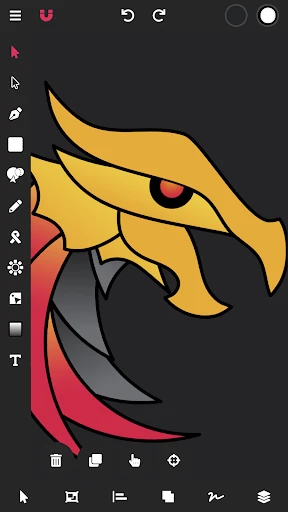


Description
About Vector Ink: SVG, Illustrator Features – A Professional Vector Design Studio in Your Pocket
Vector Ink: SVG, Illustrator is a powerful and intuitive mobile application designed for creating and editing vector graphics directly on smartphones and tablets. It bridges the gap between professional-grade vector design and mobile convenience, offering a comprehensive suite of tools tailored for crafting scalable, resolution-independent artwork. By supporting industry-standard SVG file formats and providing a user interface reminiscent of desktop illustration software, the app empowers both aspiring artists and seasoned designers to sketch, design, and refine their ideas anytime, anywhere, without compromising on precision or creative potential.
Chapter 1: Function
Vector Ink serves as a full-featured vector design studio. Its core functionality revolves around creating and manipulating vector paths using a versatile pen tool, complete with Bezier curve controls for pinpoint accuracy. Users can draw basic shapes, add and edit anchor points, and apply strokes with customizable width and dash patterns. The app supports layers, allowing for non-destructive editing and organized project structure. Key features include robust text tools for adding and formatting typography, a comprehensive color picker with support for solid fills and gradients, and advanced operations like path combining, splitting, and boolean operations (union, subtract, intersect). Furthermore, it provides direct import and export capabilities for SVG files, ensuring seamless compatibility with desktop software like Adobe Illustrator or web platforms. All these tools are packaged within a touch-optimized interface that makes complex vector editing feasible on a mobile device.
Chapter 2: Value
The primary value proposition of Vector Ink lies in its democratization of professional vector design by making it truly mobile and accessible. Unlike many mobile drawing apps focused on raster-based painting, Vector Ink delivers the critical advantage of infinite scalability inherent to vector graphics, making it indispensable for logo design, icons, illustrations for print, and web assets. Its key advantages are multifaceted. First, it offers professional fidelity at a fraction of the cost of desktop software, providing a serious alternative for freelancers and small businesses. Second, the intuitive yet powerful toolset reduces the learning curve, enabling quick mastery for beginners while still satisfying the precision demands of experts. Third, its commitment to the open SVG standard ensures artwork is portable, future-proof, and easily integrated into any digital workflow, from web development to presentation design. The app’s efficiency transforms idle moments into productive design sessions, effectively turning a mobile device into a portable design workstation. This combination of power, portability, and open-format support positions Vector Ink as a uniquely valuable tool in the mobile creative ecosystem, filling a niche that few other apps can.
Chapter 3: Scenarios
Vector Ink primarily targets a spectrum of users who require precise, scalable graphics on the go. The core user group includes freelance graphic designers and illustrators who need to draft concepts, make client revisions, or complete projects outside their primary workspace. It is equally valuable for UI/UX designers who can wireframe interfaces or design icons and assets directly on a tablet with stylus support. Marketing professionals and social media managers find it useful for creating quick vector-based promotional graphics, banners, or editable logos for campaigns. Students learning graphic design fundamentals benefit from its hands-on approach to understanding vector paths and anchor points. In everyday use, a designer might use Vector Ink during a commute to sketch a logo concept based on a sudden inspiration. A web developer could import an SVG icon and tweak its details immediately before implementing it on a site. A small business owner might create a simple vector diagram for a presentation or modify their business card design without needing specialized desktop software. These scenarios highlight the app's role in supporting spontaneous creativity and practical design tasks across various professional and educational contexts.
Uninstall Instructions
For step-by-step guidance on how to safely remove this application from your device, please refer to our 《Uninstall Instructions》 document.
Pros
- directly exports to svg with editable vector paths
- pressure-sensitive ink engine mimics real drawing tools
- unlimited canvas zoom for intricate detail work
- live boolean operations for non-destructive shape editing
- clean ui focused solely on vector sketching and drafting
Cons
- steep learning curve for boolean operation workflows
- lacks pre-made asset libraries or template support
- no direct integration with cloud storage services
- requires a stylus for full pressure sensitivity utility
- minimalist toolset may limit complex illustration projects
Frequently Asked Questions
What is Vector Ink and what does it do?
Vector Ink is a mobile vector graphics editor designed for creating and editing SVG (Scalable Vector Graphics) files. Its core function is to provide Illustrator-like drawing tools on mobile devices, allowing users to design logos, icons, and illustrations with precision. The app focuses on non-destructive editing, using layers and bezier pen tools for clean, scalable artwork. It is positioned for designers, students, or hobbyists needing portable vector design capabilities without requiring a desktop computer.
Is Vector Ink free to use or does it have in-app purchases?
Vector Ink typically operates on a freemium model. The core app is free to download and offers basic vector editing tools. Advanced features, such as exporting in specific formats, accessing premium brush libraries, or removing watermarks, usually require a one-time purchase or a subscription. The app may also offer in-app purchases for asset packs. For the most current pricing and subscription details, please check the official listing on the Apple App Store or Google Play Store.
What devices and operating systems is Vector Ink compatible with?
Vector Ink is primarily developed for iOS and is optimized for iPad with Apple Pencil support, taking full advantage of the touch interface and pressure sensitivity for drawing. It may also be available for iPhone. Compatibility with Android devices is less common for such specialized design apps. Users should verify the current system requirements, as the app likely requires a relatively recent version of iOS (e.g., iOS 14 or later) to ensure all features function correctly.
How does Vector Ink handle file import and export?
Vector Ink supports importing SVG files for editing, which is central to its workflow. For export, the app can save creations as SVG, which is its native and primary format. It may also offer export to PNG for rasterized images. A key technical characteristic is its focus on clean, code-based SVG output suitable for web use or further editing in desktop software like Adobe Illustrator. Some advanced export options or batch processing might be part of its premium features.
Can I use Vector Ink for professional print design projects?
While Vector Ink is powerful for creating scalable vector graphics, its primary focus is on SVG for digital and web use. For professional print design requiring specific color modes (like CMYK), complex bleed settings, or precise typography control, dedicated desktop software like Adobe Illustrator or Affinity Designer is recommended. Vector Ink excels as a sketching, ideation, and mobile editing tool for assets destined for digital platforms, but may have limitations for high-end print preparation.
App Info
Technical Info
Recommended For You

Batman Miniature Game
Comics

OpenSea: NFT marketplace
Art & Design

Snapchat
Communication

Speak and Translate Languages
Communication

TruckSmarter Load Board & Fuel
Business
Chevron
Auto & Vehicles

Bolt for Tesla - Tasker Plugin
Auto & Vehicles

زخرفة الكتابة بكل انواع الخطوط
Beauty

Dwell: Audio Bible
Books & Reference

iVerify Basic
Business

My Verizon For Business
Business

Amazon Relay
Business

maxim — order a taxi & food
Auto & Vehicles

Picify: AI Art Editor
Art & Design

CVTz50
Auto & Vehicles

X Launcher Pro
Art & Design

Tor OBD2 Diagnostics
Auto & Vehicles

Dashtoon: Comics & Manga
Comics

GettingOut Visits
Communication

Advent Magnificat 2024
Books & Reference