Tor OBD2 Diagnostics
Screenshots


Description
About Tor OBD2 Diagnostics Feature – A Professional Vehicle Scanner in Your Pocket
Tor OBD2 Diagnostics is a professional-grade mobile application designed to interface with a vehicle's On-Board Diagnostics (OBD2) system via a compatible Bluetooth or Wi-Fi adapter. It empowers car owners, enthusiasts, and mechanics by transforming a smartphone or tablet into a sophisticated diagnostic tool. The app reads and clears diagnostic trouble codes (DTCs), monitors real-time sensor data, and performs advanced vehicle-specific tests, providing deep insights into a car's health and performance far beyond basic code readers.
Chapter 1: Function
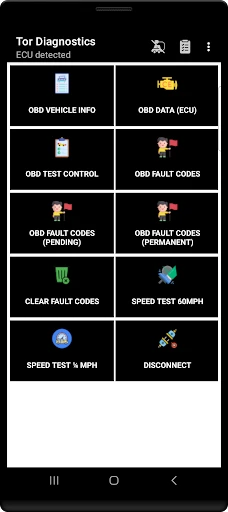
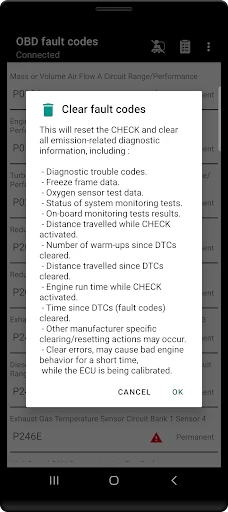
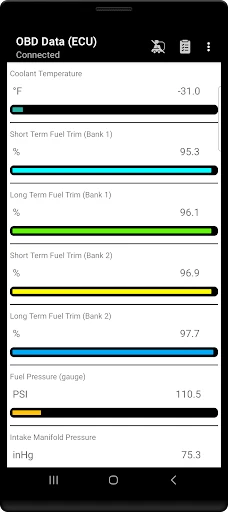
Tor OBD2 Diagnostics excels in delivering comprehensive vehicle diagnostics through its core functions. Primarily, it connects to a standard OBD2 port using an ELM327-compatible adapter, establishing a vital link to the vehicle's computer. The app reads and interprets both generic and manufacturer-specific diagnostic trouble codes, offering clear descriptions to pinpoint engine, transmission, and other system faults. Users can clear these codes to reset warning lights after addressing issues. Beyond code reading, its standout feature is the display of real-time sensor data through customizable dashboards and graphs, monitoring parameters like engine RPM, coolant temperature, fuel trim, and vehicle speed. It also supports advanced functions such as viewing freeze frame data, performing readiness tests for emissions inspections, and accessing service reset functions like oil light reset for supported car models.
Chapter 2: Value
The value proposition of Tor OBD2 Diagnostics lies in its powerful, professional-level capabilities offered at a fraction of the cost of dedicated garage tools. Its key advantage is depth of data access; it doesn't just show codes but provides live, graphable sensor data and advanced PID monitoring, which is crucial for serious troubleshooting and performance tuning. The app supports a vast array of vehicle-specific protocols and enhanced diagnostics for many makes, including BMW, Mercedes, Volkswagen, and Ford, offering functions typically reserved for expensive brand-specific scanners. This specificity dramatically increases its utility for diagnosing complex issues. Furthermore, its user interface, while data-rich, is logically organized, making advanced diagnostics accessible to informed DIYers. The ability to log data and generate reports adds value for tracking intermittent problems or performance modifications. Compared to basic OBD2 apps, Tor offers superior protocol support and more stable communication with the vehicle's ECU. For professional mechanics, it serves as a versatile, portable supplement; for enthusiasts, it's an empowering tool to understand and maintain their vehicles proactively, potentially saving significant money on diagnostic fees and preventing minor issues from escalating.
Chapter 3: Scenarios
Tor OBD2 Diagnostics primarily targets automotive do-it-yourself enthusiasts, performance tuners, and professional mechanics or technicians seeking a portable diagnostic solution. For the DIY car owner, it is invaluable when the check engine light illuminates. Instead of an immediate trip to the mechanic, they can scan the code, research the issue, and decide if it's a simple fix like a loose gas cap or a more serious sensor failure. Performance enthusiasts use it to monitor real-time engine parameters like air-fuel ratios and ignition timing while driving or tuning, logging data to optimize performance modifications. Technicians can use it for quick initial assessments, verifying repairs, or performing specific resets on a wide range of vehicles, enhancing their service efficiency. Everyday use cases include pre-purchase vehicle inspections to check for hidden fault codes, performing routine maintenance checks before long trips, resetting service interval indicators after an oil change, and diagnosing intermittent problems by logging sensor data during a drive cycle to capture faults that don't trigger a permanent code. It turns a smartphone into an essential toolkit component for anyone serious about vehicle maintenance and understanding.
Uninstall Instructions
For step-by-step guidance on how to safely remove this application from your device, please refer to our 《Uninstall Instructions》 document.
Pros
- real-time vehicle data display via bluetooth OBD2 adapter
- supports reading and clearing engine fault codes for DIY repairs
- customizable dashboard with gauges for specific vehicle parameters
- logs trip data including fuel consumption and engine performance
- no subscription fee for core diagnostic functions
Cons
- requires a compatible ELM327 OBD2 hardware adapter to function
- advanced features like ECU coding need paid manufacturer add-ons
- interface and data accuracy vary by vehicle make and model year
- real-time data streaming can drain smartphone battery quickly
- labs advanced features like DPF regen are for specific car brands only
Frequently Asked Questions
What is Tor OBD2 Diagnostics and what does it do?
Tor OBD2 Diagnostics is a mobile app that turns your smartphone into a professional-grade car diagnostic scanner. It connects to your vehicle's OBD2 port via a compatible Bluetooth or Wi-Fi adapter to read real-time sensor data, display engine parameters, and retrieve diagnostic trouble codes. Its core function is to provide detailed insights into your vehicle's health for troubleshooting and monitoring.
Is Tor OBD2 Diagnostics free to use or are there in-app purchases?
The Tor OBD2 Diagnostics app itself is free to download and use for basic functions like reading generic trouble codes and some real-time data. However, full access to manufacturer-specific codes, advanced diagnostics, and all vehicle modules requires a one-time in-app purchase to unlock the Pro version. No subscription is needed after the purchase.
What vehicles and devices are compatible with this app?
The app is compatible with most gasoline vehicles sold globally after 1996 and diesel vehicles after 2004 that support standard OBD2 protocols. It requires a compatible ELM327-based Bluetooth or Wi-Fi OBD2 adapter. The app runs on Android devices; an iOS version is not currently available. Specific vehicle coverage can vary by make and model.
How do I connect the app to my car's OBD2 port?
To connect, you need a compatible OBD2 Bluetooth/Wi-Fi adapter. Plug the adapter into your car's OBD2 port, typically located under the dashboard near the steering column. Enable Bluetooth/Wi-Fi on your phone, open the app, and pair with the adapter through the app's connection menu. Ensure your ignition is in the 'ON' position for power.
Can this app clear check engine lights and read fault codes?
Yes, the app can read generic (P0, P2, U codes) and, with the Pro version, manufacturer-specific diagnostic trouble codes that trigger check engine lights. It also allows you to clear these fault codes and turn off the check engine light, provided the underlying issue is resolved. It is a diagnostic tool and cannot repair physical faults.
App Info
Technical Info
Recommended For You

OpenSea: NFT marketplace
Art & Design

Fongo World Edition
Communication

Holy Bible, KJV Bible + Audio
Books & Reference

Haircare app for women
Beauty

Cheogram (Jabber, Call, Text)
Communication

Whistle Express Car Wash
Auto & Vehicles

Oxford Dictionary & Thesaurus
Books & Reference

TrueCar Used Cars and New Cars
Auto & Vehicles

Remodel AI - Home Renovation
Art & Design

Car Gauge Pro (OBD2 + Enhance)
Communication

Mirror - Makeup and Shaving
Beauty

Messenger - SMS Messages
Communication

Motive Driver
Business

ADP Mobile Solutions
Business

CL Theme C1
Auto & Vehicles

Shipt: Shopper and Driver
Business

CEFCO Rewards
Auto & Vehicles

Stripe Dashboard
Business

Google Voice
Communication

Car Scanner ELM OBD2
Auto & Vehicles