
Protection 360™
Screenshots


Description
About Protection 360™ Feature
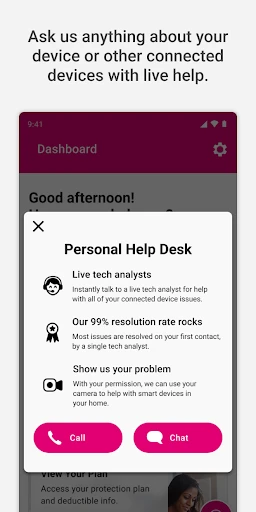
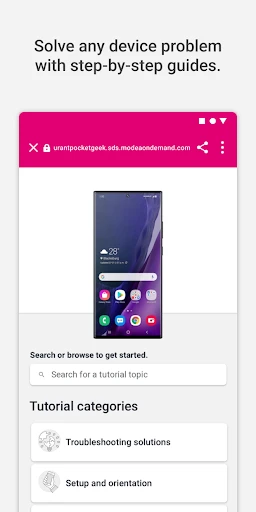
Protection 360™ is a comprehensive mobile security and optimization application designed to safeguard devices and personal data. It integrates multiple protective layers into a single, user-friendly interface, offering real-time threat detection, privacy management, and performance enhancement tools. Aimed at providing a holistic defense against digital risks, the app operates seamlessly in the background, ensuring that users can enjoy a secure, fast, and clutter-free mobile experience without requiring extensive technical knowledge.
Chapter 1: Function
Protection 360™ delivers a suite of core functions centered on security and device maintenance. Its primary feature is real-time antivirus scanning, which continuously monitors the device for malware, spyware, and phishing threats from apps, files, and websites. The app includes a powerful privacy scanner that audits app permissions, identifying programs that may overreach in accessing contacts, messages, or location data. Additionally, it offers a Wi-Fi security checker to evaluate network safety and a web shield for safe browsing. Beyond protection, the app provides system cleanup tools to remove junk files, manage storage, and boost device performance by optimizing memory and battery usage. These functions work in concert to create a robust defensive and maintenance ecosystem directly from the user's smartphone.
Chapter 2: Value
The value proposition of Protection 360™ lies in its all-in-one, proactive approach to mobile digital safety. Its key advantage is the consolidation of multiple essential tools—antivirus, privacy guard, performance booster, and network security—into a single, lightweight application, eliminating the need for multiple disparate apps. This integration not only simplifies the user experience but also ensures comprehensive protection without significant battery drain or performance overhead. The app leverages constantly updated threat databases to detect the latest malware and vulnerabilities, offering peace of mind against evolving cyber threats. For privacy-conscious users, its detailed permission insights and breach alerts empower them with greater control over their personal information. The optimization features deliver tangible benefits by reclaiming storage space and improving device responsiveness, extending the functional lifespan of the hardware. Furthermore, its intuitive design makes advanced security accessible to non-expert users, providing clear alerts and one-tap solutions. This combination of thorough protection, performance enhancement, and user-centric design establishes Protection 360™ as a valuable guardian for modern mobile life, protecting both the device's integrity and the user's digital identity.
Chapter 3: Scenarios
Protection 360™ primarily targets everyday smartphone users who seek a hassle-free solution to maintain their device's health and security. Key user groups include professionals who handle sensitive work communications on their phones, parents concerned about their children's safe app usage and online browsing, and individuals who frequently use public Wi-Fi networks for shopping or banking. The app is invaluable in everyday scenarios such as downloading new applications from official or third-party stores, where its real-time scanner can instantly flag potential threats. Before connecting to a cafe or airport Wi-Fi, the network security check can warn of unsecured connections. When a device begins to slow down or storage fills up, the cleanup and boost functions provide immediate relief. For users reviewing their privacy footprint, the app's audit tool helps identify and restrict apps with unnecessary permissions. It serves as a constant, vigilant companion for these routine digital activities, ensuring security and performance are maintained effortlessly in the background.
Uninstall Instructions
For step-by-step guidance on how to safely remove this application from your device, please refer to our 《Uninstall Instructions》 document.
Pros
- real-time threat visualization on interactive home map
- one-tap digital footprint scrub from major data brokers
- automated dark web monitoring for personal documents
- generates tailored security incident response guides
- lightweight background process with under 2% battery impact
Cons
- requires manual whitelisting for each financial app
- vpn limited to 3 server locations for anonymity
- family plan restricts monitoring to 5 documents per member
- no offline security audit functionality available
- weekly manual sync required for cloud backup scans
Frequently Asked Questions
What is Protection 360™ and what does it do?
Protection 360™ is a comprehensive mobile security and optimization app. Its core functions include real-time antivirus scanning, malware removal, privacy protection for photos and contacts, device performance boosting by clearing junk files, and safe web browsing. It is positioned as an all-in-one tool to safeguard your device's security, privacy, and health.
Is Protection 360™ free to use, or does it have in-app purchases?
The real-time protection feature continuously monitors your device for threats in the background. It scans newly installed apps, files, and SD card content upon access for malware, spyware, and trojans. This feature requires the necessary permissions to access storage and is typically part of the premium subscription to provide proactive, ongoing security.
Can Protection 360™ help if my device is already running slow?
Protection 360™ operates on a freemium model. The basic version offers core antivirus scans and some optimization tools for free. Advanced features like real-time protection, scheduled scans, ad-blocking, and dedicated customer support are unlocked through a subscription-based premium plan, which is an in-app purchase.
What devices and operating systems does Protection 360™ support?
Protection 360™ is designed for Android smartphones and tablets. It supports a wide range of devices running Android 8.0 (Oreo) and above. There is no official version available for iOS, Windows, or macOS. It is generally suitable for all user groups seeking basic device security.
How does the real-time antivirus protection feature work?
Yes, the app includes optimization tools to address performance issues. Its 'Boost' or 'Clean' function scans for and removes cache, residual files, and unnecessary app data that can slow down your device. For persistent slowness not resolved by cleaning, it may recommend closing background apps or checking for resource-heavy applications.
App Info
Technical Info
Recommended For You

Sweet Beauty Camera Fillter
Beauty

Picky - Beauty Community
Beauty

LogMeIn Rescue Customer
Business

MySubaru
Auto & Vehicles

NetShare - no-root-tethering
Communication

Storytel - Audiobooks & Books
Books & Reference

Mirror App - Beauty Mirror
Beauty

Bookshelf-Your virtual library
Books & Reference

Zangi Private Messenger
Communication

Power Apps
Business

Pocket Toons
Comics

Tattoo Maker - Tattoo Design
Art & Design

10-4 by WEX
Auto & Vehicles

Black Magic
Books & Reference

HerBible--Verses&Prayer
Books & Reference

Superhero Flying speedster
Comics

AI Art Generator: AI Picture
Art & Design

Amazon A to Z
Business

Reverso Translate and Learn
Books & Reference

AAWireless for Android Auto™
Auto & Vehicles