
Easy Pose - 3D pose making app
Screenshots


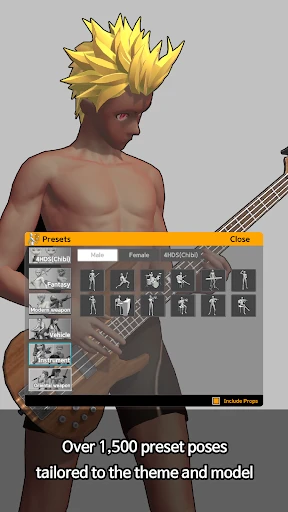
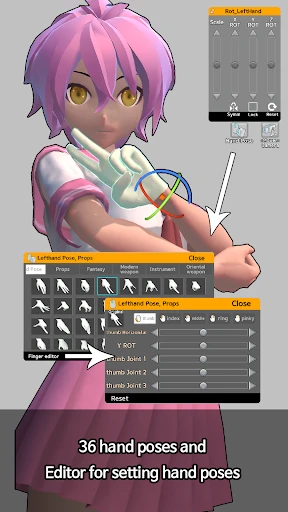
Description
About Easy Pose Feature - Your Virtual Model for Dynamic Art Creation
Easy Pose is a professional yet user-friendly 3D pose making application designed for artists, illustrators, and creative enthusiasts. It provides a fully adjustable virtual human model that users can manipulate into any desired pose, serving as an invaluable reference tool for drawing, painting, and digital art creation. By offering a robust three-dimensional space for experimentation, it bridges the gap between imagination and accurate anatomical representation, streamlining the artistic workflow.
Chapter 1: Function
The core function of Easy Pose centers on the precise manipulation of a detailed 3D human figure. Users begin with a base model, which can be customized in body type, gender, and proportions. The app's intuitive controls allow for the rotation of the entire figure or the individual movement of each joint—from fingers and toes to the spine and neck—enabling the creation of complex, naturalistic poses. A comprehensive suite of features supports this, including a vast library of pre-set poses for quick starts, adjustable lighting from multiple angles to study shadows, and a perspective grid for spatial composition. Users can save their custom poses, screenshot them from any angle for reference, and even animate simple motion sequences to understand movement dynamics. The model's mesh and joint structure are designed to respect anatomical limits, promoting realistic posing.
Chapter 2: Value
The primary value of Easy Pose lies in its empowerment of artists to overcome one of the most challenging aspects of figurative art: achieving accurate and dynamic human poses without constant reliance on live models or extensive photo searches. It offers significant time and cost efficiency, providing an always-available, customizable reference that fits any specific scene or character concept. Its key advantages are multifaceted. First, it enhances anatomical accuracy and perspective understanding through its true 3D environment, allowing artists to study forms from impossible real-life angles. Second, the app accelerates the ideation process; artists can quickly iterate through poses to find the perfect composition, fostering creativity rather than hindering it with technical hurdles. Third, it serves as an exceptional learning tool for students, helping them internalize human proportions and kinematics. Compared to static image libraries, Easy Pose offers unparalleled flexibility. The ability to control lighting and environment adds another layer of depth, teaching users how light interacts with form. Ultimately, it translates technical posing challenges into a smooth, creative exploration, making professional-grade reference tools accessible to hobbyists and professionals alike.
Chapter 3: Scenarios
Easy Pose primarily targets visual creators across various skill levels. Professional illustrators, comic book artists, and storyboard artists use it to draft complex action sequences or consistent character poses across panels. Digital painters and concept artists leverage it to block out scenes and ensure anatomical correctness in their imaginative work. Hobbyist sketchers and art students find it an indispensable practice tool for studying figure drawing and human anatomy at their own pace. Furthermore, the app is valuable for designers needing human figures for mock-ups, and even for photographers planning shots. In everyday use, an artist might open Easy Pose to quickly pose a model for a challenging foreshortened limb in a superhero illustration. A student might use the pre-set pose library to practice gesture drawing in a 10-minute daily exercise. A comic artist could set up two posed models interacting to check spatial relationships and lighting before committing to the final page. It effectively supports any scenario where a reliable, adjustable human reference is needed to bring creative visions to life with confidence and precision.
Uninstall Instructions
For step-by-step guidance on how to safely remove this application from your device, please refer to our 《Uninstall Instructions》 document.
Pros
- offers a vast library of pre-built 3D character models
- real-time joint manipulation with intuitive one-finger controls
- exports high-resolution images with transparent backgrounds
- lightweight app suitable for mid-range mobile devices
- pose mirroring and symmetry tools for balanced compositions
Cons
- premium model assets require separate in-app purchases
- limited customizability for character facial expressions
- advanced posing like weight simulation lacks precision
- no direct integration with major 3D editing software
- community-shared pose library has inconsistent quality
Frequently Asked Questions
What is Easy Pose and what does it do?
Easy Pose is a 3D posing and modeling application designed for artists, illustrators, and hobbyists. Its core function is to provide a virtual, fully posable 3D human model that users can manipulate into any stance. Unique features include adjustable lighting, a variety of body types, and the ability to create custom scenes with multiple models. It serves as a digital reference tool to help users draw accurate human figures from any angle by setting up the desired pose on their device.
Is Easy Pose free to use or does it have in-app purchases?
Easy Pose operates on a freemium model. The app can be downloaded and used for free with access to a basic set of features and models. However, it offers in-app purchases to unlock advanced content and tools. These purchases typically include additional 3D models (like different ages or styles), specialized poses, more clothing options, and premium features such as high-resolution rendering or the removal of watermarks from exported images.
What devices and systems is Easy Pose compatible with?
Easy Pose is primarily available for mobile devices. It is adapted for both iOS and Android operating systems. You can download it from the Apple App Store for iPhones and iPads, and from Google Play for Android phones and tablets. The app is designed to run on relatively modern versions of these systems. It does not require any additional external hardware, functioning solely on your smartphone or tablet's touchscreen interface.
How can I save or export my created poses from the app?
You can export your poses as images directly from within the Easy Pose app. After composing your scene, use the screenshot or export function. The free version typically saves images with an app watermark or at a standard resolution. To export high-resolution images without a watermark, you usually need to unlock the premium version through an in-app purchase. The saved images are stored in your device's gallery, allowing you to use them as a reference in other drawing applications.
Does Easy Pose require an internet connection to function?
No, Easy Pose does not require a constant internet connection for its core posing functions. Once downloaded and installed, you can create, manipulate, and pose models offline. An internet connection may be necessary for initial download, installing updates, accessing certain online asset stores for purchasing new models, or restoring in-app purchases. All basic tools and pre-loaded model assets are available for offline use.
App Info
Technical Info
Recommended For You

Perfect365 Makeup Photo Editor
Beauty

Nomad Sculpt
Art & Design

E-PASS Toll App
Business

Coinoscope: Coin identifier
Books & Reference

Picky - Beauty Community
Beauty

네이버 웹툰 - Naver Webtoon
Comics

My Best Colors
Beauty

Grubhub for Drivers
Business

All Email Login
Communication

Inbox Homescreen
Communication

10-4 by WEX
Auto & Vehicles

Avast SecureLine VPN & Privacy
Communication

Pixel Studio PRO: editor
Art & Design

AI Drawing : Trace & Sketch
Art & Design
Circuit Color
Books & Reference

Cast Phone to TV, Chromecast
Business

WAMR: Reveal deleted messages!
Communication

Flowt Wear
Auto & Vehicles

Beauty Camera -AI Photo Editor
Beauty

InnoCaption Live Call Captions
Communication