
AutoZen-Car Dashboard&Launcher
Screenshots


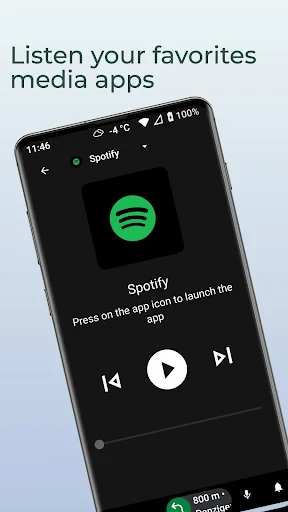


Description
About AutoZen-Car Dashboard&Launcher Feature
AutoZen is a dedicated car dashboard and launcher application designed to transform your Android device into a smarter, safer, and more intuitive in-car companion. It reimagines the standard infotainment interface by providing a driver-centric layout that prioritizes accessibility and minimizes distraction. By consolidating essential driving functions, navigation, media, and communication into a single, streamlined view, AutoZen enhances the overall driving experience. It serves as a powerful overlay that organizes and presents key information and controls in a large, touch-friendly format, making interactions seamless while on the road. The app is built with a clear focus on safety, usability, and customization, aiming to bridge the gap between smartphone versatility and the specialized needs of the driver's seat.
Chapter 1: Function
AutoZen's core functionality revolves around creating a specialized driving interface. Upon activation, it launches a full-screen dashboard that replaces your phone's standard home screen with a widget-rich layout optimized for vehicular use. Central to this interface are large, easy-to-touch tiles for quick access to navigation apps like Google Maps or Waze, music and podcast players, phone calls, and messaging. It integrates voice command support, allowing drivers to perform actions hands-free. The app automatically manages other phone functions, such as silencing non-essential notifications or enabling Do Not Disturb mode upon connection to a car's Bluetooth, to reduce interruptions. Furthermore, it offers customizable profiles, letting users arrange widgets and shortcuts according to personal preference, and can be set to auto-start when connecting to a specific Bluetooth device or car charger, ensuring a seamless transition into driving mode.
Chapter 2: Value
The primary value proposition of AutoZen lies in its dual commitment to enhanced safety and superior convenience. By curating a simplified and visually clear interface with oversized controls, it significantly reduces visual and cognitive load, allowing drivers to keep their eyes on the road and hands on the wheel for longer periods. This dedicated design directly addresses the dangers of fumbling with a standard phone interface while driving. Its deep integration with voice commands amplifies this safety benefit, enabling core functions to be operated without physical touch. Beyond safety, AutoZen delivers substantial practical value by aggregating disparate driving-related tools into a unified command center. Drivers no longer need to switch between multiple apps; everything from navigation guidance and media playback to upcoming calendar events is accessible from one screen. The high degree of customization is another key advantage, as it accommodates diverse user habits and vehicle setups. Whether for daily commutes, ride-share drivers, or long road trips, AutoZen optimizes the in-car digital experience. It effectively turns any Android device into a cost-effective, upgraded infotainment system, offering functionality comparable to built-in units but with greater personalization and without a hefty investment.
Chapter 3: Scenarios
AutoZen is ideally suited for a wide range of drivers who rely on their smartphones for navigation and entertainment while in the vehicle. Its primary user groups include daily commuters seeking a safer and more organized way to manage their drive-to-work routine, accessing traffic updates and podcasts with minimal distraction. Ride-share and delivery drivers form another core demographic, as the app's large tiles and voice control enable efficient management of turn-by-turn navigation, trip requests, and customer communications without compromising safety or professionalism during frequent stops and starts. Furthermore, frequent travelers and families embarking on road trips benefit from AutoZen's ability to provide a stable, easy-to-read navigation and media hub for passengers, often in vehicles lacking advanced built-in systems. The app is also valuable for users with older cars that have basic or no infotainment screens, offering a modern interface upgrade simply by mounting their existing Android phone or tablet. In essence, any driver looking to legally and sensibly integrate their smartphone's capabilities into the driving environment will find AutoZen's tailored scenarios highly applicable.
Uninstall Instructions
For step-by-step guidance on how to safely remove this application from your device, please refer to our 《Uninstall Instructions》 document.
Pros
- customizable dashboard replaces cluttered infotainment ui
- one-tap shortcuts for navigation and music reduce driving distraction
- real-time vehicle data overlay on navigation aids trip planning
- minimalist driving-mode interface declutters essential info
- offline maps and widget system ensure functionality without signal
Cons
- requires specific phone-mount setup for optimal safe interaction
- advanced obd-ii features need a compatible hardware adapter
- dashboard customization has a learning curve for new users
- always-on gps and sensor use can drain phone battery quickly
- limited compatibility with certain car bluetooth systems for automation
Frequently Asked Questions
What is AutoZen and what are its core functions?
AutoZen is an Android app that transforms your phone or tablet into a car dashboard launcher. Its core functions include providing a simplified, driver-friendly interface for easy access to navigation, music, calls, and car diagnostics while driving. It positions itself as a safer alternative to using standard phone screens in the car, with large buttons and voice control integration to minimize distractions.
Is AutoZen free to use or does it have in-app purchases?
AutoZen operates on a freemium model. The core app is free to download and use with basic features. It offers optional in-app purchases, typically a Pro version, which unlocks advanced features like custom themes, more widgets, detailed vehicle diagnostics (OBD2 integration), and ad removal. The specific pricing and features of the Pro tier are detailed within the app's settings or store page.
What devices and Android versions does AutoZen support?
AutoZen is designed for Android devices, including phones and tablets. It generally requires Android 6.0 (Marshmallow) or higher for optimal performance. For full OBD2 diagnostic features, an additional compatible Bluetooth or Wi-Fi OBD2 adapter is required to connect to your vehicle's port. The app is optimized for use in landscape orientation, commonly used in car mounts.
How does AutoZen ensure safety and minimize distraction?
AutoZen promotes safety through a minimalist, high-contrast interface with large, tactile-friendly buttons. It supports voice commands for core actions like navigation and music control, allowing drivers to keep their eyes on the road. The launcher automatically starts when connecting to a car's Bluetooth, reducing manual setup. It restricts complex phone operations to a simplified dashboard view designed for quick glances.
Can I use AutoZen for real-time car diagnostics?
Yes, but this is a premium feature requiring additional hardware. AutoZen can display real-time car diagnostics like engine RPM, coolant temperature, and fault codes if you purchase a compatible OBD2 adapter and likely the app's Pro version. You must pair the adapter with your device via Bluetooth. The app itself does not include the physical OBD2 scanner; it is a software interface for the data.
App Info
Technical Info
Recommended For You

Comics Price Guide
Comics

Pixel Studio PRO: editor
Art & Design

Pixilart - Make Pixel Art
Art & Design

iFnovel - Books,Web Novel
Books & Reference

Arvin® - AI Logo Maker
Art & Design

USPS MOBILE®
Business

Pratilipi Comics
Comics

Beauty Camera: Selfie Editor
Beauty

CARFAX Car Care App
Auto & Vehicles

Magic Cross Stitch: Pixel Art
Art & Design

Poseit
Art & Design

ATOM Store, Myanmar
Communication

Workforce Tools
Business

Sling: Employee Scheduling App
Communication

CarMax: Used Cars for Sale
Auto & Vehicles

Tinker DIY
Auto & Vehicles

Bible Daily, KJV Bible + Audio
Books & Reference

Messages - sms text message
Communication

SALLY BEAUTY
Beauty

ESV Bible
Books & Reference