
JusTalk - Video Chat & Calls
Screenshots




Description
About JusTalk - Video Chat & Calls Feature
JusTalk is a cross-platform communication application designed to deliver high-quality video and voice calls alongside a suite of interactive features. It enables users to connect with friends and family across different devices and operating systems seamlessly. With a focus on fun and engagement, JusTalk goes beyond standard calling by incorporating playful elements like doodling, filters, and games directly into the call interface. It serves as a versatile tool for personal communication, aiming to make remote interactions feel more vivid, connected, and entertaining.
Chapter 1: Function
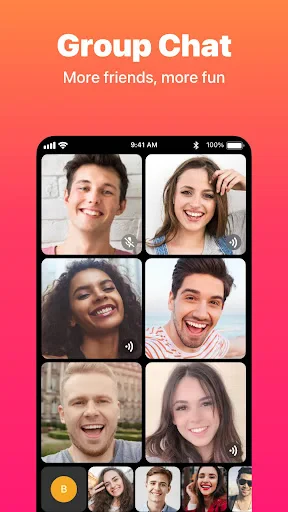
JusTalk's core functionality centers on reliable, high-definition video and voice calls over Wi-Fi or mobile data. It supports one-on-one and group calls, allowing multiple participants to join a conversation. Beyond basic calling, the app integrates unique interactive features that define its character. Users can draw and doodle in real-time on a shared canvas during a call, adding a creative layer to communication. A variety of fun filters and stickers are available to liven up video chats. Furthermore, JusTalk includes built-in games that call participants can play together simultaneously, turning a simple chat into a shared activity. Additional features encompass instant text messaging, photo sharing, and the ability to leave video messages, consolidating multiple communication modes into a single, cohesive platform.
Chapter 2: Value
The primary value proposition of JusTalk lies in its ability to transform routine video calls into engaging, shared experiences, thereby fostering closer connections over distance. Its key advantage is the seamless integration of interactive play within the communication framework, a feature not commonly found in mainstream calling apps. This positions JusTalk not just as a utility, but as a platform for creating joyful moments. The app's technological value is demonstrated through its stable connection quality and low latency, which are fundamental for a smooth user experience. Its cross-platform compatibility ensures accessibility, removing barriers between iOS and Android users. The intuitive and user-friendly interface lowers the learning curve for all age groups. From a practical standpoint, JusTalk offers significant value by serving multiple communication needs—serious conversations, collaborative drawing, or casual gaming—within one application. This multifunctionality eliminates the need to switch between apps, providing convenience and enriching the quality of remote interaction. By prioritizing both emotional engagement and reliable performance, JusTalk delivers distinctive value in the crowded field of communication apps.
Chapter 3: Scenarios
JusTalk primarily targets individuals seeking richer, more interactive ways to stay in touch with their personal networks. A core user group is families, especially those with children or grandparents. The drawing and game features make it ideal for grandparents to interact playfully with grandchildren during video calls, and for parents to engage children in creative activities while away. Long-distance couples also benefit from the app's shared activities, which can simulate shared experiences like playing a simple game together, adding a new dimension to their daily check-ins. Close friends who enjoy casual, fun interactions form another key demographic, using the app for virtual hangouts, collaborative doodling sessions, or just to apply silly filters for laughs. Furthermore, it is suitable for small, informal study groups or project teams where members might need to brainstorm ideas using the drawing feature alongside discussion. In everyday use, scenarios range from a daily video call to share news, to a scheduled weekend group call where friends play games together, to leaving a video message with doodles to celebrate a special occasion. JusTalk fits into any scenario where the goal is to combine communication with shared fun and creativity.
Uninstall Instructions
For step-by-step guidance on how to safely remove this application from your device, please refer to our 《Uninstall Instructions》 document.
Pros
- group video calls support up to 500 participants
- offers real-time doodling and screen sharing
- low-latency calls using proprietary jufr protocol
- no time limits on free one-on-one video calls
- includes interactive games and filters for social calls
Cons
- high participant calls require stable wifi connection
- advanced features need subscription to unlock
- occasional battery drain during long group sessions
- interface can feel cluttered with many interactive tools
- some regional networks may experience connection drops
Frequently Asked Questions
What is JusTalk and what does it do?
JusTalk is a communication app focused on video chat and voice calls. Its core function is to enable high-quality one-on-one or group video calls. Unique features include fun filters, doodle tools for drawing on the video feed, and group watch for synchronized media viewing. It positions itself as a personal and interactive way to connect with friends and family.
Is JusTalk free to use, and are there in-app purchases?
The group watch feature allows participants in a video call to watch videos from platforms like YouTube together in sync. One person can share a video link, and it will play simultaneously for all call members. This feature is designed for shared entertainment experiences during calls and requires a stable internet connection for optimal performance.
What should I do if I experience poor call quality?
JusTalk is free to download and use for basic video and voice calls. The app offers optional in-app purchases for premium features. These typically include access to a larger library of creative filters, stickers, and effects to enhance your calls. There are no ads during calls in the free version.
What devices and systems is JusTalk compatible with?
JusTalk is available for both iOS and Android devices, including phones and tablets. It requires a stable internet connection (Wi-Fi or mobile data) and permissions for the camera, microphone, and contacts (for easy connection setup). The app is designed for general users, with a simple interface suitable for various age groups.
How does the group watch feature work on JusTalk?
Poor call quality is often related to network conditions. First, check your internet connection and try switching between Wi-Fi and mobile data. Closing other background apps may free up device resources. Ensure the app has the necessary permissions and is updated to the latest version. For persistent issues, you can contact support through the app's help section.
App Info
Technical Info
Recommended For You

Adobe Scan AI PDF Scanner, OCR
Business

Google Chrome
Communication

InnoCaption Live Call Captions
Communication

Messages: SMS Message Text App
Communication

Tracer (Donation Package)
Art & Design

Easy Hairstyles for Girls
Beauty

Al Quran Kareem: القران الكريم
Books & Reference

Picture Editor
Beauty

Al QURAN - القرآن الكريم
Books & Reference

PocketBook reader - any books
Books & Reference

AI Image Generator: ImagineArt
Art & Design

봄툰
Comics

Fashion Design Sketches Book
Art & Design

Google Ads
Business

AR Tracer: Trace Drawing
Art & Design

BookTok- Read Good Novel
Books & Reference

Spellai - AI Art Maker
Art & Design

BookFunnel
Books & Reference

AAWireless for Android Auto™
Auto & Vehicles

Cartoon Video & Gif Maker
Comics