
Zoom Workplace for Intune
Screenshots



Description
About Zoom Workplace for Intune Feature
Zoom Workplace for Intune is a specialized enterprise application that integrates the renowned Zoom collaboration platform with Microsoft Intune, a leading unified endpoint management solution. This integration is designed for organizations that utilize Microsoft's ecosystem for device and application management. The app essentially represents the Zoom Workplace experience—encompassing meetings, team chat, phone, whiteboard, and more—packaged and optimized for secure deployment, configuration, and management through Intune. It addresses the critical need for IT administrators to maintain robust security policies and compliance standards while providing employees with a seamless, powerful tool for modern hybrid work. By bridging the gap between a best-in-class communication suite and enterprise-grade mobile device management, it creates a controlled, efficient, and secure digital workspace.
Chapter 1: Function
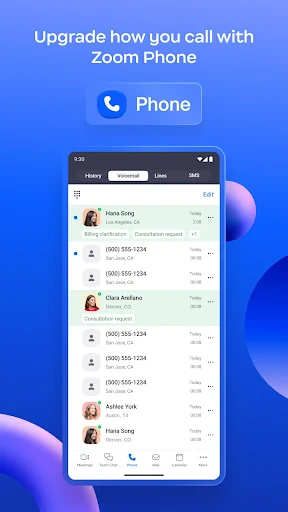
Zoom Workplace for Intune functions as the managed client for the Zoom ecosystem on mobile devices within an Intune-governed environment. Its core operational capability is to provide users with full access to Zoom's features, including joining and hosting high-quality video and audio meetings, participating in Zoom Team Chat channels, making and receiving Zoom Phone calls, and collaborating on digital whiteboards. From an IT management perspective, its critical function is to act as a conduit for Intune policies. Administrators can deploy the app silently to enrolled devices, configure settings remotely (such as requiring SSO authentication or disabling specific features), and enforce data protection rules. This includes applying app protection policies to prevent data leakage, ensuring meetings are encrypted, and managing the app's access to device resources like the microphone or camera, all through the centralized Intune admin console.
Chapter 2: Value
The primary value proposition of Zoom Workplace for Intune lies in its powerful synergy of seamless collaboration and rigorous enterprise security. For IT departments, the value is immense: it significantly reduces management overhead and security risks. By integrating with Intune, administrators gain granular control over the Zoom application across a fleet of corporate or BYOD devices. They can ensure compliance with organizational security standards by mandating authentication methods, controlling data sharing between apps, and remotely wiping corporate data from the app if a device is lost or an employee leaves. This centralized management simplifies deployment at scale and provides crucial visibility into app usage. For end-users and the organization as a whole, the value is delivered through an uncompromised, familiar Zoom experience that is both powerful and secure. Employees can collaborate effectively without navigating complex security hurdles, fostering productivity. The organization benefits from enhanced data protection, reduced risk of unauthorized access or data breaches, and a streamlined software environment that supports flexible work models while maintaining strict compliance with industry regulations. This combination makes it a strategic tool for enabling productive hybrid work without sacrificing governance.
Chapter 3: Scenarios
Zoom Workplace for Intune is primarily targeted at medium to large enterprises, especially those already invested in the Microsoft 365 and Intune ecosystem for endpoint management. Key user groups include corporate employees who rely on Zoom for daily communication and collaboration while using company-managed smartphones or tablets. A typical scenario involves a financial services firm where advisors use managed iPads to conduct secure, compliant client consultations via Zoom Meetings, with all data transmission protected by Intune app protection policies. In healthcare, clinicians might use the app on shared mobile devices for telehealth sessions, with policies ensuring patient data confidentiality. Another common scenario is within global corporations with distributed teams; IT can uniformly deploy and configure the app to thousands of devices, ensuring all employees—whether in sales, engineering, or HR—have a standardized, secure setup for internal meetings, cross-departmental chat, and customer calls via Zoom Phone. It is also ideal for organizations with strict regulatory requirements, such as in government or legal sectors, where controlling application behavior and data flow on mobile devices is non-negotiable.
Uninstall Instructions
For step-by-step guidance on how to safely remove this application from your device, please refer to our 《Uninstall Instructions》 document.
Pros
- integrates zoom meetings with intune device compliance checks
- enables conditional access based on meeting join context
- provides single-tap join from managed company portal
- app configuration policies deploy without user setup
- isolates corporate zoom data from personal app instances
Cons
- requires intune enrollment and azure ad licensing
- limited to organizations using microsoft endpoint manager
- conditional access may block join on non-compliant devices
- admin-controlled settings override user preferences
- no support for non-enterprise zoom accounts or plans
Frequently Asked Questions
What is Zoom Workplace for Intune?
Zoom Workplace for Intune is a specialized version of the Zoom Workplace platform designed for enterprise management through Microsoft Intune. Its core function is to provide secure video conferencing, team chat, phone, and collaboration tools. It is positioned as a business-grade solution where IT administrators can deploy, configure, and manage the Zoom app and its policies directly from the Microsoft Intune console, ensuring compliance with organizational security standards.
Is Zoom Workplace for Intune free to use?
No, Zoom Workplace for Intune is not a free application. It is an enterprise offering that requires an appropriate Zoom subscription license (such as Zoom One Business or Enterprise) and access to Microsoft Intune for mobile application management. The specific costs depend on your organization's Zoom plan and Microsoft 365/Intune licensing. There are no in-app purchases; billing is handled centrally through organizational contracts.
What devices and systems does this app support?
Zoom Workplace for Intune is supported on major mobile and desktop platforms, including iOS, iPadOS, Android, Windows, and macOS. The app is specifically optimized for managed environments where devices are enrolled in Microsoft Intune. It is designed for enterprise employee groups rather than individual consumers. For detailed version compatibility, please refer to the official Zoom and Microsoft Intune documentation.
How does integration with Microsoft Intune enhance security?
The integration allows IT admins to enforce security policies directly from the Intune admin center. This includes requiring PIN/biometric access to the app, encrypting app data, controlling clipboard sharing, and managing sign-in contexts. It ensures that Zoom usage complies with corporate data protection policies, such as preventing the saving of meeting recordings to personal storage. The app itself inherits Zoom's standard end-to-end encryption for meetings.
Can I use personal Zoom features in this managed version?
Core meeting, chat, and phone features are fully available. However, certain user-controlled settings or personalization options may be restricted or pre-configured by your IT administrator via Intune app protection policies. For example, the ability to use personal meeting IDs, enable certain cloud recording locations, or modify data-sharing settings might be limited to ensure organizational security. Check with your IT department for specific policy details.
App Info
Technical Info
Recommended For You

CallApp: Caller ID & Block
Communication

Yaelokre OC Maker
Art & Design

Dress Up Royal Princess Doll
Beauty

Blue Letter Bible
Books & Reference

Duo Call - Dual Global Calling
Communication

King James Bible (KJV)
Books & Reference

AT&T Visual Voicemail
Communication

Canva: AI Photo & Video Editor
Art & Design

Autowini
Auto & Vehicles

Bitcoin Miner Cloud
Business

Handshake Jobs & New Careers
Business

Virtual Hair Style Changer
Beauty

Audible: Audio Entertainment
Books & Reference

Translateasy Lingual Assistant
Books & Reference

Libby, the Library App
Books & Reference

Beauty Camera -AI Photo Editor
Beauty

Fable: Books & TV
Books & Reference

Battle Royale Chapter5 Season2
Books & Reference

inCarDoc Pro | OBD2
Auto & Vehicles

Vivaldi Color Analysis
Beauty