
Homebase: Employee Scheduling
Screenshots



Description
About Homebase: Employee Scheduling Feature - The All-in-One Solution for Small Business Workforce Management
Homebase: Employee Scheduling is a comprehensive, user-friendly application designed specifically to simplify workforce management for small businesses, including restaurants, retail stores, and service providers. It centralizes the often chaotic tasks of scheduling, time tracking, communication, and payroll into a single, intuitive platform. By replacing manual methods like spreadsheets and paper schedules, Homebase empowers managers to save significant time, reduce labor costs, and improve team coordination. Its accessible design ensures that both managers and hourly employees can engage with the tool effortlessly, fostering a more organized and transparent workplace. Ultimately, Homebase serves as a vital operational hub, helping local businesses streamline their daily administrative burdens and focus more on growth and customer service.
Chapter 1: Function
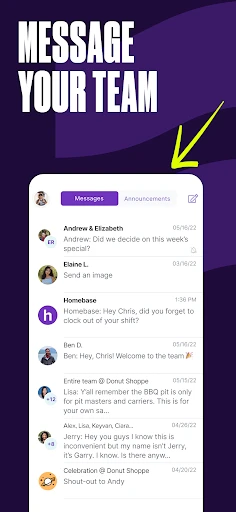
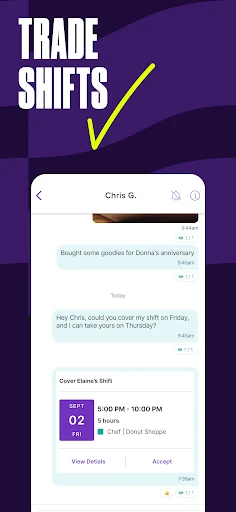
Homebase's core functionality revolves around intelligent employee scheduling and time tracking. Managers can create and publish schedules in minutes using a drag-and-drop interface, accounting for employee availability, roles, and labor forecasts. The app automatically sends shift notifications and reminders to staff, reducing no-shows. Integrated time tracking allows employees to clock in and out directly from their phones, with GPS verification for remote teams. These hours are seamlessly converted into timesheets, flagging potential overtime or scheduling conflicts. Furthermore, the app facilitates team communication through a dedicated messaging hub, allowing for shift swaps, announcements, and document sharing. Basic hiring tools and performance insights round out its functional suite, providing a unified system for managing the entire employee lifecycle from recruitment to payroll preparation.
Chapter 2: Value
The primary value proposition of Homebase lies in its ability to convert time-consuming administrative work into automated, efficient processes, delivering tangible cost savings and operational clarity for small businesses. Its key advantage is the deep integration of scheduling, time tracking, and communication, which eliminates data silos and errors associated with manual entry. By using predictive scheduling tools and labor cost alerts, managers can optimize rosters to avoid overstaffing and stay within budget. The automated compliance features help businesses adhere to local labor laws, such as break requirements and overtime rules, mitigating legal risks. For employees, the value is transparency and flexibility; they can view schedules, request time off, and swap shifts from anywhere, leading to higher job satisfaction. The platform's straightforward design requires minimal training, and its affordable, scalable pricing makes professional-grade workforce management accessible to even the smallest teams. This holistic approach not only saves managers an average of 4 hours per week but also fosters a more engaged and reliable workforce, directly contributing to improved customer service and business stability.
Chapter 3: Scenarios
Homebase is ideally suited for managers and owners of small to medium-sized businesses in the service and retail industries, such as cafes, salons, boutique shops, and gyms. The primary user group includes busy entrepreneurs and shift supervisors who lack dedicated HR staff and need to manage hourly, part-time, or seasonal employees efficiently. A typical use case involves a restaurant manager who, each week, constructs the upcoming schedule by dragging employee tiles into shifts, instantly notifying the team via the app. Employees receive alerts, confirm shifts, and use their phones to clock in for work. When a barista calls in sick, the manager can quickly send a shift offer to available staff through the messaging system, and another employee can pick it up seamlessly. Another common scenario is a retail store owner reviewing labor reports at month's end, using Homebase's exported timesheets to run payroll swiftly and accurately. For teams with multiple locations, the app provides a consolidated view, allowing area managers to oversee schedules and labor costs across all sites from a single dashboard.
Uninstall Instructions
For step-by-step guidance on how to safely remove this application from your device, please refer to our 《Uninstall Instructions》 document.
Pros
- visual drag-and-drop scheduling mimics physical planner feel
- auto-schedule by preset roles and availability reduces manual work
- team syncs shifts via mobile app without account creation
- integrated time clock with geofencing prevents early clock-ins
- labor cost forecasts update instantly with schedule changes
Cons
- steep learning curve for non-tech-savvy managers initially
- mobile app lacks some web dashboard reporting features
- geofencing requires precise location permissions setup
- limited customization for complex union shift rules
- offline mode has minimal functionality for schedule edits
Frequently Asked Questions
What is Homebase and what are its core functions?
Homebase is a workforce management app designed for small businesses, primarily in retail and hospitality. Its core functions include employee scheduling, time clock tracking with GPS, team communication, and payroll integration. It helps managers create and share schedules quickly while allowing employees to view shifts, swap shifts with approval, and clock in/out from a mobile device or computer.
Is Homebase free to use, and what are its purchase options?
Homebase offers a free plan covering basic scheduling, time tracking, and team messaging for a single location with limited features. Paid plans, available via subscription, unlock advanced features like labor cost controls, performance insights, and integrations with payroll providers. In-app purchases are not typical; billing is handled through monthly or annual subscriptions on their website.
What devices and systems does Homebase support?
Homebase is a cloud-based platform accessible via web browsers on computers and through native mobile apps for iOS and Android devices. It is designed for managers and hourly employees, requiring an internet connection for most functions. The system does not mandate specific additional hardware, though it can integrate with compatible time clock hardware for businesses.
How does Homebase handle employee shift swaps and time-off requests?
Employees can request shift swaps or time off directly within the app. The request is sent to the manager for approval. Managers receive notifications and can approve or deny requests within the platform, ensuring schedule control. This automated process reduces miscommunication and keeps the schedule updated for all team members in real time.
What happens if I need to cancel my subscription or get support?
You can cancel your paid subscription through your account settings on the Homebase website. Support is provided via email and an online help center with articles and guides. For technical or account issues, users can contact the support team. The app does not typically offer phone support for all plans; specific support channels depend on your subscription tier.
App Info
Technical Info
Recommended For You

Logos Bible Study App
Books & Reference

The Bible in pictures
Comics

TracFone My Account
Communication

AR Drawing: Sketch, Art, Paint
Art & Design

Color Analysis - Dressika
Beauty

AARP SafeTrip™
Auto & Vehicles

NetShare - no-root-tethering
Communication

Security Camera Mod Minecraft
Books & Reference

imo video calls and chat HD
Communication

XBrowser - Mini & Super fast
Communication

English-Myanmar Dictionary
Books & Reference

The Cepher
Books & Reference

myQQ – Quick Quack
Auto & Vehicles

Dayforce
Business

Planity
Beauty

World History Atlas
Books & Reference

FaxCover Pro Create Cover Page
Business

CARFAX - Shop New & Used Cars
Auto & Vehicles

Genius: AI Photo Generator
Art & Design

Gruveo - Video Conferencing
Communication