
Microsoft Designer
Screenshots
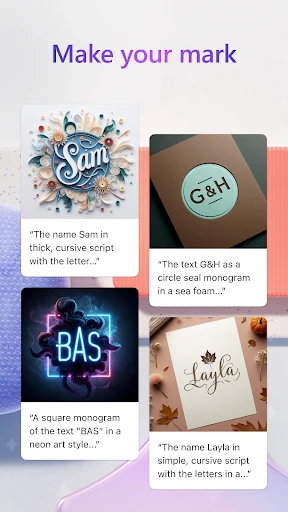
Description
About Microsoft Designer Feature - Intelligent Graphic Design at Your Fingertips
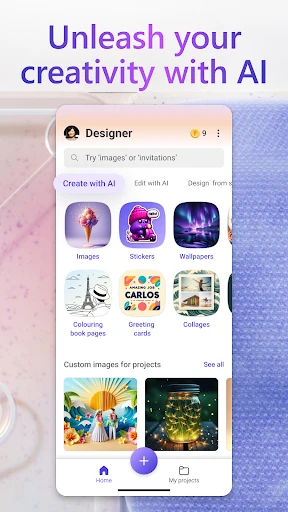
Microsoft Designer is an AI-powered graphic design tool that simplifies the creation of professional-quality visual content. Integrated with advanced models like DALL-E, it enables users to generate stunning graphics, social media posts, presentations, and more through intuitive text prompts and smart templates. Accessible via web and mobile apps, it lowers the technical barrier to design, allowing anyone to produce visually appealing materials quickly and efficiently.
Chapter 1: Function
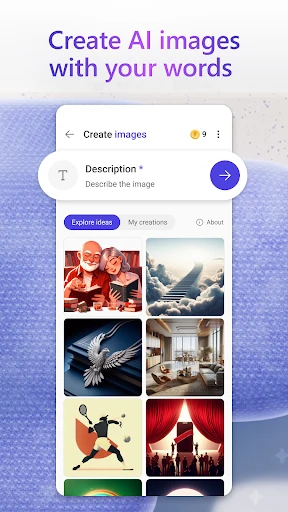
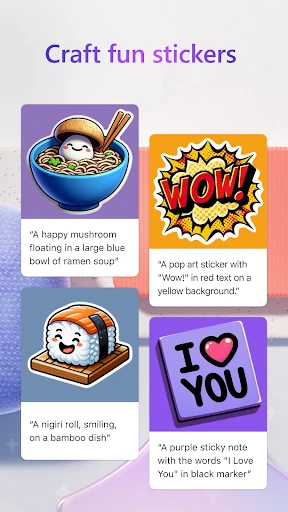
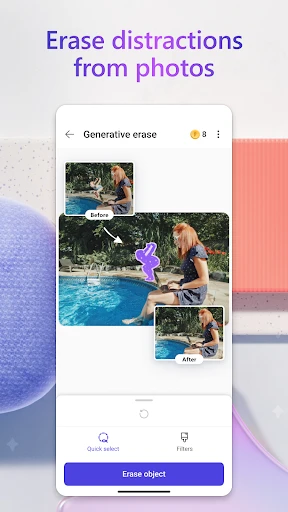
Microsoft Designer's core functionality revolves around AI-assisted design generation and editing. Users start by entering a text description of their desired graphic; the AI then generates multiple design options accordingly. The platform offers a rich library of templates for various formats, including social media banners, invitations, and marketing materials. An integrated editor allows for customization of elements like text, images, and layout. Key features include background removal, style suggestions, and brand kit integration for consistency. It also supports collaborative editing and seamless export in common formats, making the entire design process from conception to completion remarkably streamlined within a single, user-friendly interface.
Chapter 2: Value
The primary value of Microsoft Designer lies in democratizing professional graphic design through artificial intelligence. Its most significant advantage is the drastic reduction in time and skill required to produce high-quality visuals. By interpreting natural language prompts, it eliminates the need for complex design software expertise. For businesses and individuals, this translates into substantial cost savings on external design services and accelerated content creation cycles. The tool is deeply integrated with the Microsoft ecosystem, such as Microsoft 365, facilitating smooth workflows across applications like PowerPoint and Outlook. Its AI not only generates initial designs but also provides intelligent recommendations for improvements, ensuring aesthetic appeal and effectiveness. Furthermore, continuous updates and cloud-based operation mean users always have access to the latest features and templates. This combination of accessibility, power, and integration positions Microsoft Designer as a valuable asset for enhancing visual communication without a steep learning curve, empowering users to focus on creativity and message rather than technical execution.
Chapter 3: Scenarios
Microsoft Designer primarily targets small business owners, marketers, social media managers, educators, and casual users who need to create engaging visual content regularly but lack formal design training. For a small business, it's ideal for quickly producing daily social media posts, promotional flyers, or email newsletter graphics. Marketers can use it to rapidly prototype campaign visuals or design consistent branded materials. Educators and students find it useful for creating compelling presentations, posters, and educational infographics. In everyday personal use, individuals employ it to design custom invitations for events, personalized greeting cards, or eye-catching photo collages for sharing online. Its web and mobile accessibility means these tasks can be accomplished on-the-go, turning a brief idea into a polished visual within minutes, making it a versatile tool for both professional and personal creative projects.
Uninstall Instructions
For step-by-step guidance on how to safely remove this application from your device, please refer to our 《Uninstall Instructions》 document.
Pros
- generates editable designs from a text prompt
- seamless integration with microsoft 365 ecosystem
- offers unique ai-suggested visual content and layouts
- free core functionality without subscription fees
- one-click resize for different social media formats
Cons
- requires a microsoft account for full access
- limited advanced typography and layer controls
- ai-generated templates can lack brand uniqueness
- offline functionality is severely restricted
- brand kit feature is less robust than competitors
Frequently Asked Questions
What is Microsoft Designer and what does it do?
Microsoft Designer is a graphic design application powered by AI, primarily positioned as a tool for quickly creating social media graphics, digital postcards, invitations, and marketing materials. Its core function is to generate professional-looking visual designs from text prompts or basic user inputs. It simplifies the design process by offering AI-generated design suggestions, templates, and automated layout adjustments, making it accessible for users without formal design skills.
Is Microsoft Designer free to use, or does it require payment?
Microsoft Designer offers a free tier with core functionality, accessible with a Microsoft account. However, premium features, such as removing background from images, generating custom templates, and accessing advanced AI capabilities, require a Microsoft 365 Personal or Family subscription. The app itself does not have a one-time purchase option; its premium access is tied to the Microsoft 365 service plan. No additional hardware purchases are necessary.
On which devices and platforms can I use Microsoft Designer?
Microsoft Designer is primarily a web application accessible through modern browsers on Windows, macOS, and ChromeOS. It also has dedicated mobile apps available for download on iOS and Android devices. The app requires an internet connection for full functionality, especially for its AI-powered features. It is designed for general consumers, small business owners, marketers, and social media enthusiasts, not for professional high-end print or complex editorial design.
How does the AI feature in Microsoft Designer work?
The AI in Microsoft Designer, powered by DALL-E and other models, generates design drafts, suggests layouts, and creates visual elements based on your text descriptions. You start by entering a prompt (e.g., 'a birthday party flyer'), and the AI provides multiple design options. It can also suggest matching icons, photos, and color palettes. The AI assists in resizing designs for different social platforms and can generate text captions. It functions as a creative co-pilot, automating routine design tasks.
Can I export my designs for commercial use without watermarks?
Yes, designs created with the free tier of Microsoft Designer can be downloaded as PNG or JPEG files for personal or commercial use without any Microsoft watermark. For premium subscribers, additional export options and higher resolution downloads may be available. It is the user's responsibility to ensure all content (including AI-generated images, icons, and stock photos provided within the app) complies with licensing terms for commercial use. Microsoft provides usage rights information within the app's help section.
App Info
Technical Info
Recommended For You

dēzl™
Auto & Vehicles

Microsoft Authenticator
Business

Thrift Savings Plan
Business

Tor OBD2 Diagnostics
Auto & Vehicles

Bookshelf-Your virtual library
Books & Reference

Phone Mirror app - True Mirror
Beauty

RingCentral
Business

WhatsApp Messenger
Communication

Twenty-Four Hours a Day
Books & Reference

Draw Anime: Paint & Sketch App
Art & Design

Google Messages
Communication

Invoice Simple: Invoice Maker
Business

Invoice Maker - Invoice Fly
Business

OBD Scanner ELM327: GaragePro
Auto & Vehicles

Beauty Camera -AI Photo Editor
Beauty

Men's Hair Cuts & Hairstyles
Beauty

BookTok- Read Good Novel
Books & Reference

WebNovel
Books & Reference

Adblock Browser: Fast & Secure
Communication

TMOLector: Manga and Stories
Comics