
Chat Cloner Secretly View Chat
Screenshots



Description
About Chat Cloner Secretly View Chat Feature – Overview
Chat Cloner Secretly View Chat is an application that claims to offer users the ability to monitor and clone messaging activities from another device. It is marketed as a tool for accessing chat histories and messages from various social platforms. The app positions itself within a category of software designed for oversight, often targeting individuals who wish to monitor device usage. It is important to note that the functionality described by the app raises significant ethical and legal concerns regarding privacy and consent. The following sections detail its purported functions, stated value, and claimed use scenarios as presented in its promotional materials.
Chapter 1: Function
The core function of Chat Cloner Secretly View Chat, as described, is to operate discreetly on a target device to replicate and transmit chat conversations to a remote dashboard accessible by the installer. It claims to clone data from popular messaging applications such as WhatsApp, Facebook Messenger, SMS, and others. Once installed, the app purportedly runs in stealth mode without displaying an icon, logging incoming and outgoing messages, media files, and contact details. This data is then uploaded to a private online account where the user who installed the app can view it. The process is presented as requiring one-time physical access to the target device for installation and configuration, after which monitoring is conducted remotely. The app's functionality is centered on surreptitious data extraction and surveillance of digital communications.
Chapter 2: Value
The purported value proposition of Chat Cloner Secretly View Chat hinges on providing covert access to private conversations. Its key advertised advantage is stealth operation, ensuring the app remains undetectable on the monitored device. Promoters claim it offers comprehensive monitoring, capturing not just text but also shared images, videos, and call logs from integrated applications. Another stated advantage is remote accessibility; users can view collected data from any web browser, facilitating constant oversight without further interaction with the target device. The app is also marketed as easy to use, with a straightforward installation process and a centralized web dashboard for reviewing logs. It appeals to a desire for information gathering by presenting itself as a powerful tool for uncovering hidden conversations. However, the actual value is deeply controversial and largely illegitimate, as it fundamentally violates personal privacy. The effectiveness and reliability of such apps are often questionable, and they may pose security risks, including data breaches or malware. It is critical to understand that using such software to monitor individuals without their explicit consent is illegal in most jurisdictions and constitutes a severe breach of trust and personal boundaries.
Chapter 3: Scenarios
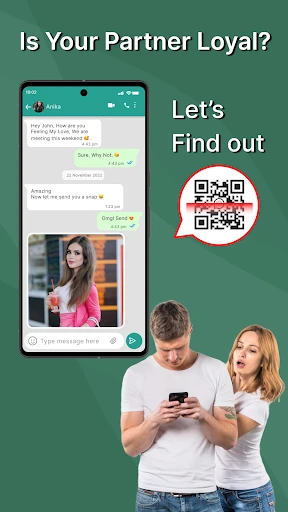
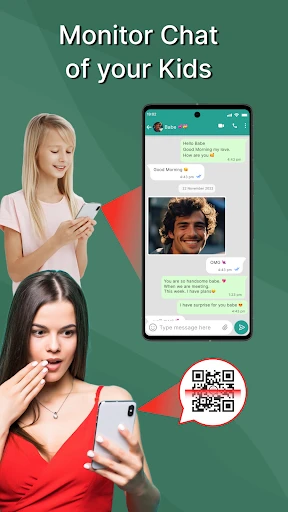
The primary target user groups for this app, as implied by its marketing, are individuals suspecting infidelity in a relationship, parents seeking to monitor their children's online activity without their knowledge, or employers wishing to track company-owned devices used by employees. In everyday use cases, a person might install the app on a partner's phone to secretly read their WhatsApp messages. A parent could potentially use it to view their child's SMS conversations and social media interactions to guard against online predators or bullying, albeit through covert means. An employer might deploy it on corporate smartphones to ensure company resources are not misused. These scenarios, while presented as justifications, are ethically and legally fraught. Monitoring adults without consent is generally illegal. Even in parental control contexts, transparency is widely recommended over secret surveillance to build trust. The use of such apps typically stems from situations characterized by a lack of trust, but they often exacerbate conflicts and can lead to serious legal consequences including charges of stalking, invasion of privacy, or violations of cybercrime laws.
Uninstall Instructions
For step-by-step guidance on how to safely remove this application from your device, please refer to our 《Uninstall Instructions》 document.
Pros
- clones chat apps to a local sandbox for analysis
- operates offline without requiring cloud uploads
- extracts and categorizes media files from chats automatically
- bypasses online detection through complete local processing
- supports forensic-style metadata and timeline reconstruction
Cons
- requires physical access to the target device for installation
- limited to specific app versions due to encryption changes
- no real-time monitoring; only captures static snapshots
- may violate privacy laws in many jurisdictions
- complex setup needing technical understanding of Android
Frequently Asked Questions
What is Chat Cloner and what does it do?
Chat Cloner is an application categorized under tools or utilities. Its core function is to create a local, view-only backup or clone of chat history from certain messaging applications on the same device. It positions itself for users who wish to save or view chat logs discreetly. The app operates by accessing data already present on the device to generate a standalone, browsable archive. It does not transmit data to external servers for this primary cloning function.
Is Chat Cloner free to use or does it have in-app purchases?
Specific pricing details for Chat Cloner are not provided in the available information. Apps of this nature often operate on a freemium model, offering basic features for free with advanced functionalities locked behind a one-time purchase or subscription. It is recommended to check the official app store listing for the most accurate and current information regarding its cost structure, in-app purchases, or any required subscriptions.
What permissions or equipment does Chat Cloner require?
To perform its core function of cloning chats, Chat Cloner typically requires extensive permissions on your device. This includes access to device storage to read and create backup files. Crucially, it may require accessibility service permissions or notification access to read and replicate chat content from other apps. No additional physical equipment is needed. Users should review the permission request list carefully during installation.
On which devices and Android versions does this app work?
The app is designed for Android devices. A specific minimum Android version requirement is not stated, but such tools generally require a moderately recent OS version to ensure compatibility with the permissions system and target messaging apps. It is not typically available for iOS (iPhone) due to platform restrictions. Performance may vary depending on the device manufacturer's custom Android skin and the specific messaging application being cloned.
Does Chat Cloner work for all messaging apps like WhatsApp?
No, Chat Cloner does not universally support all messaging applications. Its functionality is limited to specific apps that store accessible chat logs on the device. Compatibility depends on the app's data structure and the permissions Chat Cloner can obtain. It may not work with end-to-end encrypted chats that are not stored in plain text locally. The official description should list supported source apps, but coverage is not guaranteed to be comprehensive or permanent.
App Info
Technical Info
Recommended For You

Sky Map
Books & Reference

AppBarber: Cliente
Beauty

PocketBook reader - any books
Books & Reference

Pocket Novel
Books & Reference

Joyread
Books & Reference

리디 - 웹툰, 만화, 웹소설, 전자책 모두 여기에!
Comics

Car Gauge Pro (OBD2 + Enhance)
Communication

All Document Reader:PDF Viewer
Business

Learn how to draw - ArtWorkout
Art & Design

Video AI - AI Hug & Kiss Maker
Art & Design

CarParts.com
Auto & Vehicles

Holy Bible - Verse+Audio
Books & Reference

ArtCanvas: Learn how to draw
Art & Design

Holy Bible King James + Audio
Books & Reference

AniDraw: 2D Draw Animation
Art & Design

SelfComic: Super Saiyan Photo
Comics

BookTok- Read Good Novel
Books & Reference

DMV Practice Test Pro 2024
Auto & Vehicles

Messenger: Text Messages, SMS
Communication

myColorado
Business