
Phoner 2nd Phone Number + Text
Screenshots




Description
About Phoner 2nd Phone Number + Text Feature
Phoner is a mobile application that provides users with one or more additional, private phone numbers for calling and texting. Operating independently of a user's primary cellular carrier number, it leverages Voice over Internet Protocol (VoIP) technology to facilitate communication over a data connection. This app is designed for individuals seeking to separate personal and professional communications, protect their privacy in online transactions, or manage various aspects of their social life without disclosing their real phone number. With a user-friendly interface, Phoner allows for the seamless acquisition and management of these secondary numbers directly from a smartphone, offering a flexible and modern solution for contemporary communication needs.
Chapter 1: Function
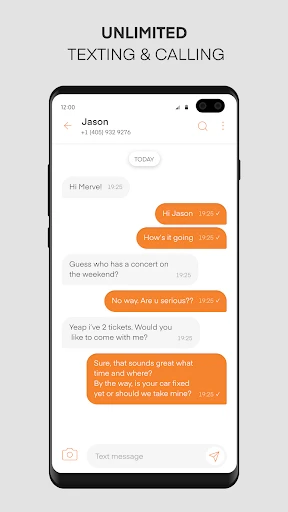
The core functionality of Phoner revolves around generating and managing disposable, secondary phone numbers. Users can instantly obtain a new phone number with a chosen area code from a selection of countries. This number is fully functional for both inbound and outbound voice calls and text messages (SMS) within the app. Key features include a built-in dialer and messaging interface that keeps all communications associated with the Phoner number separate from the device's native phone and messaging apps. Users can manage multiple numbers simultaneously, customize voicemail greetings for each line, and utilize call forwarding options. The app also supports sending picture messages (MMS) and provides a call history and message log for each number, ensuring organized and compartmentalized communication channels. All functions operate over Wi-Fi or mobile data, eliminating the need for additional SIM cards.
Chapter 2: Value
Phoner's primary value proposition lies in its powerful offering of privacy, organization, and convenience. It addresses the growing need for personal data protection by allowing users to engage in online marketplaces, dating apps, or website sign-ups without exposing their primary number, thereby reducing spam calls and potential security risks. For professionals and freelancers, it provides a dedicated business line that maintains work-life balance; clients can contact them without intruding on personal time, and the line can be paused or disposed of after a project ends. The app is cost-effective, eliminating the expense of a second physical phone or SIM card plan, especially for international communication where local numbers can be obtained. Its key advantages include ease of setup—no carrier approval or hardware change is needed—and flexibility, as numbers can be changed or discarded at will. This empowers users with control over their accessibility and digital footprint, making Phoner an essential tool for savvy communicators in a digitally-connected world where privacy is paramount.
Chapter 3: Scenarios
Phoner is ideally suited for several distinct user groups and everyday situations. Freelancers, entrepreneurs, and remote workers form a core demographic, using a dedicated Phoner number as their public-facing business contact to maintain professionalism and separate work inquiries from personal life. Online shoppers and sellers on platforms like Craigslist or Facebook Marketplace benefit immensely; they can communicate securely with buyers or sellers without revealing their real identity, enhancing safety in transactions. Individuals exploring the dating scene use a Phoner number to chat with new matches, providing an initial layer of privacy. Travelers can obtain a local number in their destination country to make local calls affordably without incurring roaming charges. Furthermore, anyone needing a temporary number for short-term purposes—such as verifying accounts on websites that require SMS confirmation, participating in contests, or signing up for trial services—finds Phoner to be a perfect, clutter-free solution that prevents future spam to their primary number.
Uninstall Instructions
For step-by-step guidance on how to safely remove this application from your device, please refer to our 《Uninstall Instructions》 document.
Pros
- offers disposable numbers for temporary sign-ups
- separates work and personal calls on one device
- supports calling over Wi-Fi to save plan minutes
- provides area code selection for local presence
- auto-blocks known telemarketing numbers
Cons
- requires active subscription for number retention
- mms group messaging support varies by carrier
- outgoing caller id shows the phoner number
- in-app call quality depends on data signal strength
- cannot port your existing primary number in
Frequently Asked Questions
What is Phoner and what does it do?
Phoner is a communication app that provides users with a second, disposable phone number for calling and texting. Its core function is to offer privacy and convenience by allowing you to sign up for services, sell items online, or manage separate work/personal communications without using your primary number. It operates as a VoIP (Voice over Internet Protocol) service over a data connection or Wi-Fi.
Is Phoner a free app to use?
The Phoner app itself is free to download and install. However, to acquire and use a second phone number, it requires in-app purchases or a subscription. Costs vary based on the country of the number, the subscription plan duration, and features like call minutes or SMS credits. You can manage numbers and view pricing within the app.
How does Phoner protect my privacy and number?
Phoner provides a layer of privacy by keeping your primary number hidden from contacts you engage with using your Phoner number. The app requests permissions for contacts, microphone, and notifications to function for calling and messaging. Your usage data is governed by its privacy policy; it does not sell your personal number but uses the provided number for service operation.
Can I use my Phoner number on multiple devices?
A Phoner number is typically tied to your account on one primary device (smartphone). It is not designed for simultaneous use on multiple devices like tablets or other phones. The service is primarily adapted for iOS and Android mobile systems. For specific multi-device support, please refer to the official Phoner support documentation.
Why are my calls or texts not going through?
Common issues include an unstable internet connection (Wi-Fi or mobile data), insufficient account credits for the operation, or app permissions being disabled. Ensure the app has necessary permissions and your subscription is active. For persistent service problems, contact Phoner's customer support through the app or their official website for troubleshooting and maintenance.
App Info
Technical Info
Recommended For You

Beauty Makeup Editor & Camera
Beauty

Messages: Text SMS
Communication

Joyread
Books & Reference

Krita
Art & Design

Clip Studio Paint
Art & Design

マンガほっと -話題の漫画や人気コミックが読めるマンガアプリ
Comics

Meeting - Video Conference
Business

NIV Bible
Books & Reference

Watchgram for Telegram
Communication

Audubon Bird Guide
Books & Reference

Standup Wireless
Communication

Lalatoon - Comics & Webtoon
Comics

Draw Anime: Paint & Sketch App
Art & Design

ShiftLock
Books & Reference

Package Tracker - pkge Mobile
Business

Castle - Make and Play
Art & Design

HHAeXchange
Business

All Document Reader:PDF Viewer
Business

VSD Viewer for Visio Drawings
Business

Conversations (Jabber / XMPP)
Communication