
Microsoft Power BI
Screenshots
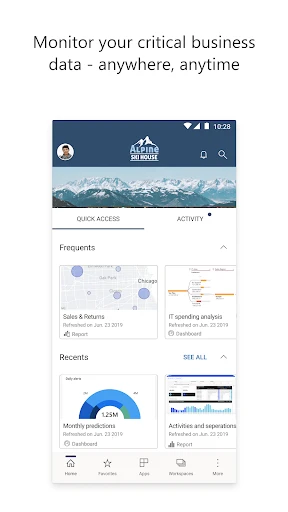


Description
About Microsoft Power BI Feature
Microsoft Power BI is a unified, scalable platform for business intelligence and data visualization. It empowers users to connect to diverse data sources, transform raw information into coherent datasets, and create interactive, insightful reports and dashboards. As a core component of the Microsoft ecosystem, it integrates seamlessly with products like Excel, Azure, and SQL Server, catering to both individual analysts and large enterprises. Power BI democratizes data insights by offering a spectrum of tools from the free, user-friendly Power BI Desktop for report creation to the cloud-based Power BI Service for sharing and collaboration, and the mobile apps for on-the-go access. Its primary mission is to enable data-driven decision-making across all levels of an organization.
Chapter 1: Function
Microsoft Power BI's core functionality revolves around a seamless end-to-end data workflow. It begins with data connectivity, allowing users to import data from hundreds of sources including Excel, cloud services like Salesforce and Google Analytics, databases, and direct web feeds. Once connected, the Power Query Editor enables robust data transformation and cleaning, shaping information into an analysis-ready model. The heart of its function is an intuitive drag-and-drop visualization canvas where users build charts, graphs, maps, and KPIs. These elements combine into interactive reports where clicking a data point filters and highlights related information across all visuals. For collaboration, reports are published to the Power BI Service online workspace, where they can be shared, pinned to dashboards for a consolidated view, and scheduled for automatic data refresh. Advanced features include natural language Q&A, where users ask questions about their data in plain English, and the creation of AI-powered visuals.
Chapter 2: Value
The value proposition of Microsoft Power BI lies in its ability to transform complex data into actionable intelligence with remarkable speed and accessibility. Its foremost advantage is deep integration with the Microsoft stack, providing a familiar environment that reduces the learning curve and ensures compatibility with existing investments in tools like Office 365 and Azure. This fosters a cohesive data culture. For organizations, Power BI delivers significant cost efficiency through a flexible licensing model, including a powerful free tier, lowering the barrier to entry for business intelligence. Its self-service nature empowers non-technical users to create their own reports, reducing dependency on IT departments and accelerating insight generation. From a technical standpoint, Power BI handles massive datasets with robust performance, supports real-time analytics, and enforces rigorous data governance and security through row-level security and sensitivity labels. The platform's scalability ensures it grows with the business, from individual pro users to enterprise-wide deployments with premium capacity. Ultimately, its value is measured in empowered decision-making, where interactive, real-time dashboards provide a single source of truth, enabling teams to spot trends, identify opportunities, and respond to challenges with data-backed confidence.
Chapter 3: Scenarios
Microsoft Power BI serves a wide spectrum of users across various professional scenarios. Key target groups include business analysts and data professionals who use Power BI Desktop for deep data modeling and complex report authoring. Department managers and executives in sales, marketing, finance, and operations rely on shared dashboards in the Power BI Service to monitor KPIs like monthly revenue, campaign performance, or inventory levels in real time, facilitating strategic reviews. Front-line employees, such as retail store managers, use the mobile app to access performance reports on tablets or phones while on the shop floor. Common use cases are abundant: a marketing team connects Power BI to social media and web analytics data to visualize campaign ROI and customer engagement trends. A financial controller consolidates data from ERP and Excel spreadsheets to create a unified profit-and-loss dashboard with drill-through capabilities. A manufacturing supervisor monitors real-time production line metrics from IoT sensors on a live dashboard to preempt bottlenecks. In essence, any scenario requiring the consolidation, visualization, and shared understanding of data to inform daily operations or long-term strategy is a prime scenario for Power BI.
Uninstall Instructions
For step-by-step guidance on how to safely remove this application from your device, please refer to our 《Uninstall Instructions》 document.
Pros
- connects directly to hundreds of live data sources
- creates interactive reports with natural language queries
- publishes and embeds dashboards securely across platforms
- handles massive datasets with in-memory analytics engine
- offers deep integration with the entire Microsoft ecosystem
Cons
- steep learning curve for advanced dax and data modeling
- premium capacity and per-user licensing can be costly
- report performance heavily depends on underlying data model
- mobile app experience is more for consumption than creation
- complex sharing and governance setup for large enterprises
Frequently Asked Questions
What is Microsoft Power BI and what does it do?
Microsoft Power BI is a business analytics service. It transforms data from various sources into interactive dashboards and reports. Its core function is to help users visualize and analyze business data to gain insights and make data-driven decisions. It connects to hundreds of data sources, from Excel files to cloud services, and allows for the creation of customized visualizations.
Is Power BI free to use or are there in-app purchases?
Power BI offers a free desktop application for creating reports. For sharing and collaboration, paid licenses are required. The main service tiers are Power BI Pro (per-user monthly fee) and Power BI Premium (capacity-based). There are also in-app purchases for premium data connectors and AI features. The mobile app is free to view reports shared with you.
What devices and systems does Power BI support?
Power BI is available across multiple platforms. The primary authoring tool is Power BI Desktop for Windows. A web-based service works on modern browsers. Mobile apps are available for iOS, Android, and Windows devices. It requires an internet connection for most cloud services, though Power BI Report Server is available for on-premises deployment.
How does Power BI handle large datasets and real-time data?
Power BI can handle large datasets through data compression and efficient querying. For massive data volumes, it leverages DirectQuery or Live Connection modes to query the source system directly instead of importing. Real-time streaming is supported through dashboards that can visualize data pushed from APIs, Azure Stream Analytics, or PubNub, updating in near real-time.
Can I share my Power BI dashboards with external users?
Yes, sharing with external users is possible but depends on your license. With a Pro license, you can share with other Pro users. For broader external sharing (like to users without a license), you typically need a Premium capacity subscription and can use features like 'Publish to web' (public) or 'Share via Azure AD B2B' (secure, requires sign-in). Admin controls govern these permissions.
App Info
Technical Info
Recommended For You

LinkedIn: Jobs & Business News
Business

Paint
Art & Design

iVerify Basic
Business

BookTok- Read Good Novel
Books & Reference

Pixl - Face Retouch & Blemish
Beauty

Smarty Men Jacket Photo Editor
Beauty

Avast SecureLine VPN & Privacy
Communication

ThriftBooks: New & Used Books
Books & Reference

Driver Pulse by Tenstreet
Business

Car Launcher
Auto & Vehicles

BuildCalc
Business

СL Theme Line
Auto & Vehicles

StoryGraph
Books & Reference

Edmunds - Shop Cars For Sale
Auto & Vehicles

Canva: AI Photo & Video Editor
Art & Design

X Launcher Pro
Art & Design

clickworker
Business

HHAeXchange
Business

Amazon A to Z
Business

Picrew PFP & OC Maker
Art & Design