
clickworker
Screenshots


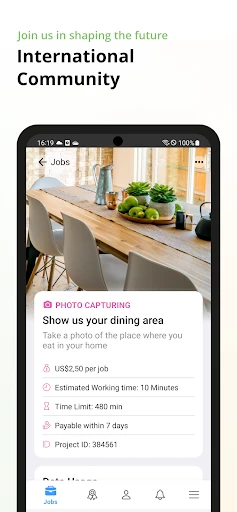
Description
About Clickworker Feature - The On-Demand Microtask Platform
Clickworker is a crowdsourcing platform that connects businesses with a global workforce of independent contractors, known as Clickworkers, who perform small, digital tasks. It serves as a scalable solution for data collection, categorization, and AI training, breaking down large projects into manageable microtasks. The app facilitates this ecosystem, allowing workers to find and complete jobs anytime, anywhere, while enabling companies to access a flexible, on-demand labor pool for tasks unsuitable for automation.
Chapter 1: Function
The Clickworker app functions as a mobile gateway to a vast marketplace of microtasks. Its core operation revolves around three key actions: browsing, executing, and submitting. Users can log in to view an available task list, filtered by categories such as data collection, surveys, web research, text creation, or image tagging. Each task, or 'job', comes with clear instructions, estimated completion time, and compensation details. The primary function is to provide the tools necessary to complete these tasks directly within the app. This may involve taking specific photos, recording short audio clips, answering survey questions, categorizing search results, or writing short product descriptions. Upon completion, users submit their work through the app for review and subsequent approval for payment, tracking their earnings and job history within a personal dashboard.
Chapter 2: Value
Clickworker's primary value proposition lies in its creation of a symbiotic, efficient, and accessible micro-economy. For businesses and researchers, it offers unparalleled scalability and speed in data processing. Instead of hiring a dedicated team, companies can leverage Clickworker's global crowd to annotate thousands of images for computer vision models, verify local business information, conduct market research surveys, or generate SEO-friendly text snippets in a fraction of the time and cost. The platform ensures data quality through built-in validation mechanisms and a distributed workforce. For the individual Clickworker, the value is flexibility and accessibility. It provides an opportunity to earn income on a completely flexible schedule, using just a smartphone. There are no fixed hours or commitments; users can work during breaks, commutes, or free time. The app democratizes work by requiring no formal qualifications, opening doors for students, stay-at-home parents, or individuals seeking supplementary income. The payment system, typically per-task, offers transparency, and the cumulative effect of completing multiple small tasks can lead to meaningful earnings. This dual-sided platform effectively bridges the gap between the growing demand for human-led data services and the supply of individuals seeking flexible, digital work opportunities.
Chapter 3: Scenarios
The Clickworker app caters to distinct user groups on both sides of the platform. For task performers, primary users include students looking to earn extra money between classes, freelancers seeking to fill gaps in their project schedule, stay-at-home parents managing household responsibilities, and individuals in regions with limited traditional job opportunities. Their everyday use involves logging into the app during spare moments to scan for quick tasks—perhaps a 5-minute survey on consumer habits, a request to photograph storefronts in their local area, or a batch of 50 product descriptions to write. For businesses, the key users are AI/ML developers needing large datasets labeled, local SEO agencies verifying business listings, market research firms conducting rapid surveys, and e-commerce companies requiring content generation. Their typical scenario involves uploading a project, such as 'transcribe 10,000 short audio clips' or 'identify objects in 50,000 images,' setting parameters, and distributing it to the Clickworker community via the platform. The app enables them to collect diverse, human-verified data from a global perspective within days, accelerating project timelines that would otherwise be prohibitively expensive or slow.
Uninstall Instructions
For step-by-step guidance on how to safely remove this application from your device, please refer to our 《Uninstall Instructions》 document.
Pros
- accesses a global network of on-demand microtask workers
- platform handles project payment and quality control automatically
- enables rapid scaling of data annotation and collection projects
- intuitive dashboard for task creation and real-time results tracking
- supports a wide array of AI training data formats and requirements
Cons
- requires clear
- detailed task instructions to ensure worker accuracy
- per-task pricing model can accumulate cost for large
- complex projects
- limited direct communication with individual workers performing tasks
- quality variance may occur across different regions and task types
- dashboard analytics lack deep
- customizable reporting features
Frequently Asked Questions
What is clickworker and what does it do?
Clickworker is a crowdsourcing platform app that connects businesses with a global workforce for micro-tasks. Its core function is to allow registered users (clickworkers) to complete small, paid online jobs such as data categorization, surveys, web research, and content creation. The app serves as a mobile gateway to these tasks, positioning itself as a tool for earning supplemental income. It does not provide traditional employment but offers flexible, project-based work.
Is clickworker free to use, and how do I earn money?
The most common payment issues involve PayPal account verification and minimum payout thresholds. Payments are processed via PayPal only, so your clickworker account email must match your verified PayPal email. There is a minimum balance required to request a payout, which varies by country. Payments are not instant and follow a scheduled invoicing cycle. If tasks are rejected by the client for quality reasons, they will not be paid. Ensure your profile and tax information are fully completed to avoid payment holds.
What devices and systems are supported by the clickworker app?
The clickworker app is free to download and use. There are no subscription fees. Earnings come from completing tasks (called UHRS or in-app jobs) offered by clients. Payment is per successfully completed task, with rates varying by task complexity. You must register an account, pass any required assessments, and have a valid PayPal account for payout. Earnings are not guaranteed and depend on task availability and your speed/accuracy. The app itself does not charge any fees for access.
What are the common problems with receiving payments?
The clickworker app is available for both Android and iOS mobile devices. You can download it from the Google Play Store or the Apple App Store. For optimal functionality, a stable internet connection is required. The app is designed for smartphones and tablets. Some specific tasks, especially those requiring precise input or larger screens, may be better suited for completion on a desktop computer, but the app provides mobile access to the task dashboard and basic job completion.
How does clickworker ensure task quality and handle support?
Clickworker uses qualification assessments and guidelines for each task type to maintain quality. Your work is regularly evaluated, and consistently low-quality submissions can lead to account restrictions. For support, the app and website provide a help center with FAQs and a contact form for submitting tickets. There is no direct phone support. Response times can vary. It is the worker's responsibility to read task instructions carefully. The platform does not mediate disputes beyond its stated terms of service.
App Info
Technical Info
Recommended For You

DSLR HD Camera : 4K HD Camera
Beauty

Car Launcher Pro
Auto & Vehicles

Zoom Rooms Controller
Business

POCKET COMICS: Premium Webtoon
Comics

Bible Daily, KJV Bible + Audio
Books & Reference

OBD Auto Doctor: OBD2 Scanner
Auto & Vehicles

Face Massage, Skincare: forYou
Beauty

Comics Price Guide
Comics

FAB Adblocker Browser:Adblock
Communication

Pratilipi Novel
Books & Reference

Messenger: Text Messages, SMS
Communication

UKG Dimensions
Business

Manga Translator
Comics

MediBang Paint:Draw Art, Comic
Art & Design

Hair Color Changer: Hairstyles
Beauty

CarGurus: Used & New Cars
Auto & Vehicles

SketchPad - Doodle On The Go
Art & Design

Kelley Blue Book: We Know Cars
Auto & Vehicles

Google Meet
Communication

Maru - ComicViewer/TextReader
Comics