
Inbox Homescreen
Screenshots


Description
About Inbox Homescreen Feature – Streamlining Your Digital Entryway
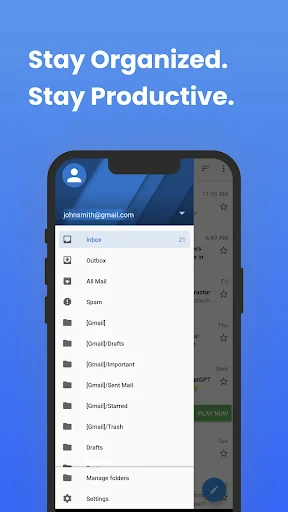
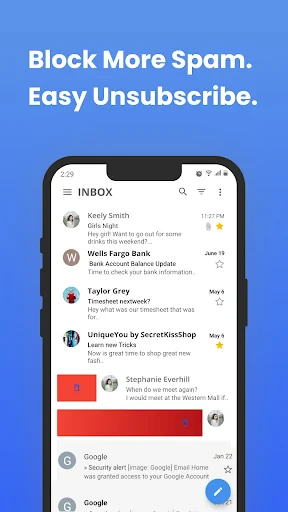
Inbox Homescreen is an innovative Android application that reimagines the traditional smartphone home screen by integrating email and task management directly into the primary interface. It transforms the static grid of app icons into a dynamic, productivity-focused dashboard. The app primarily aggregates information from connected email accounts, presenting summaries, important notifications, and actionable items front and center. By doing so, it aims to reduce the friction of constant app switching, allowing users to access critical communications and pending tasks with a single glance at their home screen. This approach positions the home screen not just as a launchpad for applications, but as a central command center for daily digital workflow, promoting efficiency and helping users stay on top of their most important information without unnecessary clutter.
Chapter 1: Function
Inbox Homescreen operates by replacing the user's default Android launcher with its own intelligent interface. Its core functionality revolves around deep email integration. Upon setup, users connect their email accounts (such as Gmail or Outlook). The app then processes incoming emails, extracting key details like senders, subjects, and dates to create clean, glanceable cards or widgets directly on the main home screen panel. These are not just notifications; they are interactive elements that allow for quick actions like archiving, deleting, or scheduling reminders for emails without opening the native email client. Beyond email, the app often incorporates basic task management features, enabling users to create to-do items that also reside on the home screen. The layout is typically minimalist, prioritizing this stream of information while still providing access to frequently used apps through a dock or a simplified app drawer. The function is essentially to curate and present actionable information proactively, making the home screen a live feed of one's pending communications and duties.
Chapter 2: Value
The primary value proposition of Inbox Homescreen lies in its profound commitment to reducing digital distraction and cognitive load. In a typical smartphone usage pattern, users unlock their device, face a neutral screen, and must proactively decide which app to open to check for updates, often leading to unintended scrolling through social media or news feeds. Inbox Homescreen flips this model by presenting the most likely needed information—emails and tasks—immediately, thereby saving time and mental energy. Its key advantage is context creation; the home screen becomes purpose-driven. For professionals and busy individuals, this means starting every interaction with their device with a clear view of priorities. The value extends beyond mere convenience to fostering better email and task management habits. By making emails visually manageable and actionable from the home screen, it discourages inbox buildup and the 'out of sight, out of mind' problem. Furthermore, its unified view prevents the need to manage separate widgets for email, calendar, and tasks, offering a cohesive and aesthetically streamlined experience. This consolidation reduces home screen clutter, creating a calmer, more focused digital environment. The app delivers tangible efficiency gains, turning previously passive screen time into productive, intentional interaction.
Chapter 3: Scenarios
Inbox Homescreen is ideally suited for specific user groups whose daily routines heavily rely on prompt email communication and basic task tracking. The primary target users are busy professionals, entrepreneurs, and managers who receive a high volume of actionable emails and need to triage them quickly throughout the day. It is equally valuable for students managing assignments and university communications, helping them keep deadlines visible. Freelancers and remote workers, who often use their smartphones as primary tools for client correspondence, will find the immediate access invaluable for maintaining responsiveness. Everyday use cases are centered around routine checks. A user wakes up and unlocks their phone to immediately see a digest of overnight emails without opening any app. During a short break between meetings, they can swiftly archive promotional emails and flag important ones for later response directly from the home screen. When thinking of a sudden to-do item, they can add it instantly to their home screen list. The scenario eliminates the constant opening and closing of the email app, which is often a source of distraction. It is perfect for individuals seeking a minimalist, productivity-first phone interface that actively serves their workflow rather than passively waiting for commands.
Uninstall Instructions
For step-by-step guidance on how to safely remove this application from your device, please refer to our 《Uninstall Instructions》 document.
Pros
- widgets replace app icons for direct content access
- unified inbox aggregates notifications from all apps
- minimalist home screen reduces visual clutter
- one-tap actions on notifications without opening apps
- adaptive widgets prioritize urgent notifications
Cons
- requires initial setup for each app's widget
- limited widget customization for visual preferences
- dependent on individual app's notification support
- may increase battery use with live widgets active
- steep learning curve for traditional home screen users
Frequently Asked Questions
What is Inbox Homescreen and what does it do?
Inbox Homescreen is a launcher and notification manager app for Android. It replaces your default home screen with a smart, unified inbox that automatically organizes notifications, messages, emails, and app alerts into categorized stacks. Its core function is to centralize and prioritize all incoming information on your main screen for efficient triage.
Is Inbox Homescreen free to use or does it have in-app purchases?
Inbox Homescreen operates on a freemium model. The core app is free to download and use with essential features. It offers optional in-app purchases, typically for advanced customization options, additional themes, or premium organizational filters. The app may display ads, which can often be removed via a purchase.
What devices and Android versions are compatible with this app?
Inbox Homescreen is designed for Android devices. It generally requires Android 8.0 (Oreo) or later for full functionality, as it relies on modern notification access and overlay permissions. It is optimized for smartphones and may not be tailored for tablets. Specific device compatibility can vary.
How does the smart inbox organization feature work?
The feature uses notification access permission to scan alert contents. It then applies rule-based algorithms to sort them into predefined or user-defined categories (e.g., Social, Personal, Work). It uses factors like app source, keywords, and your interaction history to intelligently group notifications into collapsible stacks on the home screen.
Can I customize the notification categories and sorting rules?
Yes, the app provides customization for categories and rules. You can create, rename, or reorder notification categories. Sorting rules can often be adjusted based on app, sender, or keywords. However, the depth of customization may vary between the free and premium versions, with advanced rules typically being a paid feature.
App Info
Technical Info
Recommended For You

Cat Maker: Cat Emoji Sticker
Art & Design

Valvoline Instant Oil Change
Auto & Vehicles

Twenty-Four Hours a Day
Books & Reference

pixivコミック - みんなのマンガアプリ
Comics

telebirr
Business

ParkMobile: Park. Pay. Go.
Auto & Vehicles

VINELink
Books & Reference

CaptionCall
Communication

Google Meet
Communication

Salesforce Authenticator
Business

AI Image Generator - Dali
Art & Design

JW Library
Books & Reference

Photo App - AI Photo Enhancer
Art & Design

YouVersion Bible App + Audio
Books & Reference

WebNovel
Books & Reference

RSA Authenticator (SecurID)
Communication

Perfect Viewer Donation 2
Comics

Glorify: Devotional & Prayer
Books & Reference

clickworker
Business

Orbot: Tor for Android
Communication