
Blinq: Digital Business Card
Screenshots



Description
About Blinq: Digital Business Card Feature
Blinq: Digital Business Card is a modern networking application designed to replace traditional paper business cards. It enables users to create, manage, and share dynamic digital profiles instantly via smartphones. By leveraging QR codes, NFC technology, or simple web links, Blinq facilitates seamless contact exchange, ensuring professional connections are made efficiently and sustainably. The app integrates with major contact management systems and offers real-time updates, making it a powerful tool for professionals aiming to enhance their networking strategy in the digital age.
Chapter 1: Function
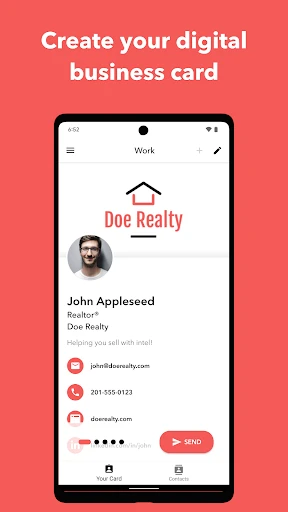
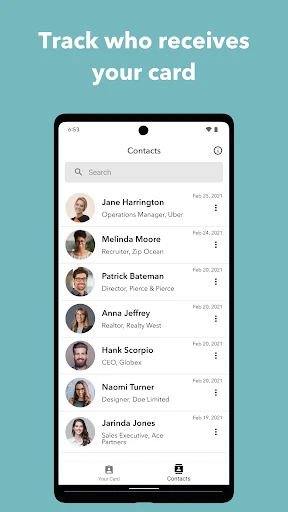
Blinq's core functionality revolves around creating and sharing a comprehensive digital identity. Users can build a customizable profile featuring their name, photo, job title, company, contact details, and links to social media or websites. The app generates a unique QR code and supports NFC-enabled cards for tap-to-share interactions. Recipients can save contact information directly to their phone's address book with a single tap. Additionally, Blinq provides analytics to track profile views and shares, and allows users to create multiple profiles for different contexts, such as personal and professional use. All information is centrally managed, enabling instant updates that are automatically reflected for all shared contacts, eliminating the need for reprinting or redistributing outdated cards.
Chapter 2: Value
Blinq delivers significant value by transforming static contact exchange into an interactive, eco-friendly, and data-rich experience. Its primary advantage is the elimination of physical waste and cost associated with printing paper cards, aligning with sustainable business practices. The app enhances professionalism through rich media integration; users can embed videos, portfolios, or product catalogs directly into their profile, offering a more engaging introduction than a plain card. From a practical standpoint, Blinq ensures contact information is never outdated, as changes sync in real-time to all previously shared profiles, preventing lost opportunities due to obsolete details. The built-in analytics provide valuable insights into networking effectiveness, showing when and where a profile was accessed. Furthermore, Blinq boosts efficiency. Exchanging details in meetings or at events becomes instantaneous—a quick scan or tap replaces fumbling for cards. It also streamlines contact management by automatically organizing new connections and integrating with CRM platforms like Salesforce and HubSpot. Security and privacy are upheld, as users control what information is shared and with whom. This combination of sustainability, dynamic presentation, perpetual accuracy, and actionable insights positions Blinq as a superior tool for modern networking and personal branding.
Chapter 3: Scenarios
Blinq is ideally suited for professionals and organizations that prioritize networking and agile contact management. Primary user groups include sales representatives, business developers, recruiters, freelancers, entrepreneurs, and attendees at conferences, trade shows, and networking events. For sales teams, sharing a digital card with embedded product demos during client meetings can immediately reinforce a pitch. Freelancers and creatives benefit by linking their portfolio or LinkedIn profile, offering a complete view of their work upon first meeting. In corporate settings, companies can issue standardized digital cards to employees, ensuring brand consistency while equipping staff with a modern tool. Everyday use cases are abundant: during a casual coffee meeting, a professional can share their profile via QR code; at a large conference, an NFC-enabled Blinq card allows for rapid connection exchanges with hundreds of attendees simply by tapping phones. Even in virtual interactions, users can include their Blinq link in email signatures or video call chat windows, making remote networking as effective as in-person. Ultimately, Blinq serves anyone seeking to make a memorable, efficient, and environmentally conscious connection.
Uninstall Instructions
For step-by-step guidance on how to safely remove this application from your device, please refer to our 《Uninstall Instructions》 document.
Pros
- instantly shares contact details via a unique QR code
- integrates with crm tools for automated contact saving
- eco-friendly alternative to disposable paper cards
- real-time updates to card info for all connections
- supports rich media like videos and portfolio links
Cons
- requires recipient to also use the app for full features
- limited customization in free tier for card design
- qr code scanning depends on stable camera lighting
- networking relies heavily on smartphone battery life
- fewer offline sharing options in areas with poor connectivity
Frequently Asked Questions
What is Blinq: Digital Business Card?
Blinq is a digital business card app that allows you to create, share, and manage contact information digitally. It replaces physical cards by generating a unique URL or QR code containing your profile details. Core functions include designing customizable cards, sharing via text, email, or apps, and tracking when your card is viewed. It is positioned as a tool for networking and professional branding.
Is Blinq free to use, and what are in-app purchases?
Blinq offers a free version with basic features like creating and sharing digital cards. In-app purchases are available for premium plans, which typically include advanced customization, analytics on card views, team management tools, and removal of Blinq branding. There are no additional equipment requirements, but some features may need permissions like camera access for QR scanning.
What devices and systems does Blinq support?
Blinq is designed for iOS and Android mobile devices, with apps available on the Apple App Store and Google Play Store. It may also offer web access for card management. The app generally supports recent versions of these operating systems, but specific version requirements can vary. It is adapted for professionals, teams, and individuals seeking digital networking solutions.
How does Blinq protect my contact information and privacy?
Blinq employs technical measures like encryption to secure data. You control what information is shared on your digital card. The app may collect usage data as outlined in its privacy policy. It does not publicly list your details without consent; sharing is typically done through your generated link or QR code. For detailed practices, refer to the app's official privacy documentation.
Can I use Blinq without an internet connection?
Blinq primarily requires an internet connection to create, update, and share digital cards, as data is stored online. However, once shared, your digital card (via QR code or saved link) may be accessible to recipients offline depending on how it's viewed. Core functions like editing or analytics need connectivity. No information is available on full offline mode usage.
App Info
Technical Info
Recommended For You

Staples - Deals & Shopping
Business

BeautifyX - AI Makeover Studio
Beauty

Workforce Tools
Business

iFnovel - Books,Web Novel
Books & Reference

TapRead - Romance Stories
Books & Reference

Mirror Study Bible
Books & Reference

Cartoon Video & Gif Maker
Comics

USAA DriveSafe
Auto & Vehicles

Boat AI Browser: Web & Tools
Business

AutoTempest - Car search
Auto & Vehicles

Microsoft Power BI
Business

Visual Voicemail
Business

DIKIDI Online
Beauty

Talking Baby Babsy At The Zoo
Comics

One Block for Minecraft Maps
Books & Reference

Flowbird Parking
Auto & Vehicles

Filtre for Selfie
Beauty

WebNovel
Books & Reference

Messenger SMS & MMS
Communication

Azar: 1 on 1 Video Chat Online
Communication