
Meta Ads Manager
Screenshots



Description
About Meta Ads Manager Feature
Meta Ads Manager is the central command platform for creating, managing, and analyzing advertising campaigns across Meta's family of apps and services, including Facebook, Instagram, Messenger, and the Audience Network. It serves as an indispensable tool for businesses, marketers, and advertisers aiming to reach targeted audiences with precision. This comprehensive dashboard consolidates all advertising activities, offering robust tools for campaign setup, budget control, performance tracking, and audience insight. By providing a unified interface for complex advertising operations, Meta Ads Manager empowers users to optimize their ad spend, enhance campaign effectiveness, and drive measurable business outcomes through data-driven decisions.
Chapter 1: Function
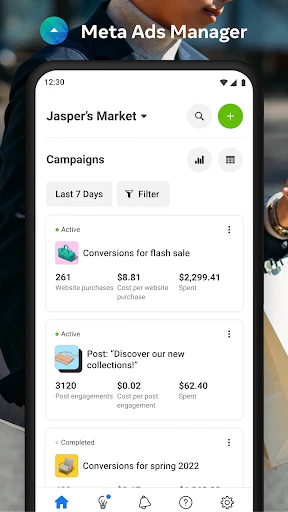
Meta Ads Manager operates as a full-featured advertising suite with several core functions. Primarily, it enables users to create and structure ad campaigns by defining objectives such as brand awareness, lead generation, or conversions. Users can design ad creatives, write copy, and select formats including image, video, carousel, and collection ads. A critical function is audience targeting, allowing advertisers to define custom audiences based on demographics, interests, behaviors, or use lookalike audiences to reach new people similar to existing customers. The platform also provides comprehensive tools for budget and schedule management, letting users set daily or lifetime budgets and choose ad delivery optimization. Finally, it offers a detailed ads management interface where all active, paused, and completed campaigns can be monitored and adjusted in real time.
Chapter 2: Value
The value proposition of Meta Ads Manager lies in its integration, depth, and analytical power, offering key advantages that streamline and enhance digital advertising. Its primary value is consolidation; instead of juggling multiple platforms, advertisers manage campaigns for Facebook, Instagram, and other Meta surfaces from a single, unified dashboard, significantly improving operational efficiency. The platform delivers exceptional targeting precision by leveraging Meta's vast user data, enabling hyper-specific audience segmentation to ensure ads reach the most relevant potential customers. A major advantage is its robust measurement and reporting suite. Users gain access to real-time performance metrics, conversion tracking, and detailed insights through tools like Ads Reporting and Attribution, allowing for continuous optimization of creative elements, audience targeting, and bidding strategies. This data-centric approach helps maximize return on ad spend (ROAS). Furthermore, its scalability supports businesses of all sizes, from local shops running their first campaign to large agencies managing extensive global portfolios. The automation and machine learning features for ad delivery and budget optimization further enhance its value by improving campaign performance with minimal manual intervention. Ultimately, Meta Ads Manager transforms complex advertising processes into a more manageable, insightful, and results-oriented endeavor.
Chapter 3: Scenarios
Meta Ads Manager primarily targets businesses, marketing professionals, and advertisers who need to execute and oversee paid social media campaigns. Key user groups include small to medium-sized business owners seeking to promote their products or services locally or regionally with controlled budgets. Digital marketing agencies and consultants represent another core group, utilizing the platform to manage multiple client accounts, conduct A/B testing, and deliver detailed performance reports. E-commerce brands heavily rely on it to drive sales, retarget website visitors, and leverage dynamic ads for product catalogs. Content creators and influencers may use it to boost posts and expand their reach to grow their following. Everyday use cases are diverse: a local restaurant might create a campaign to promote a weekend special to users within a 10-mile radius; an online retailer could launch a conversion-focused campaign retargeting users who abandoned their shopping cart; a mobile app developer might run an install campaign optimized for cost-per-install across Instagram and Facebook feeds. The platform is essential for any scenario requiring targeted audience reach, performance measurement, and strategic budget allocation on Meta's networks.
Uninstall Instructions
For step-by-step guidance on how to safely remove this application from your device, please refer to our 《Uninstall Instructions》 document.
Pros
- manages multiple ad accounts from a single dashboard
- offers detailed
- customizable reporting for cross-platform campaigns
- provides robust audience targeting with visual placement previews
- features bulk editing and quick duplication for efficient workflow
- integrates real-time performance tracking across meta's ecosystem
Cons
- steep learning curve for new digital advertising users
- requires a meta business account for full feature access
- advanced analytics can feel overwhelming for simple campaigns
- mobile app functionality is limited compared to desktop version
- occasional syncing delays with newly created ad assets
Frequently Asked Questions
What is Meta Ads Manager and what does it do?
Meta Ads Manager is a free app designed for creating, managing, and tracking advertising campaigns across Meta platforms like Facebook and Instagram. Its core functions include building ads, setting budgets and schedules, targeting specific audiences, and analyzing real-time performance metrics. It serves as a mobile dashboard for advertisers to monitor their campaigns on the go.
Is Meta Ads Manager free to use, or are there in-app purchases?
The Meta Ads Manager app itself is completely free to download and use. However, to run advertising campaigns, you must fund your Meta ad account. The app is a management tool; all costs are associated with the ad spend you allocate to your campaigns, not with the app. There are no in-app purchases for premium features within the Ads Manager application.
What devices and systems are compatible with Meta Ads Manager?
Meta Ads Manager is available for both iOS and Android mobile devices. It can be downloaded from the Apple App Store and Google Play Store. The app is optimized for smartphones and tablets. For full functionality, a stable internet connection and a valid Meta Business account with an active ad account are required. It does not require any additional specialized hardware.
How does the app handle tracking and reporting for ad campaigns?
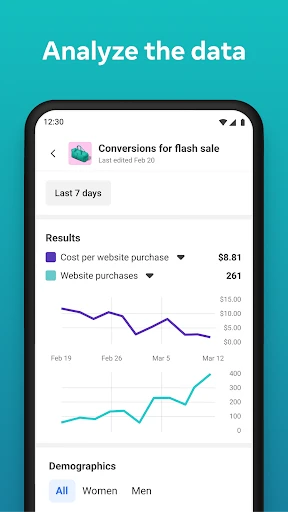
The app provides detailed, real-time reporting on key metrics such as reach, impressions, clicks, conversions, and spend. You can view performance charts, demographic breakdowns of your audience, and results for individual ads. Data syncs automatically with your web-based Ads Manager. For complex custom reports or certain advanced analytics, accessing the desktop version via browser may be necessary.
Can I create new ad campaigns entirely within the mobile app?
Yes, you can create full ad campaigns from start to finish within the Meta Ads Manager app. The process includes selecting a campaign objective, defining your target audience, setting a budget and schedule, choosing ad placements, and uploading creative assets (images/videos) and text. It is designed to offer core creation and editing tools comparable to the desktop experience for most standard ad types.
App Info
Technical Info
Recommended For You

ThinkDiag+
Auto & Vehicles

My Bible - Verse+Audio
Books & Reference

Weargram
Communication

Pango Comics: cartoon for kids
Comics

Audiobooks.com: Books & More
Books & Reference

ArtistAI: AI Photo Generator
Art & Design

Marvel Unlimited
Comics

Adobe Capture: Illustrator,Ps
Art & Design

Dwell: Audio Bible
Books & Reference

Avast SecureLine VPN & Privacy
Communication

Floor Plan Creator
Art & Design

Translate Now: All Languages
Business

Telegram
Communication

Carly — OBD2 car scanner
Auto & Vehicles

Filtre for Selfie
Beauty

Blue Yonder Workforce
Business

One Block for Minecraft Maps
Books & Reference

BUBBLE Comics. Russian heroes.
Comics

Jobber: Field Service Software
Business

القرآن الكريم كامل بدون انترنت
Books & Reference