AR Drawing: Sketch, Art, Trace
Screenshots


Description
About AR Drawing: Sketch, Art, Trace Feature
AR Drawing: Sketch, Art, Trace is an innovative mobile application that revolutionizes the process of learning and creating art by leveraging augmented reality technology. It serves as a digital bridge, allowing users to transform any image from their device's gallery or the physical world into a traceable guide projected directly onto paper or canvas. This app demystifies drawing for beginners and provides a powerful tool for artists of all levels to refine their skills, practice techniques, and bring complex designs to life with remarkable ease and precision. By merging the digital and physical realms, it creates an intuitive and interactive art studio in the user's immediate environment.
Chapter 1: Function
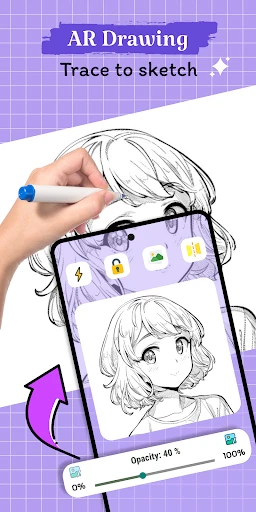
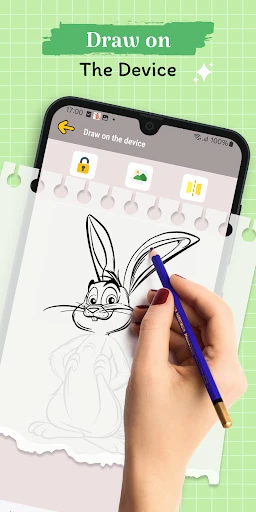
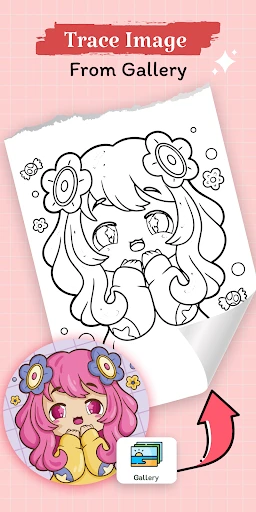
The core functionality of AR Drawing centers on its augmented reality tracing system. Users begin by selecting a desired image or photo from their gallery or capturing one using their device's camera. The app then utilizes the phone's camera feed to superimpose this image as a semi-transparent outline onto a real-world surface, such as a sketchbook, viewed through the screen. The user can adjust the image's size, opacity, and orientation to perfectly align with their drawing medium. With the virtual guide locked in place, they simply trace the projected lines onto the physical paper with their pencil or pen. Additional functions include a library of pre-loaded traceable templates ranging from simple shapes to intricate portraits, step-by-step drawing tutorials, and basic editing tools to prepare images for optimal tracing. The app essentially functions as a smart, dynamic stencil, removing the guesswork from proportion and perspective.
Chapter 2: Value
The primary value proposition of AR Drawing lies in its ability to drastically lower the barrier to entry for artistic expression while simultaneously serving as a serious practice tool. Its key advantage is the empowerment of absolute beginners; individuals who may feel intimidated by a blank page can immediately produce recognizable, accurate sketches, building confidence and fostering a love for art. For intermediate artists, the app offers immense educational value. It accelerates skill development by allowing focused practice on specific elements like line work, shading techniques, and understanding complex forms without the initial struggle of freehand construction. Artists can deconstruct masterworks or photographs by tracing them, gaining intimate knowledge of composition and anatomy. Furthermore, the app saves significant time and reduces material waste for projects requiring precise replication or scaling, such as creating murals, detailed illustrations, or personalized artwork. Unlike static stencils or lightboxes, AR Drawing provides dynamic, adjustable, and limitless reference material. This fusion of cutting-edge AR technology with the tactile, traditional act of drawing on paper creates a unique, hands-on learning experience that purely digital drawing apps cannot replicate, making the process of skill acquisition more accessible, engaging, and effective.
Chapter 3: Scenarios
AR Drawing caters to a diverse spectrum of users across various everyday scenarios. The foremost target group is art enthusiasts and hobbyists at the beginner to intermediate level, who wish to learn drawing fundamentals, improve their technique, or simply enjoy a relaxing, creative activity with guaranteed satisfying results. It is equally valuable for children and students, serving as an engaging educational tool in art classes or at home to develop motor skills and artistic confidence in a fun, tech-integrated manner. Professional artists and illustrators may use it for practical purposes, such as quickly transferring digital sketches or client designs onto a physical canvas for painting, or for planning large-scale wall art with accurate proportions. In casual settings, the app is perfect for individuals looking to create personalized greeting cards, decorate journals with intricate designs, or even trace patterns for craft projects like wood burning or embroidery. It transforms any well-lit desk or table into an instant art studio, making it ideal for use during travel, in classrooms, at coffee shops, or in the comfort of one's home. Essentially, any scenario where one desires to create accurate physical artwork from a digital reference becomes a perfect use case for AR Drawing.
Uninstall Instructions
For step-by-step guidance on how to safely remove this application from your device, please refer to our 《Uninstall Instructions》 document.
Pros
- projects complex reference images directly onto paper for tracing
- eliminates the need for a physical lightbox or projector setup
- adjustable opacity and layer locking for flexible sketching control
- uses device camera for real-world perspective alignment in drawings
- serves as a portable
- all-in-one tool for beginners to learn proportions
Cons
- requires a stable mount or stand for hands-free tracing use
- camera perspective can distort with angled paper or movement
- screen brightness and glare affect projection clarity in bright light
- limited advanced editing tools compared to full digital art suites
- battery drain is significant with prolonged camera and screen use
Frequently Asked Questions
What is AR Drawing and what does it do?
AR Drawing: Sketch, Art, Trace is a creative utility app that uses augmented reality (AR) technology to help users draw. Its core function is to allow you to trace over images by projecting them onto real paper through your device's camera, simplifying sketching and learning art. It's positioned as a tool for beginners, hobbyists, and anyone looking to improve their drawing skills by tracing references easily.
Is AR Drawing free to use or does it have in-app purchases?
The app is free to download and use with basic functionality. It typically includes optional in-app purchases, such as subscriptions or one-time payments, to unlock premium features like advanced tracing tools, a larger image library, or removal of ads. No additional physical equipment is required beyond your smartphone or tablet and a piece of paper.
What devices and systems are compatible with AR Drawing?
AR Drawing is compatible with most modern iOS and Android smartphones and tablets that have a rear camera and support ARCore (for Android) or ARKit (for iOS). It is designed for a wide user group, from children under supervision to adults interested in casual drawing. Performance may vary based on device camera quality and AR platform support.
How does the AR tracing feature work in this app?
The AR tracing feature works by using your device's camera to overlay a selected image or photo from your gallery onto the physical paper in front of you. You position the device on a stand or hold it steady, and the app displays the image as a semi-transparent guide on your screen, allowing you to trace its outlines onto the actual paper with precision.
Can I export and share my drawings created with AR Drawing?
Yes, drawings created within the app can typically be exported. You can save your artwork as an image file (like JPEG or PNG) to your device's photo gallery. From there, you can share it directly to various social media platforms, messaging apps, or cloud storage services supported by your device's operating system.
App Info
Technical Info
Recommended For You

Avast SecureLine VPN & Privacy
Communication

Connecteam Team Management App
Business

e.l.f. Cosmetics and Skincare
Beauty

Reolink
Communication

Zoom Rooms Controller
Business

VoyceMe: Manga and Webtoons
Comics

Marco Polo - Video Messenger
Communication

WoAD
Communication

CamCard-Digital business card
Business

Police Radar - Camera Detector
Auto & Vehicles

Freed Audiobooks
Books & Reference

MyFrontier
Communication

Manta: Comics & Graphic Novels
Comics

Invoice2go: Easy Invoice Maker
Business

PhiApp
Beauty

Hinovel
Books & Reference

Gospel Library
Books & Reference

ShiftLock
Books & Reference

Pratilipi Novel
Books & Reference

DaVinci - AI Image Generator
Art & Design