
AR Drawing Paint Sketch Trace
Screenshots
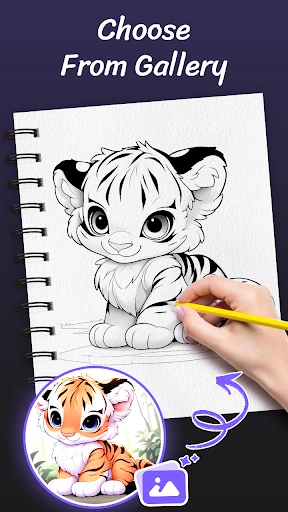
Description
About AR Drawing Paint Sketch Trace Feature
AR Drawing Paint Sketch Trace is an innovative mobile application that revolutionizes the traditional process of sketching and drawing by leveraging augmented reality technology. It allows users to project any image from their device's screen onto a physical surface, such as paper or canvas, enabling them to trace and replicate the image with remarkable ease and accuracy. This app bridges the gap between digital inspiration and physical creation, serving as a powerful tool for artists, hobbyists, students, and anyone looking to improve their drawing skills or create artwork without needing advanced freehand techniques. By simplifying the initial outline process, it empowers users to focus on the artistic aspects of shading, coloring, and detailing.
Chapter 1: Function
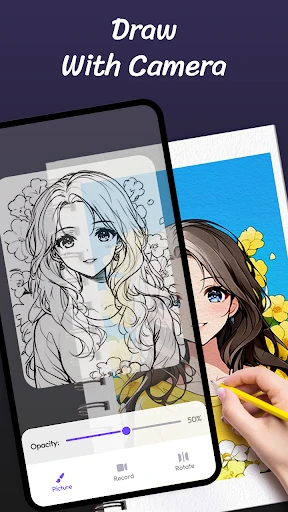
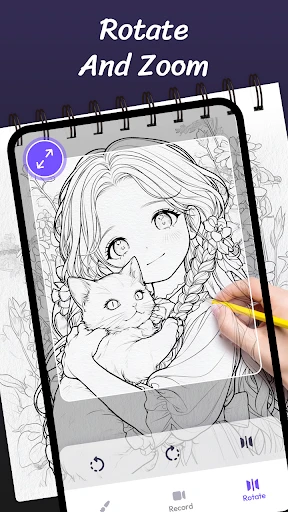
The core functionality of AR Drawing Paint Sketch Trace centers on its augmented reality tracing capability. Users begin by selecting or importing a desired image or photo into the app. The device's camera is then activated, and the chosen image is superimposed as a semi-transparent overlay onto the real-world view seen through the screen. By positioning the device above a physical drawing surface, users can align the virtual projection precisely. They then simply trace the visible lines onto the paper or canvas beneath. The app typically offers essential tools to adjust the image's opacity, size, and orientation for optimal tracing. Additional basic drawing guides or grid overlays may be included to aid in proportion. The primary function is a direct, real-time AR-assisted transfer of a digital image into a physical sketch outline, acting as a modern-day pantograph or lightbox directly on your smartphone.
Chapter 2: Value
The value proposition of AR Drawing Paint Sketch Trace lies in its democratization of drawing and its significant reduction of the technical barrier to entry for creating accurate artwork. Its foremost advantage is the empowerment it provides to individuals who lack confidence in their freehand drawing abilities. By guaranteeing a precise outline, the app eliminates the frustration of disproportionate sketches, allowing users to achieve satisfying results quickly. This builds artistic confidence and encourages creative exploration. For seasoned artists, the app offers immense practical value by saving substantial time on the initial drafting phase of complex compositions, intricate patterns, or detailed portraits, enabling them to dedicate more energy to the expressive stages of art creation. Furthermore, it serves as an excellent educational tool. Beginners can learn proportions, shapes, and line work by tracing, gradually internalizing techniques that improve their independent drawing skills over time. Compared to traditional methods like physical light boxes or projectors, the app provides unparalleled convenience and portability, turning any well-lit space into an instant tracing studio. It transforms a ubiquitous smartphone into a powerful creative assistant, making art more accessible, enjoyable, and less intimidating for a broad audience, thereby fostering creativity and artistic expression in everyday life.
Chapter 3: Scenarios
The primary target users for AR Drawing Paint Sketch Trace are diverse, spanning various age groups and skill levels. A key user group includes art enthusiasts and hobbyists who enjoy crafting, bullet journaling, or DIY projects but may struggle with drawing complex designs from scratch. They use the app to transfer intricate patterns, logos, or decorative elements onto cards, walls, or fabrics effortlessly. Another significant audience is children and parents; the app makes drawing fun and accessible for kids, helping them create impressive artwork while developing motor skills and creativity during playtime or educational activities. Students, particularly those in design or architecture fields, find it useful for quickly sketching concepts or tracing references for projects. Professional artists and illustrators may employ it for client work that requires precise replication of logos or specific elements, streamlining their workflow. Everyday use cases are plentiful: a teacher preparing classroom decorations, a person wanting to create a personalized gift with a traced portrait, a tattoo enthusiast brainstorming designs by sketching on skin-safe paper, or a social media user crafting unique hand-drawn content. Essentially, any scenario requiring an accurate translation of a digital image into a physical drawing is an ideal situation for this application.
Uninstall Instructions
For step-by-step guidance on how to safely remove this application from your device, please refer to our 《Uninstall Instructions》 document.
Pros
- projects reference images directly onto your drawing surface
- adjustable opacity and grid overlay for precise tracing
- works on physical paper using phone's AR camera view
- minimal setup required—just a smartphone and paper
- no need for a dedicated drawing tablet or lightbox
Cons
- requires a stable
- well-lit environment for AR tracking
- limited to tracing existing images
- not creating new art
- battery drains quickly with continuous camera and AR use
- hand or phone can block the projected image while drawing
- advanced artistic tools like layers are not supported
Frequently Asked Questions
What is AR Drawing Paint Sketch Trace?
AR Drawing Paint Sketch Trace is a mobile art application that uses augmented reality (AR) technology to assist with drawing and sketching. Its core function is to allow users to trace images or real-world scenes projected onto their drawing surface through their device's camera. This helps in learning proportions and outlines. Basic usage involves selecting an image, positioning your device above your paper, and tracing the projected guide lines.
Is AR Drawing Paint Sketch Trace free to use?
The app is typically free to download and offers basic tracing and sketching functions. However, it often includes in-app purchases to unlock premium features such as a larger library of traceable images, advanced AR filters, additional drawing tools, or the removal of advertisements. No additional physical equipment is required beyond a smartphone or tablet.
What devices and systems are compatible with this app?
The app is designed for mobile devices like smartphones and tablets. It requires a device with a camera and gyroscope for proper AR functionality. It is primarily available on Android and iOS systems. For optimal performance, a relatively recent operating system version is recommended to support the AR Core (Android) or ARKit (iOS) frameworks.
How does the AR tracing feature work?
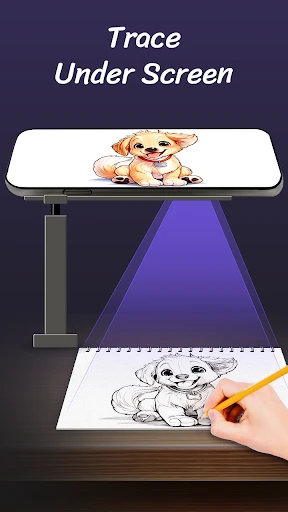
The AR tracing feature works by using your device's camera to overlay a selected image onto your physical drawing paper as a semi-transparent guide. You position your device on a stand or holder so the camera sees the paper. The app then projects the image onto the screen, aligned with the paper, allowing you to trace the outlines directly. This requires adequate and steady lighting for best results.
Can I draw without tracing or import my own images?
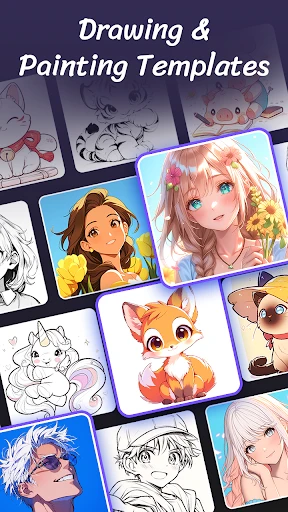
Yes, the app generally includes a freehand sketching mode with basic digital drawing tools like brushes, pencils, and color palettes for creating original art. The ability to import your own photos from your device's gallery to use as a traceable reference is a common feature, though access to this specific function may be part of the free offering or require an in-app purchase.
App Info
Technical Info
Recommended For You

Messages - Text SMS App
Communication

ExtraMile Rewards®
Auto & Vehicles

POCKET COMICS: Premium Webtoon
Comics

Mirror Study Bible
Books & Reference

Beauty Camera - Selfie Camera
Beauty

AI Art Generator: AI Picture
Art & Design

HerBible--Verses&Prayer
Books & Reference

Typology Paris - Skincare
Beauty

Learn how to draw - ArtWorkout
Art & Design

Xcel Energy
Business

Caller ID Name, Location & SMS
Communication

Auto Sync for Android/Car Play
Auto & Vehicles

Snapchat
Communication

scan my tesla
Auto & Vehicles

Chirp Audiobooks
Books & Reference

봄툰
Comics
AR Drawing Paint Sketch Trace
Art & Design
OpenDocument Reader Pro
Business

미스터블루 - 웹툰, 만화, 소설앱
Comics

Filtre for Selfie
Beauty