
Messages
Screenshots


Description
About Messages App Feature - Seamless Communication Redefined
The Messages app is the default and integrated messaging application developed by Apple for its ecosystem of devices, including iPhone, iPad, and Mac. It serves as a central hub for text-based communication, seamlessly blending traditional SMS/MMS with Apple's proprietary iMessage service. When communicating between Apple devices, messages automatically upgrade to iMessage, enabling a richer, more secure, and feature-packed experience over the internet. The app is designed with a clean, intuitive interface, prioritizing ease of use while offering deep integration with the iOS, iPadOS, and macOS operating systems. It stands as a fundamental tool for personal and group conversations, deeply woven into the daily digital lives of users within the Apple ecosystem.
Chapter 1: Function
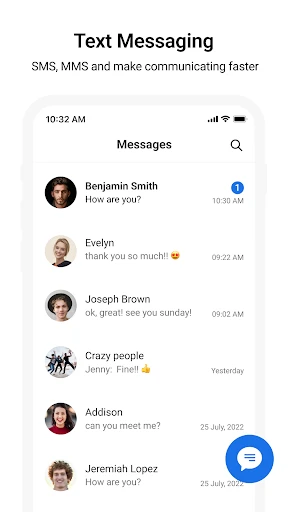
The core function of the Messages app is to facilitate text, image, video, and audio communication. It intelligently routes messages: blue bubbles indicate iMessages sent over the internet to other Apple users, featuring read receipts, typing indicators, and high-quality media sharing. Green bubbles represent standard SMS/MMS sent through cellular networks to non-Apple contacts. Beyond basic texting, the app supports creating and managing group chats, sharing locations, sending digital touch messages, and utilizing Animoji and Memoji. It integrates with other apps via the share sheet and supports Apple Pay for peer-to-peer payments directly within a conversation. Message organization is streamlined with search functionality, pinning important conversations, and filtering unknown senders. Its functionality extends to syncing conversations across all user devices signed into the same Apple ID, ensuring a unified messaging experience.
Chapter 2: Value
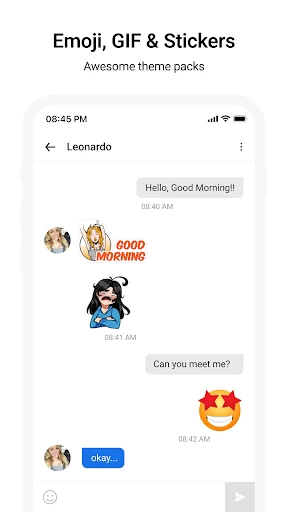
The primary value proposition of the Messages app lies in its deep ecosystem integration, security, and rich feature set exclusive to iMessage. For users within the Apple ecosystem, it provides a seamless, unified, and superior communication channel compared to standard SMS. The end-to-end encryption of iMessages ensures that conversations, including attachments, remain private and secure between sender and recipient, a significant advantage for privacy-conscious individuals. The value is further amplified by features like high-resolution photo and video sharing without compression, seamless synchronization across iPhone, iPad, Apple Watch, and Mac, and the ability to start a conversation on one device and continue it on another without interruption. The app adds a layer of expressiveness through fun features like message effects, stickers, and personalized Memoji. Its integration with system-level services like Spotlight search, Siri, and app extensions enhances productivity. For families and groups using Apple devices, it creates a cohesive, reliable, and feature-rich communication network that reduces reliance on third-party messaging platforms, fostering a more convenient and interconnected user experience within the trusted Apple environment.
Chapter 3: Scenarios
The Messages app primarily targets individual consumers, families, and professional groups who are invested in the Apple ecosystem. Its everyday use cases are vast and integral to daily life. For individuals, it is the go-to app for quick check-ins with friends, sharing moments through photos and videos, and coordinating social plans. Students use it for group project discussions, easily sharing documents and links. Families rely on it for shared family group chats, coordinating schedules, and staying connected with read receipts providing peace of mind. In professional settings, colleagues using Apple devices can use it for quick, secure team communication, sharing screenshots, or discussing work informally. The app is also crucial for two-factor authentication, securely receiving verification codes from banks and other services. Its accessibility features, like VoiceOver and Speak Selection, make it valuable for users with disabilities. Essentially, any scenario requiring quick, reliable, and often enriched text-based communication between Apple device users is perfectly served by the Messages app, making it an indispensable tool for personal connection and lightweight coordination.
Uninstall Instructions
For step-by-step guidance on how to safely remove this application from your device, please refer to our 《Uninstall Instructions》 document.
Pros
- integrates multiple messaging protocols into a single unified inbox
- offers end-to-end encryption for supported chat services
- provides a powerful
- unified search across all connected accounts
- customizable notification rules per contact or chat type
- lightweight desktop client with minimal system resource usage
Cons
- initial setup for non-mainstream protocols can be complex
- lacks native video calling features within the app interface
- message synchronization speed varies by connected service provider
- advanced filtering rules require manual configuration effort
- limited theming and visual customization for chat bubbles
Frequently Asked Questions
What is the Messages app and what does it do?
Messages is the default messaging app for Apple devices. Its core function is to send and receive SMS, MMS, and iMessages. iMessage, its unique feature, enables free, encrypted messaging over Wi-Fi or cellular data between Apple users, supporting read receipts, typing indicators, and high-quality media sharing. It integrates seamlessly with other Apple services like FaceTime and Apple Pay.
Is the Messages app free to use?
Yes, the Messages app is completely free. It comes pre-installed on Apple devices with no in-app purchases. Standard SMS/MMS messaging may incur charges from your cellular carrier. iMessage functions require an internet connection (Wi-Fi or cellular data), but uses data instead of traditional SMS fees. No additional equipment is needed beyond an Apple ID.
On which devices and systems does Messages work?
The Messages app is designed exclusively for Apple's ecosystem. It is available on iPhone, iPad, Mac, and Apple Watch. It requires iOS, iPadOS, or macOS. iMessage features, like blue bubble chats, only function between these Apple devices. You can send traditional SMS/MMS to non-Apple phones, but advanced iMessage features will not be available in those conversations.
How does iMessage differ from regular SMS in Messages?
iMessage uses an internet connection to send encrypted messages between Apple devices, appearing in blue bubbles. It supports features SMS (green bubbles) lacks: read receipts, typing indicators, high-resolution photos/videos, animations, and group chats without carrier limits. SMS/MMS are standard carrier protocols for texting any phone number, are not encrypted, and may have media size limits.
What should I do if my iMessage won't activate or send?
First, ensure your device is connected to the internet. Go to Settings > Messages and toggle iMessage off and on. Verify your Apple ID is correct in Settings > Messages > Send & Receive. Check for iOS/macOS updates. If sending to a non-Apple device fails, ensure 'Send as SMS' is enabled in settings. For persistent issues, contact your carrier for SMS problems or Apple Support for iMessage-specific activation help.
App Info
Technical Info
Recommended For You

Sling: Employee Scheduling App
Communication

Batman Miniature Game
Comics

Joist Invoices for Contractors
Business

GlobalComix: Comic Book Reader
Comics

Yesway & Allsup’s Rewards
Auto & Vehicles

TrustDial: Caller, SMS & Block
Communication

Comicle Manga: Manhwa & Manga
Comics

Roadie Driver
Business

MobiOffice: Word, Sheets, PDF
Business

Bible Homescreen - Read Now
Books & Reference

Volvo Cars
Auto & Vehicles

Recraft
Art & Design

ArtCanvas: Learn how to draw
Art & Design

inCarDoc Pro | OBD2
Auto & Vehicles

MessengerX App
Books & Reference

Perfect365 Makeup Photo Editor
Beauty

Amazon Relay
Business

Android Auto
Auto & Vehicles

N6_Theme for Car Launcher app
Auto & Vehicles

Comics Price Guide
Comics