
ComiQuest - Comic Reader
Screenshots



Description
About ComiQuest - Comic Reader Feature
ComiQuest - Comic Reader is a dedicated mobile application designed for digital comic and manga enthusiasts. It serves as a powerful, organized, and user-friendly platform to manage, read, and discover comic content. The app focuses on providing a seamless reading experience with robust library management tools, supporting a wide range of common comic archive formats. By prioritizing offline access, customizable viewing, and intuitive navigation, ComiQuest positions itself as a personal digital comics hub, transforming a smartphone or tablet into a portable comic book shelf and reader.
Chapter 1: Function
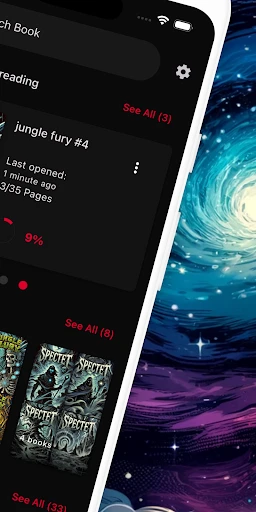
ComiQuest operates primarily as a comprehensive comic file manager and reader. Its core function is to import and organize comic files in formats such as CBZ, CBR, PDF, and ZIP from local device storage or cloud services. Once imported, the app automatically catalogs entries, often fetching metadata like cover art, title, and author to create a tidy digital library. The reading engine is central, featuring a smooth, configurable viewer with multiple navigation modes including page-by-page, scrolling, and guided view for panel-by-panel reading. It allows for zooming, rotation, and brightness adjustment within the app. Basic library management functions like creating custom collections, sorting by various criteria, and tracking reading progress are also fundamental features.
Chapter 2: Value
The primary value of ComiQuest lies in its specialization and user-centric design for comic readers, which offers distinct advantages over generic e-book readers or file viewers. Its foremost advantage is the superior reading experience tailored specifically for comic artwork. The viewer handles double-page spreads intelligently and renders images with high fidelity, preserving the artist's detail. The panel-guided view mode is a significant value-add, dynamically framing individual panels in a logical sequence, which greatly enhances readability on smaller screens. Secondly, its organizational prowess transforms a scattered collection of files into a searchable, categorized library, saving users time and frustration. The automatic metadata fetching enriches this library without manual input. Thirdly, the app respects user ownership and offline access; it does not lock content into a proprietary store or subscription, allowing users to build and curate a permanent personal collection from any source. This combination of powerful organization, a tailored reading engine, and user control delivers a reliable, efficient, and enjoyable platform that deeply understands and fulfills the specific needs of comic collectors and readers.
Chapter 3: Scenarios
ComiQuest is ideally suited for several key user groups and daily scenarios. The primary audience is dedicated comic and manga fans who have amassed digital collections, often from various online sources or personal scans. They use the app daily to manage their library and read new additions. Another significant group is commuters and travelers who pre-load comics onto their devices for offline entertainment during flights or subway rides, leveraging the app's portability. Students or researchers with educational or archival comic material may use ComiQuest for its organizational features to sort and access reference content efficiently. Casual readers who prefer reading in short bursts benefit from the panel-guided view, making it easy to enjoy a few pages during a lunch break. Finally, it serves collectors who wish to maintain a digital backup of their physical comics, using the app as a curated, space-saving archive. In all these scenarios, ComiQuest functions as the central, reliable tool for accessing and enjoying sequential art digitally.
Uninstall Instructions
For step-by-step guidance on how to safely remove this application from your device, please refer to our 《Uninstall Instructions》 document.
Pros
- organizes personal comic library across multiple cloud services
- precise panel-by-panel guided view for complex layouts
- background AI upscaling for older archive image quality
- syncs reading progress and annotations across all devices
- supports niche formats like cbr/cbz without conversion
Cons
- guided view can be disruptive for simple page layouts
- background upscaling significantly increases battery drain
- requires multiple cloud service logins for full library access
- annotation tools lack pressure sensitivity for stylus input
- no built-in store or community for discovering new titles
Frequently Asked Questions
What is ComiQuest and what does it do?
ComiQuest is a digital comic book reader app. Its core function is to organize, manage, and read your personal collection of digital comic files (like CBZ, CBR, PDF). It positions itself as a streamlined tool for comic enthusiasts, offering a bookshelf-style library, customizable reading modes (e.g., guided view, page scroll), and basic metadata tagging. It does not provide a built-in store or subscription for comics; you must import your own files.
Is ComiQuest free to use, or does it have in-app purchases?
The ComiQuest app is free to download and use for core reading and library management. It may offer optional in-app purchases to unlock advanced features such as cloud sync across devices, advanced organizational tools (smart collections), or additional visual customization options for the reading interface. The app does not display ads. All basic reading functionality remains accessible without payment.
What file formats and devices does ComiQuest support?
ComiQuest primarily supports common comic archive formats: CBZ, CBR, and PDF. It is designed for mobile devices, available on both iOS and Android platforms. The app is optimized for phones and tablets, automatically adapting the reading view to different screen sizes. It does not require any additional specialized hardware. File import is typically done via local device storage or cloud drive connections.
How does the guided view or panel-by-panel reading work?
The guided view feature automatically detects and zooms in on individual comic panels, guiding you through the story sequence. This function works best with properly formatted digital comics. You can usually tap or swipe to move to the next panel. The app also allows you to switch back to a full-page view at any time. Performance can vary depending on the file quality and page layout.
Can I organize a large collection and sync across devices?
ComiQuest provides basic organization through a manual bookshelf and folder-based system. For managing very large collections, advanced sorting and smart tagging features may be part of the premium tier. Native cross-device sync for your library and reading progress is not a core free feature; this functionality, if available, is typically offered through a premium subscription or one-time purchase, enabling sync via a private cloud account.
App Info
Technical Info
Recommended For You

Manga Renta
Comics

Cross Stitch Thread Organizer
Art & Design

LinkedIn: Jobs & Business News
Business

POCKET COMICS: Premium Webtoon
Comics

Castle - Make and Play
Art & Design

Logo Maker : Logo Creator
Art & Design

WhatsApp Business
Communication

Daily Bible - KJV Holy Bible
Books & Reference

DeepL Translate
Books & Reference

Google Pixel Watch
Communication

ExtraMile Rewards®
Auto & Vehicles

Car Launcher
Auto & Vehicles

Cars Mod for Minecraft PE 2025
Auto & Vehicles

DC UNIVERSE INFINITE
Comics

Dreame-Read Romance Stories
Books & Reference

Sketch Pro: Draw & Create Art
Art & Design

Connecteam Team Management App
Business

ComicScreen - PDF, ComicReader
Comics

X Launcher Pro
Art & Design

Resume - Intelligent CV maker
Business