
aiMail - Al Email Accounts
Screenshots

Description
About aiMail - AI Email Accounts Feature
aiMail - AI Email Accounts is an innovative email management application that leverages artificial intelligence to revolutionize how users handle their email communications. Designed for the modern digital landscape, it serves as a centralized platform for managing multiple email accounts from various providers, all while integrating smart AI tools to enhance productivity, security, and organization. The app moves beyond traditional inboxes by offering intelligent sorting, automated responses, and advanced privacy features, positioning itself as a next-generation solution for individuals and professionals overwhelmed by email clutter and seeking a smarter, more efficient way to stay on top of their correspondence.
Chapter 1: Function
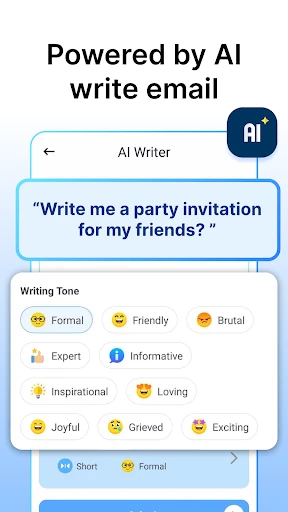
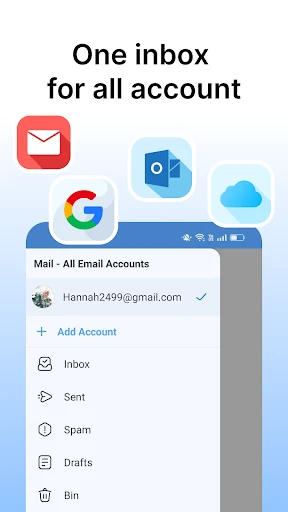
The core functionality of aiMail centers on unified inbox management and AI-driven automation. Primarily, the app allows users to securely link and manage multiple email accounts from services like Gmail, Outlook, Yahoo, and others within a single, clean interface. Its foundational feature is the AI-powered inbox organizer, which automatically categorizes incoming emails into logical groups such as Primary, Social, Promotions, and Updates, much like standard filters but with adaptive learning that improves over time based on user behavior. Beyond sorting, the app includes a smart compose and reply assistant. This tool can generate contextual email drafts and responses by understanding the content of the received message, significantly reducing typing time. Furthermore, it offers one-click unsubscribe from mailing lists, scheduled sending, and customizable notification rules. These functions work in concert to transform a chaotic collection of inboxes into a streamlined, manageable communication hub.
Chapter 2: Value
The primary value proposition of aiMail lies in its powerful synthesis of convenience, intelligence, and privacy, delivering significant time savings and mental clarity. Its key advantage is the AI assistant that acts as a personal email secretary. By learning user preferences, it not only sorts mail with high accuracy but also highlights urgent messages and can even draft concise replies for user approval. This drastically cuts down the hours spent daily on email triage and composition, boosting personal and professional productivity. Another critical value is its robust focus on privacy and security. aiMail often incorporates features like temporary, anonymized email addresses for signing up to online services, shielding the user's primary email from spam and data breaches. The app's unified dashboard eliminates the need to constantly switch between different apps or browser tabs, creating a singular, efficient workflow. For power users, the ability to schedule emails, set follow-up reminders, and use templates adds a layer of strategic communication management often found in premium desktop clients, but now accessible on mobile. Ultimately, aiMail transforms email from a reactive task into a proactively managed tool, offering users a sense of control and efficiency. Its intelligent automation handles the routine work, allowing the user to focus on what truly matters in their communications.
Chapter 3: Scenarios
aiMail is ideally suited for several key user groups whose daily lives are heavily impacted by email volume and management. The primary target includes busy professionals and entrepreneurs who juggle multiple email accounts for work, business, and personal use. For them, the app's unified inbox and AI-driven prioritization ensure critical client or project emails are never missed amidst the noise. Freelancers and digital nomads, who often rely on clean communication for project acquisition and management, benefit from the smart reply and scheduling features to maintain responsiveness across time zones. Students managing academic, personal, and part-time work correspondence can use the app to keep different aspects of their life organized. Furthermore, privacy-conscious individuals, wary of spam and data tracking, find immense value in the disposable email alias feature when signing up for new apps, forums, or online shopping. In everyday use, a professional might use aiMail to quickly scan a consolidated priority inbox during their morning commute, use an AI-suggested reply to confirm a meeting, and schedule a detailed follow-up to be sent later in the day. A student could use it to separate university announcements from social media notifications and create a temporary email for a one-time software download. In all scenarios, aiMail serves as an intelligent layer that simplifies digital communication.
Uninstall Instructions
For step-by-step guidance on how to safely remove this application from your device, please refer to our 《Uninstall Instructions》 document.
Pros
- manages multiple email accounts in one unified inbox
- ai-powered quick replies adapt to your writing style
- one-tap unsubscribe from newsletters and promotions
- real-time translation for multilingual email threads
- privacy-focused local ai processing for email content
Cons
- initial ai training requires manual reply feedback
- advanced scheduling requires specific timezone setting
- complex rules need web version for full configuration
- local processing limits model complexity on older devices
- unified inbox may mix personal and work accounts initially
Frequently Asked Questions
What is aiMail and what does it do?
aiMail is an email client app designed to manage multiple AI-generated email accounts. Its core function is to provide users with temporary, disposable email addresses, often used for signing up to online services without using a personal primary email. It focuses on privacy and organization by keeping your main inbox separate from promotional or sign-up clutter. The app typically allows you to create and manage these aliases directly within its interface.
Is aiMail free to use or are there in-app purchases?
aiMail positions itself as a privacy tool by isolating your primary email from spam. It functions by generating disposable aliases that forward messages to your real inbox, keeping your personal email address hidden from senders. The app's technical characteristics likely include not requiring your email password for these aliases. However, data handling specifics, such as server logging or encryption standards, should be reviewed in the app's official privacy policy for complete details.
What devices and systems is aiMail compatible with?
aiMail likely operates on a freemium model. The basic version is usually free, offering a limited number of email accounts or features. For advanced functionality—such as creating more accounts, using custom domains, longer email forwarding durations, or removing ads—the app typically requires a subscription or one-time in-app purchase. Specific pricing tiers are detailed within the app's settings or on its official store page.
How does aiMail protect my privacy and data?
aiMail is primarily available as a mobile application. It is adapted for iOS devices (iPhone/iPad) through the Apple App Store and for Android devices via Google Play. The app is designed for these mobile operating systems and does not require additional hardware. There is no information regarding a dedicated desktop or web version; its core functionality is intended for on-the-go use on smartphones and tablets.
Can I reply to emails from my aiMail alias address?
This depends on the app's specific feature set. Many disposable email services only support receiving and forwarding emails, not sending replies. Some advanced features may allow sending replies from the alias, but this often requires additional setup or is a premium feature. For the exact capabilities of aiMail regarding sending emails, please refer to the app's feature description or help section within the application itself, as this is a common functional limitation in the category.
App Info
Technical Info
Recommended For You

HCMToGo
Business

PrinterShare Mobile Print
Business

Paint
Art & Design

Doodle Master - Glow Art
Art & Design

AnExplorer Pro File Transfer
Business

KakaoTalk : Messenger
Communication

Drawing Apps: Draw, Sketch Pad
Art & Design

Beauty Plus Princess Camera
Beauty

Getcontact
Communication

Zoom Rooms Controller
Business

Handy Art Reference Tool
Comics

Autolink
Auto & Vehicles

Picture Editor
Beauty

Phoner 2nd Phone Number + Text
Communication

Online chat, calls - Gem Space
Communication

Ascension | Bible & Catechism
Books & Reference

King James Bible (KJV)
Books & Reference

Pocket Novel
Books & Reference

Hushed: US Second Phone Number
Communication

Gruveo - Video Conferencing
Communication