
Zoom Rooms Controller
Screenshots


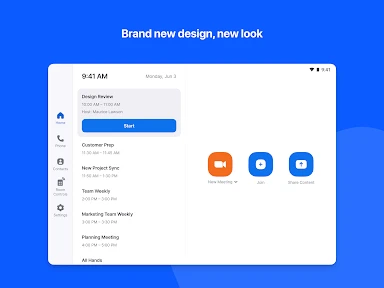
Description
About Zoom Rooms Controller Feature - Seamless Conference Room Management
Zoom Rooms Controller is a dedicated mobile application designed to manage Zoom Rooms hardware systems. It transforms a smartphone or tablet into a remote control for scheduling, launching, and managing meetings in dedicated conference rooms equipped with Zoom Rooms. This app provides administrators and meeting participants with a centralized interface to handle room systems, ensuring smooth and professional meeting experiences without direct interaction with the in-room computer.
Chapter 1: Function
The Zoom Rooms Controller app delivers core functionalities for operating a Zoom Rooms setup. Primarily, it allows users to start or join scheduled meetings instantly with a single tap from the mobile device. Users can view the room's calendar schedule, see upcoming meetings, and book the room directly from the app. During a meeting, the app provides controls to mute/unmute audio, turn the video on or off, invite participants by phone or meeting ID, share content wirelessly, and adjust volume. It also offers management features like changing the connected screen, restarting the Zoom Room, or checking system status, effectively replacing the need for a physical touch panel or keyboard in the conference room.
Chapter 2: Value
The primary value of Zoom Rooms Controller lies in its ability to simplify and centralize the control of complex conference room technology, enhancing operational efficiency and user experience. Its key advantage is the empowerment it grants users, reducing dependency on IT support for basic meeting functions. By using a familiar personal device as a remote, it lowers the barrier to using advanced room systems, leading to quicker meeting start-ups and fewer technical disruptions. For IT administrators, the app offers valuable oversight and troubleshooting capabilities remotely, reducing maintenance costs and downtime. The app ensures consistency across different office locations by providing a uniform control interface, which is crucial for enterprises with standardized Zoom Rooms deployments. Furthermore, it enhances security by allowing authenticated control and reducing the risk of unauthorized access to the in-room computer. Overall, it maximizes the investment in Zoom Rooms hardware by making the system more accessible, reliable, and easy to manage, thereby improving meeting productivity and collaboration quality.
Chapter 3: Scenarios
The Zoom Rooms Controller app primarily targets two user groups within an organization. The first is the general employee or meeting participant who needs to conduct or join meetings in a Zoom Rooms-equipped conference room. For them, the app is used daily to quickly start a scheduled team huddle, join a client video conference, or spontaneously book a room for an impromptu discussion. The second key group is IT and facility managers responsible for maintaining multiple conference rooms. They use the app to monitor room status, troubleshoot issues like a frozen screen or audio problems without physically entering the room, and ensure systems are ready for the day's meetings. Common scenarios include a presenter using their phone to wirelessly share a slideshow during a meeting, an assistant booking a room for an executive from their desk, or an IT staff member quietly restarting a malfunctioning room system during a meeting break to avoid disruption.
Uninstall Instructions
For step-by-step guidance on how to safely remove this application from your device, please refer to our 《Uninstall Instructions》 document.
Pros
- controls multiple room systems from a single mobile interface
- one-touch join for scheduled meetings without code entry
- hardware status monitoring for displays and microphones
- customizable room controls for lighting and blinds
- scheduled room auto-wake eliminates manual boot
Cons
- requires dedicated zoom rooms hardware for full function
- limited utility for personal zoom meeting participants
- advanced scheduling needs a separate zoom rooms scheduler
- room hardware diagnostics lack third-party device support
- interface is optimized for tablets
- less for small phones
Frequently Asked Questions
What is Zoom Rooms Controller and what does it do?
Zoom Rooms Controller is a companion mobile app for managing Zoom Rooms hardware setups. It allows users to control room systems for scheduled Zoom Meetings from their personal device. Core functions include starting/ending meetings, adjusting volume, controlling cameras, and sharing content. It positions itself as a remote for dedicated Zoom Rooms, enabling meeting management without using the room's touchscreen.
Is Zoom Rooms Controller free to use?
The Zoom Rooms Controller app itself is free to download. However, its functionality requires an existing and properly configured Zoom Rooms subscription and hardware setup. The app does not initiate meetings independently; it acts as a remote control interface. There are no in-app purchases within the controller app, but access is tied to an organization's paid Zoom Rooms license.
What devices and systems are compatible with this app?
Zoom Rooms Controller is available for iOS and Android mobile devices. It is designed to control Zoom Rooms systems running on supported hardware like Zoom Rooms for Touch, PC, or Mac. The app requires network connectivity to the same network as the Zoom Room. It is intended for users who have scheduling permissions within their organization's Zoom ecosystem.
Can I start a personal meeting without a scheduled room?
No, the primary function is to control scheduled meetings for a dedicated Zoom Room. It is not designed to start instant, personal Zoom meetings from your device like the main Zoom app. Its core use is for managing pre-configured room systems in office environments. For personal meetings, you should use the standard Zoom client application.
How do I troubleshoot connection issues with a room?
Ensure your mobile device is on the same network as the Zoom Room. Verify the Zoom Room hardware is online and the app is paired correctly. Restarting the app and the room system can resolve temporary glitches. For persistent issues, contact your organization's IT or Zoom Rooms administrator, as configuration is managed at the account level. The app does not provide direct customer support.
App Info
Technical Info
Recommended For You
Car Key: Smart Car Remote Lock
Auto & Vehicles

MANGA Plus by SHUEISHA
Comics

Bible: Advent Prayers & Verses
Books & Reference

Luvme Hair
Beauty

Quranly
Books & Reference

CVTz50
Auto & Vehicles

VSD Viewer for Visio Drawings
Business

Botim - Video and Voice Call
Communication

AR Drawing: Art, Trace, Sketch
Art & Design

2nd Phone Number - Call & Text
Communication

Volvo Cars
Auto & Vehicles

Robokiller - Spam Call Blocker
Communication

Alight Mobile
Business

mobile.de - car market
Auto & Vehicles

AnExplorer Pro File Transfer
Business

AMarkets: Trade & Invest
Business

Virtual Dyno PRO
Auto & Vehicles

Tattoo Simulator Tattoo Maker
Art & Design

FAX App: Send Faxes from Phone
Business

Holy Bible Study
Books & Reference