
Gruveo - Video Conferencing
Screenshots


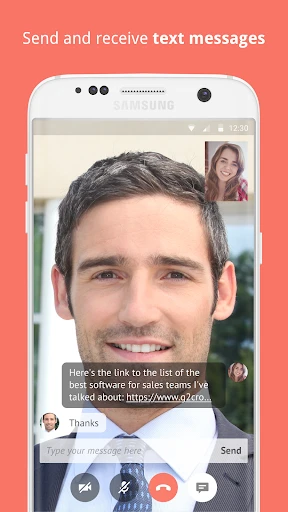


Description
About Gruveo Video Conferencing Feature
Gruveo is a streamlined video conferencing application designed for instant, hassle-free video and audio calls. It operates directly through web browsers without requiring downloads for participants, though dedicated mobile apps are also available. The service emphasizes simplicity, security, and accessibility, making it a practical choice for personal and professional communication. Its core appeal lies in eliminating complex setups; users can start or join a call instantly by sharing a simple link or using a unique code. With end-to-end encryption ensuring privacy, Gruveo positions itself as a reliable and straightforward solution for connecting people face-to-face across different devices and platforms.
Chapter 1: Function
Gruveo's primary function is to facilitate instant, one-to-one or group video and audio conferences. The app operates on a simple link-based system: the call initiator generates a unique link or code, which can be shared with participants. Recipients click the link to join the call instantly via their web browser—no mandatory software installation or account creation is required. The interface is minimalist, featuring essential controls for video, audio, screen sharing, and call management. It supports stable connections for face-to-face meetings, remote consultations, and virtual catch-ups. The platform is optimized for low latency, ensuring real-time communication. Administrative functions like muting participants or ending the call are straightforward, keeping the focus on seamless interaction without technical distractions.
Chapter 2: Value
Gruveo's value proposition centers on unparalleled simplicity, robust security, and cross-platform accessibility. Its most significant advantage is the elimination of barriers to entry; participants need only a modern web browser and the shared link, removing the friction of downloads, registrations, and lengthy setups. This makes it exceptionally user-friendly for non-technical individuals or urgent calls. Security is a cornerstone, with end-to-end encryption protecting all communications, ensuring that conversations remain private—a critical feature for professionals discussing sensitive information. Furthermore, Gruveo is platform-agnostic, functioning smoothly on iOS, Android, and desktop browsers, thus accommodating virtually any user's device. Unlike many bloated conferencing tools, Gruveo's lean design translates to reliability and faster load times, reducing connection drops and technical issues. It offers a free tier with substantial functionality, while premium plans provide extended features like custom branding and longer call durations for businesses. This combination of ease-of-use, privacy, and reliability delivers a focused, efficient communication tool that saves time and reduces complexity, distinguishing it in a crowded market of feature-heavy alternatives.
Chapter 3: Scenarios
Gruveo is ideally suited for individuals and small teams prioritizing quick, secure, and straightforward video communication. Primary user groups include freelancers and remote consultants who conduct client meetings, as the link-based system allows them to connect professionally without requiring clients to install software. Healthcare professionals, such as therapists or doctors offering telemedicine consultations, benefit from the easy access and strong encryption for patient confidentiality. Families and friends seeking an uncomplicated way for video chats, especially with elderly relatives less comfortable with technology, find Gruveo's browser-based approach highly accessible. Educational tutors and students use it for one-on-one lessons due to its reliable connection and screen-sharing capability. In business scenarios, it serves for quick internal check-ins, remote interviews, or urgent discussions with partners where formal webinar features are unnecessary. Its everyday use cases span from impromptu personal catch-ups and remote tech support to scheduled professional consultations and small team collaborations, effectively bridging the gap between informal messaging apps and complex enterprise conferencing suites.
Uninstall Instructions
For step-by-step guidance on how to safely remove this application from your device, please refer to our 《Uninstall Instructions》 document.
Pros
- one-click call links require no app installation for guests
- end-to-end encryption for all peer-to-peer video calls
- extremely low latency due to webrtc peer-to-peer connections
- browser-based access eliminates cross-platform compatibility issues
- minimalist interface reduces pre-meeting setup steps
Cons
- lacks collaborative features like shared whiteboards or notes
- peer-to-peer architecture limits large group meeting scalability
- no native meeting recording function within the basic service
- advanced features like scheduling require separate integrations
- minimal host controls compared to full suite competitors
Frequently Asked Questions
What is Gruveo and what does it do?
Gruveo is a web-based video conferencing application designed for instant, one-to-one video calls. Its core positioning is simplicity and speed, allowing users to start a secure video call by simply sharing a unique link or a code, without requiring the other party to download an app or create an account. It functions directly in a web browser.
Is Gruveo free to use, and are there in-app purchases?
Yes, Gruveo offers a free basic service for peer-to-peer video calls. For business or professional use, it provides paid plans (Gruveo Business) which include features like group calling, call recording, custom branding, and priority support. In-app purchases or subscriptions are handled through its website for these premium features.
What devices and systems does Gruveo work on?
Gruveo is highly adaptable and works on most modern devices with a web browser. This includes desktop computers (Windows, macOS, Linux), laptops, smartphones (iOS, Android), and tablets. The primary requirement is a stable internet connection, a webcam, and a microphone. No specific app installation is needed for basic use.
How does Gruveo ensure call privacy and security?
Gruveo employs end-to-end encryption for all peer-to-peer video calls, meaning the video and audio data is encrypted directly between participants and not stored on Gruveo servers. Calls are initiated via unique, randomly generated links or codes, which act as a simple access control. The platform is designed with a strong focus on user privacy.
What should I do if I have audio or video problems during a call?
First, ensure your browser has permission to access your camera and microphone. Check your internet connection stability. Using the latest version of Chrome, Firefox, or Safari is recommended for optimal performance. For persistent issues, Gruveo provides a support contact form on its official website for technical assistance. There is no direct in-app chat support.
App Info
Technical Info
Recommended For You

CamToPlan
Business

MyHeritage: Family Tree & DNA
Books & Reference

Shiftsmart - Find Work
Business

Jotform - Form, Sign & Survey
Business

AI Clothes Try-On: DressTry
Beauty

GizmoHub
Communication

FPS Shooting Gun Games Offline
Comics

Marco Polo - Video Messenger
Communication

iVerify Basic
Business

Proton Mail: Encrypted Email
Communication

Sticker.ly - Sticker Maker
Communication

[KNA008] COMBINE
Art & Design

One Block for Minecraft Maps
Books & Reference

Conversations (Jabber / XMPP)
Communication

NIV Bible version, Offline app
Books & Reference

漫畫集 - 追漫神器
Comics

Hinovel
Books & Reference

AI Dress up-Try Clothes Design
Beauty

Manga UP!
Comics

Dreame-Read Romance Stories
Books & Reference