
Handy Art Reference Tool
Screenshots

Description
About Handy Art Reference Tool Features – A Portable Studio for Artists
Handy Art Reference Tool is a specialized mobile application designed to assist artists, illustrators, and students in improving their drawing skills, particularly in anatomy and figure drawing. It serves as a dynamic and customizable reference library, replacing the need for physical mannequins or extensive photo collections. The app provides a digital, posable 3D human model that users can manipulate to study proportions, perspectives, and lighting from any angle. By offering a convenient and portable solution for accessing anatomical references, it addresses a fundamental need in artistic practice, making it an essential tool for both learning and professional creative workflows.
Chapter 1: Function
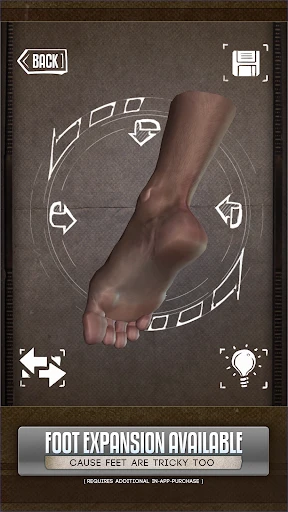
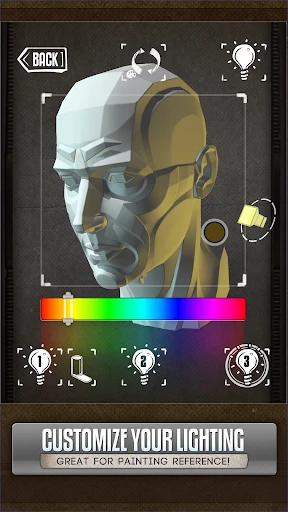
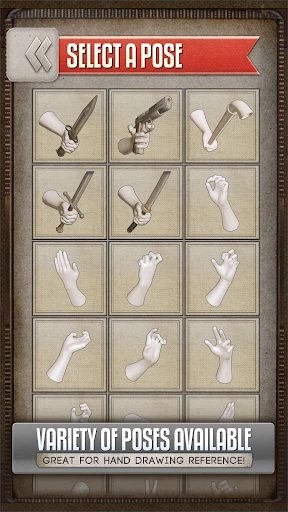
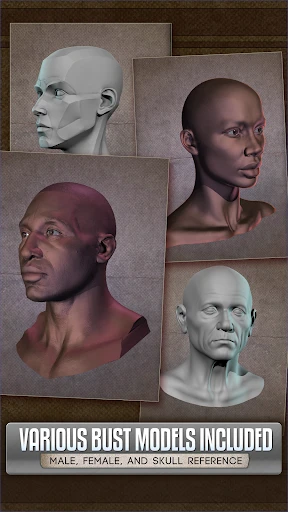
The core function of Handy Art Reference Tool centers on providing an adjustable 3D human figure model for artistic study. Users can select from basic male or female models and manipulate them with intuitive controls. The model can be rotated 360 degrees, zoomed in and out, and posed by dragging individual joints into desired positions, allowing for the study of complex gestures and perspectives. A key feature is the ability to adjust lighting direction and intensity to understand how shadows and highlights define form. The app includes basic measurement tools, like a perspective grid and a straight-line tool, to aid in constructing accurate drawings. Furthermore, it allows users to save custom poses and create timed gesture drawing sessions, where the model changes pose at set intervals to practice quick figure sketching. Essentially, it bundles the functions of a posable artist's mannequin, a light source, and a timer into one accessible mobile tool.
Chapter 2: Value
The primary value of Handy Art Reference Tool lies in its unparalleled convenience and cost-effectiveness as a portable reference solution. For artists, acquiring a comprehensive library of photographic references for every conceivable pose and angle is impractical, while traditional wooden mannequins are limited in their articulation and realism. This app bridges that gap by offering an infinite number of reference possibilities in a pocket-sized device. Its key advantage is the depth of control it grants; artists are not passive consumers of static images but active participants who can craft the exact reference they need for a specific piece, experimenting with foreshortening, dynamic action poses, or subtle anatomical details that might be difficult to photograph. This active manipulation deepens the understanding of three-dimensional form and spatial relationships, which is fundamental to drawing from imagination. Compared to scrolling through online image boards, the app provides a focused, ad-free environment dedicated to practice. It also encourages regular practice through its gesture drawing timer, turning idle moments into productive study sessions. For students, it demystifies human anatomy by making it interactive and accessible, while for professionals, it saves valuable time in the research phase of a project. By consolidating multiple tools into one streamlined interface, the app delivers significant practical value, enhancing both the learning curve and the efficiency of the artistic process.
Chapter 3: Scenarios
Handy Art Reference Tool is ideally suited for a range of users engaged in figurative art. Art students and beginners form a primary group, using the app to build a solid foundation in human proportions, skeletal structure, and muscle groups outside the classroom or life drawing sessions. Digital illustrators and concept artists, often working under tight deadlines, utilize it to quickly block out character poses and perspectives directly on their tablets or as a secondary reference on their phones while working on a desktop. Traditional artists, including sketchers and painters, employ it to plan compositions and solve anatomical problems before committing to canvas. Furthermore, comic book and storyboard artists find it invaluable for constructing consistent characters in dynamic, sequential action. In everyday use, an artist might open the app to capture a challenging foreshortened limb for a painting, set a two-minute timer for a warm-up gesture drawing session during a break, or create and save a specific pose for a client's character commission to ensure anatomical accuracy throughout the drawing process. It serves as a constant, reliable companion for anyone seeking to improve or expedite their work with the human figure.
Uninstall Instructions
For step-by-step guidance on how to safely remove this application from your device, please refer to our 《Uninstall Instructions》 document.
Pros
- provides 3D poseable models for anatomy study
- offers time-lapse playback of drawing process
- includes specialized brush texture libraries
- lightweight offline reference board functionality
- customizable lighting for model rendering
Cons
- high-precision model manipulation requires stylus
- advanced brush engines drain battery quickly
- limited pose libraries for animal subjects
- no real-time collaborative critique features
- project files incompatible with major drawing apps
Frequently Asked Questions
What is Handy Art Reference Tool and what does it do?
Handy Art Reference Tool is a mobile application designed for artists and art students. Its core function is to provide a customizable, 3D-posable human figure model for drawing reference. You can adjust lighting, set dynamic poses, and view anatomical structures. It serves as a portable replacement for traditional wooden mannequins, helping users study proportions, perspective, and complex poses digitally.
Is the app free to use or does it have in-app purchases?
The app operates on a freemium model. You can download and use a basic set of features for free. However, to access advanced features like additional high-detail models, more pose presets, specific lighting tools, or advanced anatomical layers, you will need to make in-app purchases. These are typically one-time unlocks or subscription options for premium content.
What devices and operating systems does this app support?
Handy Art Reference Tool is primarily available for iOS and Android mobile devices, including phones and tablets. It is optimized for touch interfaces and leverages device gyroscopes for model rotation. For system requirements, it generally needs a relatively recent OS version (e.g., iOS 13+ or Android 8.0+) to ensure smooth performance of the 3D rendering. There is no dedicated desktop version.
How does the 3D model reference feature work uniquely?
Its unique feature is a fully rigged, scalable 3D human model with layered anatomy (muscle and skeleton toggles) that you can pose in real-time using intuitive touch controls. Unlike static image libraries, it allows infinite angle customization, adjustable lighting direction, and perspective grids. This interactive approach lets artists create the exact reference viewpoint they need for their specific artwork.
Can I use the app without an internet connection?
Yes, the core posing and reference functionality of Handy Art Reference Tool works offline once the app is installed. However, any initial download of the app or subsequent downloads of additional premium model packs purchased via in-app purchases will require an internet connection. Restoring previous purchases or accessing cloud-saved pose libraries may also need connectivity.
App Info
Technical Info
Recommended For You

Enphase Enlighten
Business

UKG Ready
Business

Face Swap Magic: AI Avatars
Art & Design

Driver Pulse by Tenstreet
Business

Car Launcher Pro
Auto & Vehicles

AI Face Swap Video App-Swapme
Art & Design

TapRead - Romance Stories
Books & Reference

Phone by Grice
Communication

All Document Reader:PDF Viewer
Business

aesthetic background
Art & Design

Meta Business Suite
Business

InstaFeet
Beauty

Blink Charging Mobile App
Auto & Vehicles

Carmin
Auto & Vehicles

Amazon A to Z
Business

AI Video Generator - Clips AI
Art & Design

Blessed - Bible verse & Prayer
Books & Reference

Car play/Android Auto Sync
Auto & Vehicles

RoughAnimator - animation app
Art & Design

Message Plus - SMS Messager
Communication