
PrinterShare Mobile Print
Screenshots


Description
About PrinterShare Mobile Print Feature – Print Anywhere, Anytime
PrinterShare Mobile Print is a versatile mobile printing solution that transforms smartphones and tablets into portable printing hubs. It breaks the traditional constraints of printing by enabling users to send documents and photos directly from their mobile devices to a wide array of printers, regardless of brand or connection type. Whether over a local Wi-Fi network, via the internet, or even through a direct USB connection, the app bridges the gap between mobile convenience and physical hard copies. It supports a comprehensive range of file formats and printer models, making it a practical tool for individuals and professionals who need to print on the go without relying on a desktop computer.
Chapter 1: Function
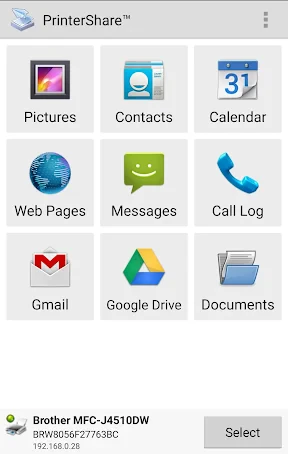
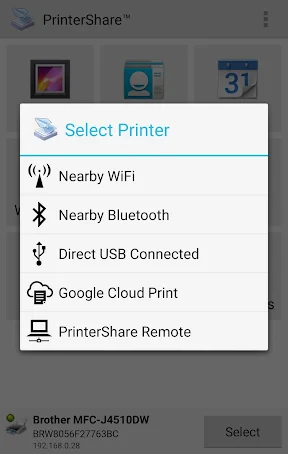
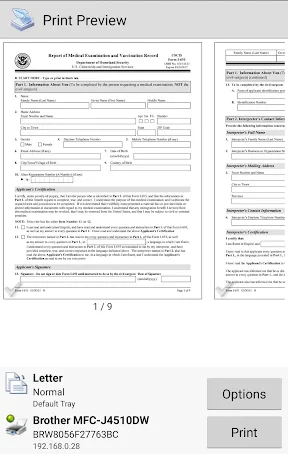
PrinterShare Mobile Print operates by detecting and connecting to available printers through multiple methods. Its core function is to facilitate printing from mobile devices. Users can select documents, photos, web pages, or contacts stored on their device or within cloud services like Google Drive or Dropbox. The app then searches for printers on the same local network, allows pairing via Bluetooth, or enables remote printing over the internet through the PrinterShare online service. For printers without network capabilities, it supports direct USB OTG connections on Android. Once a printer is selected, the app provides a preview and basic formatting options such as page range, copies, color settings, and orientation. It also functions as a scanner when used with a printer's scanning bed, allowing users to initiate scans and receive the digital files directly on their mobile device.
Chapter 2: Value
The primary value of PrinterShare Mobile Print lies in its universal compatibility and exceptional convenience. It eliminates the need for manufacturer-specific apps or complex driver installations on mobile devices. By supporting nearly all printer brands—from HP and Canon to Epson and Brother—and various connection protocols, it serves as a single, unified printing interface. This universality is a significant advantage for users in mixed-printer environments, such as homes with older models or offices with diverse hardware. Its remote printing feature is particularly valuable, allowing users to send print jobs to a printer anywhere in the world, provided the host computer running the PrinterShare desktop helper is online. This is ideal for printing documents to a home printer while at work or for travelers needing output at their hotel. Furthermore, the app enhances productivity by integrating seamlessly with mobile workflows, enabling last-minute edits and immediate printing without transferring files to a PC. The absence of recurring subscription fees for basic local and remote printing offers great cost-effectiveness compared to some cloud print services. Its reliability and broad file format support make it a dependable tool that extends the utility of both mobile devices and existing printing hardware.
Chapter 3: Scenarios
PrinterShare Mobile Print caters to a broad spectrum of users whose common need is printing flexibility. Students are primary beneficiaries, as they can quickly print lecture notes, assignments, or project reports directly from their phones or tablets while on campus or at home, without needing a laptop. Remote and hybrid professionals find it indispensable for printing work contracts, boarding passes, or last-minute presentation handouts to a home or office printer from any location. Parents and home users appreciate the simplicity for printing photos, school permission slips, recipes, or coupons directly from their mobile galleries or emails. Small business owners and freelancers, such as real estate agents or delivery personnel, use it to print invoices, receipts, or labels on-site using a portable printer connected via Bluetooth or USB. Additionally, it serves users in environments with shared or public printers, like libraries or coworking spaces, where installing drivers is impractical. The app is also crucial for individuals who rely heavily on cloud storage, allowing them to print documents from services like OneDrive or Gmail without downloading them first. Essentially, any mobile-centric user who occasionally needs a physical copy but prioritizes speed and minimal setup will find this app solving a common point of friction in the digital-to-physical workflow.
Uninstall Instructions
For step-by-step guidance on how to safely remove this application from your device, please refer to our 《Uninstall Instructions》 document.
Pros
- prints directly to nearby printers without a pc
- supports a wide range of printer brands and models
- cloud printing via google cloud print integration
- can print documents from phone storage and cloud services
- offers a 'find printer' feature for local network discovery
Cons
- requires in-app purchase for usb/bluetooth printing
- interface can be complex for basic printing tasks
- print quality varies with original document resolution
- some network printers need specific driver setup
- free version includes ads and print job delays
Frequently Asked Questions
What is PrinterShare Mobile Print?
PrinterShare Mobile Print is a utility app that allows you to print documents, photos, emails, and web pages directly from your Android or iOS device. It works by connecting your mobile device to printers over Wi-Fi, Bluetooth, USB (with an OTG cable), or the internet. The core function is to enable printing without a PC, positioning itself as a versatile mobile printing solution for home and office use.
Is PrinterShare completely free to use?
The app offers basic printing functionality for free. However, to access advanced features like printing to remote printers over the internet (not on the same local network) or to certain network printer models, a paid premium upgrade is required. The app may also contain advertisements. No additional physical equipment is needed for local network printing.
What printers and devices are compatible?
PrinterShare supports a wide range of printers from major brands like HP, Epson, Canon, and Brother. It is compatible with Android and iOS smartphones/tablets. Printing methods include Wi-Fi (same network), Bluetooth, direct USB connection via adapter, and cloud/remote printing. It can also utilize Google Cloud Print and shared printers on a PC with helper software installed.
How do I print to a printer not on my Wi-Fi?
For printers not on your local Wi-Fi, you have several options. You can use a direct USB OTG cable, Bluetooth if supported, or the internet printing feature (premium). For remote printing, the target printer must be connected to a computer running the PrinterShare desktop helper, which relays the print job. The app's 'Print via Internet' feature also facilitates this connection.
Why can't my device find my Wi-Fi printer?
Ensure both your mobile device and printer are on the same Wi-Fi network. Restart the app, your phone, and the printer. Check if your printer's model is on the supported list in the app. Some network printers may require specific drivers or might need to be set up via the printer's own app first. For persistent issues, using the direct USB or Bluetooth connection methods is a reliable alternative.
App Info
Technical Info
Recommended For You

Boat Trader
Auto & Vehicles

UKG Pro
Business

IRMO AI Video Photo Generator
Art & Design

Barber Chop
Beauty

Paycor Mobile
Business

Invoice Maker & Estimate Maker
Business

WAMR: Reveal deleted messages!
Communication

Caller ID - Block Spam Call
Communication

Messenger Kids – The Messaging
Communication

Galatea: Books & Audiobooks
Books & Reference

Invoice Simple: Invoice Maker
Business

Logos Bible Study App
Books & Reference

Monster Job Search
Business

Bible Chat: Holy Bible Study
Books & Reference

Dual App - Web Scanner App
Communication

DMV Practice Test Pro 2024
Auto & Vehicles

Desygner: Graphic Design Maker
Art & Design

Minicraft Crafting Building
Comics

Shipt: Shopper and Driver
Business

CamCard-Digital business card
Business