
My Total Wireless: Account App
Screenshots




Description
About My Total Wireless: Account App Features
My Total Wireless: Account App is the official mobile management tool for Total Wireless customers, a prepaid wireless service provider in the United States. Designed for on-the-go account control, the app consolidates essential service management functions into a single, user-friendly interface. It empowers users to handle their wireless plans, payments, and usage directly from their smartphones, eliminating the need for desktop visits or customer service calls for routine tasks. The application serves as a digital companion for subscribers, providing real-time insights and transactional capabilities to ensure seamless connectivity and service management.
Chapter 1: Function
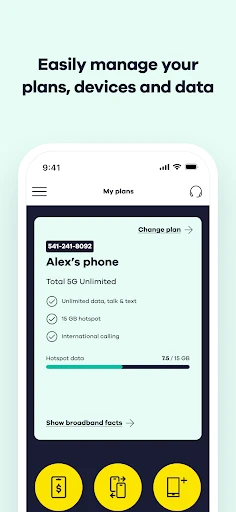
The core functionality of the My Total Wireless app centers on comprehensive account administration. Users can effortlessly check their current plan details, including data, talk, and text balances. The app facilitates easy plan renewals and upgrades with a few taps. A central feature is the integrated payment system, allowing users to add payment methods and securely pay their bill to keep service active. Furthermore, subscribers can review usage history, manage auto-refill settings, and add data or international calling features as needed. The app also provides access to support resources and enables users to update their account information, ensuring all management aspects are addressed from one convenient location.
Chapter 2: Value
The primary value proposition of the My Total Wireless app lies in its empowerment of users through convenience, control, and cost-effectiveness. It transforms account management from a chore into a streamlined, self-service experience available 24/7. A key advantage is the prevention of service interruption; with push notifications for low balances and easy, immediate payments, users can react instantly to maintain connectivity. The app offers transparency by providing clear, up-to-date views of usage against plan limits, helping users avoid unexpected overages and manage their wireless budget effectively. For cost-conscious prepaid customers, the ability to quickly compare and switch plans or add-ons directly in the app ensures they always have the most suitable and economical service. This direct management channel reduces dependency on customer service for trivial matters, saving users time. The secure, official platform also protects payment information and personal data, building trust. Ultimately, the app delivers peace of mind by putting full control of the wireless service in the user's pocket, aligning perfectly with the autonomy and flexibility sought by modern prepaid mobile consumers.
Chapter 3: Scenarios
The My Total Wireless app is ideally suited for Total Wireless subscribers who prioritize self-service and mobile-centric solutions. Its primary user groups include budget-conscious individuals and families on prepaid plans who need to track and control their monthly wireless spending meticulously. It is equally valuable for busy professionals and students who require the ability to manage their account instantly between tasks, such as renewing a plan during a commute or adding data before an important trip. Frequent travelers within the U.S. can use the app to ensure their service remains active and topped up while away from home. Everyday use cases are practical: a user receives a low-balance alert and immediately uses the app to pay and renew their plan before their service lapses. A parent checks the family plan's data usage mid-cycle to decide if an add-on is needed. Another user explores new plan options within the app to find a better fit for their changing needs. In all scenarios, the app serves as an indispensable tool for maintaining uninterrupted, affordable wireless service through proactive and convenient self-management.
Uninstall Instructions
For step-by-step guidance on how to safely remove this application from your device, please refer to our 《Uninstall Instructions》 document.
Pros
- manages multi-line family plans with a single dashboard
- prepaid balance and data tracking updates in real-time
- one-touch refill for prepaid accounts without login delays
- usage alerts are customizable per line for cost control
- offers plan-specific add-ons directly within the app
Cons
- account linking requires manual entry of PINs each time
- no integrated chat support
- reliant on call redirects
- usage graphs lack historical comparison beyond 30 days
- group data pooling controls are limited to primary holder
- app notifications sometimes duplicate carrier SMS alerts
Frequently Asked Questions
What is My Total Wireless: Account App?
My Total Wireless: Account App is the official mobile application for Total Wireless prepaid service customers. Its core function is to allow users to manage their wireless account directly from their phone. This includes checking data usage, adding service plans, making payments, and redeeming refill cards. It is designed for account management and does not replace standard dialer or messaging apps.
Is the app free to use, and are there in-app purchases?
The My Total Wireless app is free to download and install. There are no subscription fees for using the app itself. However, the app is a tool for managing your prepaid wireless service. Therefore, you will use it to purchase your service plans, add-ons, or pay your bill, which involves transferring funds to your Total Wireless account. These are not traditional in-app purchases but payments for your cellular service.
What devices and systems is the app compatible with?
The app is designed for smartphones. It is available for download on both iOS and Android operating systems. You can typically find it on the Apple App Store for iPhones and the Google Play Store for Android phones. The app requires an active Total Wireless service account and an internet connection (via Wi-Fi or cellular data) to function for most account management tasks.
How do I check my data balance and plan details?
After logging into the app with your Total Wireless account credentials, your remaining high-speed data balance, plan expiration date, and other usage details are usually displayed on the main dashboard or account overview screen. The app provides a real-time view of your service status. For precise navigation, refer to the app's menu, which may have sections labeled 'Usage,' 'My Plan,' or 'Dashboard.'
What should I do if I can't log in or make a payment?
If you encounter login issues, first ensure your login credentials are correct and your internet connection is stable. For payment failures, verify your payment method details. If problems persist, the app includes support options such as access to a help section or customer service contact information. For unresolved technical issues with the app, you may need to uninstall and reinstall it, or contact Total Wireless customer support directly for account-specific assistance.
App Info
Technical Info
Recommended For You

Perfect365 Makeup Photo Editor
Beauty

Ice Princess Makeup Salon
Comics

AR Drawing - Trace Drawing App
Art & Design

Opera: Private Web Browser
Communication

Maru - ComicViewer/TextReader
Comics

BimmerLink for BMW and MINI
Auto & Vehicles

Meta Ads Manager
Business

My SafeLink
Communication

Realtime Charts for Torque Pro
Auto & Vehicles

Tarteel ترتيل - Memorize Quran
Books & Reference

StoryGraph
Books & Reference

T Shirt Design - T Shirts Art
Art & Design

LINE: Calls & Messages
Communication

Chat Cloner Secretly View Chat
Communication

Spirit Fanfiction and Stories
Books & Reference

Mens Hairstyles And Haircuts
Art & Design

WhatsApp Business
Communication

Etsy Seller: Manage Your Shop
Business

Telegram
Communication

AlphaNovel — Books & Stories
Books & Reference