
Opera: Private Web Browser
Screenshots
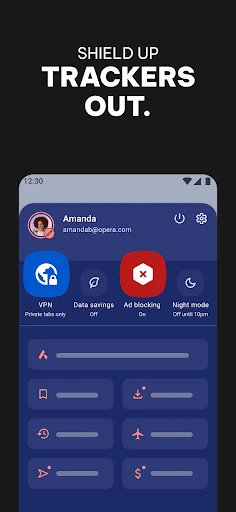
Description
About Opera: Private Web Browser Feature
Opera: Private Web Browser is a mobile internet browser that emphasizes privacy, speed, and a streamlined user experience. Building upon the legacy of the desktop version, the mobile app integrates a free, built-in VPN, an ad blocker, and a private browsing mode to safeguard user data. It is designed for users seeking an alternative to default browsers, offering a balance of powerful features and intuitive navigation within a clean interface. Available on both Android and iOS platforms, Opera positions itself as a comprehensive tool for secure and efficient web exploration on mobile devices.
Chapter 1: Function
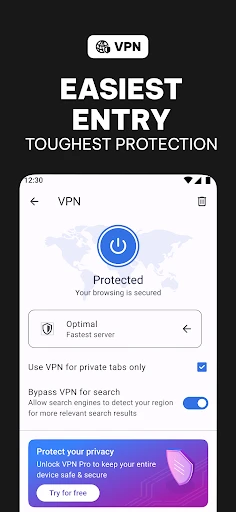
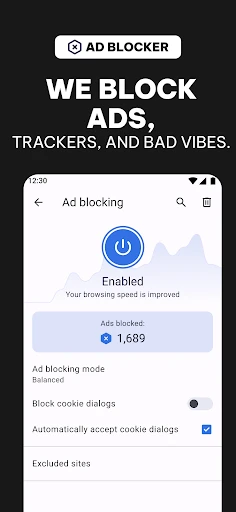
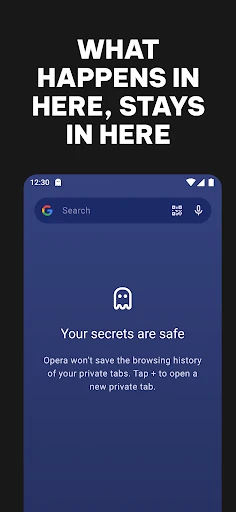
Opera's core functionality revolves around secure and efficient web browsing. Its built-in, no-log VPN allows users to mask their IP address and encrypt their connection without needing a separate subscription, enhancing privacy on public Wi-Fi. The integrated ad blocker speeds up page loading times by removing intrusive ads and trackers. The browser features a native cryptocurrency wallet for Web3 interactions and a personal newsreader that aggregates content based on user interests. A dedicated private browsing mode with a private search engine does not save history or cookies. Furthermore, it includes data savings mode to compress webpages, fast download management, and a customizable start page with quick access links and visual bookmarks.
Chapter 2: Value
The primary value proposition of Opera: Private Web Browser lies in its integrated, no-cost privacy suite, which delivers significant advantages over many competitors. The free, unlimited VPN is a standout feature, providing a tangible security benefit without complex setup or ongoing fees, a rarity in the mobile browser market. This, combined with the effective ad blocker, not only protects user privacy from trackers but also materially improves browsing speed and reduces data consumption—a critical advantage for users with limited data plans. The browser's design philosophy centers on user convenience and control. By bundling essential tools like the ad blocker and savings mode directly into the core experience, it eliminates the need for multiple extensions, which can compromise performance and security. The inclusion of a crypto wallet and Web3 readiness future-proofs the browser for evolving internet trends. Overall, Opera offers a cohesive package that prioritizes user agency over their data and online footprint. Its key advantages are the seamless integration of powerful privacy tools at no extra cost, a performance-optimized engine that respects user attention by removing clutter, and a feature set that caters to both everyday browsing and emerging digital needs, all wrapped in a user-friendly interface.
Chapter 3: Scenarios
Opera: Private Web Browser is ideally suited for privacy-conscious individuals, students, travelers, and cost-aware users. Its integrated VPN and private mode are invaluable for professionals or students frequently using public Wi-Fi networks in cafes, airports, or libraries, allowing them to conduct research or access work portals securely. The ad blocker and data savings mode appeal directly to users in regions with expensive or slow mobile data, as it accelerates browsing and reduces monthly data usage. Everyday use cases include reading news via the personalized feed without intrusive advertisements, making secure online purchases or banking transactions with an encrypted connection, and privately searching for sensitive health or financial information without leaving a local history. The crypto wallet feature caters to users engaged in the decentralized web, allowing them to interact with dApps directly. For the general user, it serves as a one-stop, faster, and more private alternative to pre-installed browsers, simplifying their mobile internet experience while providing robust protection by default.
Uninstall Instructions
For step-by-step guidance on how to safely remove this application from your device, please refer to our 《Uninstall Instructions》 document.
Pros
- built-in ad blocker and free vpn for enhanced privacy
- cryptocurrency wallet integration directly into the browser
- flow feature syncs notes/files across devices via shared space
- low device resource consumption despite feature richness
- supports web3 and accesses decentralized apps seamlessly
Cons
- flow requires account creation for cross-device syncing
- crypto wallet may complicate interface for casual users
- vpn has limited server choices on the free tier
- ad blocker occasionally breaks layout on rare sites
- default search engine is less customizable than competitors
Frequently Asked Questions
What is Opera: Private Web Browser?
Opera: Private Web Browser is a privacy-focused mobile web browser. Its core positioning is to provide fast, secure, and private browsing with a built-in free VPN, ad blocker, and crypto wallet. It is designed for users seeking enhanced online privacy without complex setups. The browser is based on Chromium, ensuring compatibility with most websites and extensions.
Is Opera Browser free to use with no hidden costs?
Yes, the Opera browser is completely free to download and use. Its core features like the ad blocker, private browsing tabs, and the free VPN with a limited data allowance have no cost. There are no mandatory in-app purchases. Optional premium VPN services with unlimited data may be offered via subscription, but the base app remains fully functional without payment.
How does the built-in free VPN work and its limits?
The built-in VPN encrypts your traffic and masks your IP address to enhance privacy on public Wi-Fi or to access region-restricted content. It is free, easy to toggle on/off, and offers several virtual locations. However, it has a monthly data limit (e.g., several GBs) and may be slower than premium VPNs. The VPN is integrated into the browser only, not system-wide.
What devices and systems does Opera Browser support?
Opera: Private Web Browser is primarily available for Android and iOS mobile devices. It requires a recent version of the operating system (e.g., Android 8.0+ or iOS 14.0+). It is not designed for desktop use (separate desktop versions exist). The app adapts to various screen sizes and supports standard smartphone hardware without requiring additional equipment.
Can I use browser extensions with Opera on mobile?
No, the mobile version of Opera: Private Web Browser does not currently support the installation of third-party extensions or add-ons from web stores like its desktop counterpart. Its functionality is delivered through built-in features such as the ad blocker, VPN, and crypto wallet. For extension support, users would need to switch to the desktop version of Opera.
App Info
Technical Info
Recommended For You

Microsoft Teams
Business

Shipt: Shopper and Driver
Business

Selfie Camera - Photo Effects
Beauty

Skype for Business for Android
Business

eBird by Cornell Lab
Books & Reference

TracFone My Account
Communication

Jooble — Job Search App
Business

StoryFont for Instagram Story
Art & Design

OpenDocument Reader Pro
Business

Chat Cloner Secretly View Chat
Communication

Hwahae(Korea’s Beauty APP)
Beauty

Passio GO!
Auto & Vehicles

Face Shape - Pretty Scale
Beauty

Carista OBD2
Auto & Vehicles

Bible Chat: Holy Bible Study
Books & Reference

AR Drawing: Art, Trace, Sketch
Art & Design

Batman Miniature Game
Comics

FantacyStory: novels, fictions
Books & Reference

Valvoline Instant Oil Change
Auto & Vehicles

IRMO AI Video Photo Generator
Art & Design