
AR Drawing - Trace Drawing App
Screenshots
Description
About AR Drawing - Trace Drawing App Features
AR Drawing is an innovative mobile application that bridges the gap between digital and traditional art by utilizing augmented reality technology. Designed for both beginners and enthusiasts, it transforms the process of learning and creating drawings. The app projects a virtual guide onto a physical surface, allowing users to trace images with ease using their smartphone or tablet camera. This approach demystifies the initial steps of sketching, making art creation accessible and less intimidating. By serving as a digital tracing paper, AR Drawing empowers users to replicate complex designs, practice proportions, and develop muscle memory, all while working on real paper with their preferred drawing tools.
Chapter 1: Function
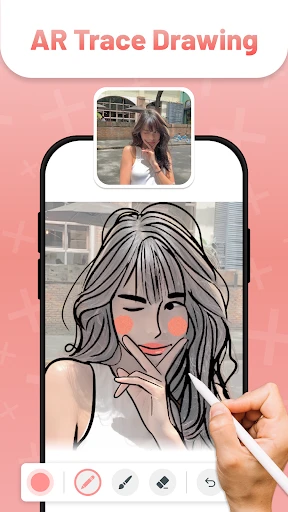
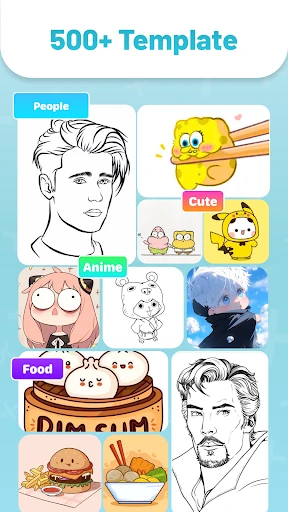
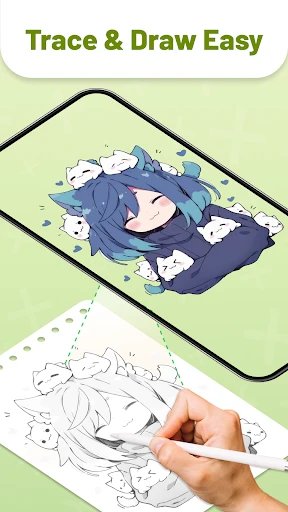
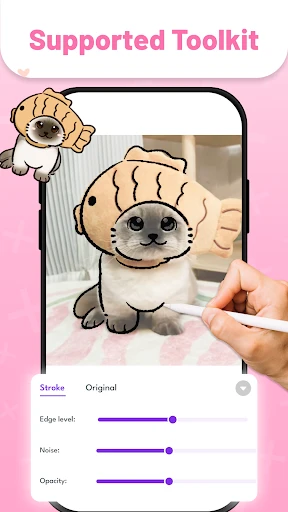
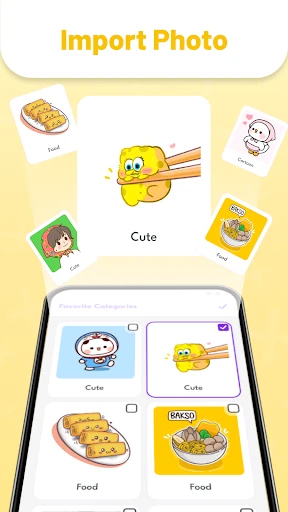
The core function of AR Drawing is its augmented reality tracing capability. Users begin by selecting an image from their device's gallery or the app's built-in library. The app then uses the device's camera to display the chosen image as a semi-transparent overlay onto the real-world surface in front of them, such as a sketchbook or canvas. By aligning their paper within the camera view, users can see the virtual image superimposed on it. They then simply trace the projected lines with a pencil, pen, or any physical drawing tool. The app offers essential tools to adjust the image's opacity, lock the projection to prevent shifting, and zoom or rotate the guide for perfect alignment. This creates a seamless, hands-on tracing experience that feels natural, bypassing the need for manual lightboxes or cumbersome transfer methods.
Chapter 2: Value
The primary value of AR Drawing lies in its ability to lower the barrier to entry for drawing and significantly accelerate skill development. For absolute beginners, it eliminates the initial frustration of blank-page anxiety by providing a confident starting point, allowing them to produce recognizable and satisfying artwork immediately. This builds motivation and encourages consistent practice. For hobbyists and intermediate artists, the app serves as an excellent practice tool for mastering proportions, perspectives, and complex line work found in portraits, anime, or intricate patterns. Its key advantages include portability, as it replaces physical tracing equipment; cost-effectiveness, being a one-time or low-cost investment compared to hardware; and flexibility, supporting any drawing style or image source. Furthermore, it enhances the learning process by helping users internalize shapes and structures through repetitive tracing, effectively training hand-eye coordination. Unlike apps that create purely digital art, AR Drawing promotes the tactile experience of drawing on real paper, merging digital convenience with traditional art's physical satisfaction. It is a focused tool that does one job exceptionally well, providing immediate, tangible results without overwhelming users with complex digital art software features.
Chapter 3: Scenarios
AR Drawing primarily targets aspiring artists, craft enthusiasts, and individuals seeking a relaxing, creative outlet without formal training. A key user group is children and teenagers interested in art, as the app makes learning fun and approachable, helping them draw their favorite characters or animals with ease. Adult beginners exploring a new hobby, such as bullet journal decoration, card making, or simple sketching, also benefit greatly. In everyday use, a user might employ the app to trace a beautiful floral design onto a greeting card, transfer a portrait onto a canvas for painting, or practice drawing hands by tracing over photographic references. It is also valuable for educators and parents guiding children's artistic activities, and for crafters needing to replicate specific designs onto wood, fabric, or other surfaces accurately. The scenario extends to casual users looking for a mindful, screen-detached activity; they can put their phone on a stand, follow the projected image, and enjoy the analog process of drawing, reducing digital eye strain. Essentially, any situation requiring accurate transfer of an image onto a physical medium becomes simpler and more accessible with AR Drawing.
Uninstall Instructions
For step-by-step guidance on how to safely remove this application from your device, please refer to our 《Uninstall Instructions》 document.
Pros
- projects reference images directly onto your drawing surface
- simplifies complex outlines for beginners and hobbyists
- functions offline without requiring an internet connection
- uses device camera for real-world canvas alignment
- provides adjustable opacity for tracing layer control
Cons
- requires a stable mount for precise image projection
- limited to tracing rather than teaching drawing theory
- camera use drains battery faster during extended sessions
- accuracy diminishes in poor or uneven lighting conditions
- layers lack advanced editing tools for digital artists
Frequently Asked Questions
What is AR Drawing and what does it do?
AR Drawing is a creative art app that uses augmented reality (AR) technology to help users draw. Its core function is to allow you to trace images onto physical paper. You place your phone on a stand, select an image or photo, and its outline is projected onto your drawing surface through your phone's camera view. You can then trace this projected guide onto your paper, making it easier to create accurate sketches and illustrations.
Is AR Drawing free to use or does it have in-app purchases?
AR Drawing is free to download and use with basic functionality. However, it includes optional in-app purchases. These purchases typically unlock premium features such as access to a larger library of traceable images, advanced drawing tools, removal of watermarks from saved artwork, or an ad-free experience. The core tracing feature using your own photos is generally available for free.
What devices and systems are compatible with this app?
AR Drawing requires a smartphone or tablet with a rear camera and support for ARCore (for Android) or ARKit (for iOS). It is available for both Android and iOS systems. For optimal performance, a relatively recent device model is recommended to ensure stable AR projection. The app does not require any additional specialized hardware, but a simple phone stand is highly recommended for hands-free tracing.
How accurate is the AR tracing projection feature?
The accuracy of the AR projection depends on several environmental factors. It works best in a well-lit room with consistent lighting and a stable surface. The phone must be securely positioned on a stand. Calibration is required to align the projection with your paper, and slight distortions can occur if the phone moves or the lighting changes. It is designed for sketching guidance and may not achieve perfect precision for technical drafting.
Can I save and share my drawings created with the app?
Yes, you can save your drawings directly to your device's photo gallery. The app typically provides options to export your artwork as an image file (like JPEG or PNG). Sharing functionalities are integrated, allowing you to send your creations to social media platforms or other apps directly from within AR Drawing. Note that free versions may include a watermark on saved images, which can often be removed via a premium upgrade.
App Info
Technical Info
Recommended For You

My Total Wireless: Account App
Communication

리디 - 웹툰, 만화, 웹소설, 전자책 모두 여기에!
Comics

Pocket Novel
Books & Reference

أرت نوين
Comics

CreArt - AI Image Generator
Art & Design

Perfect Viewer PDF&DJVU Plugin
Comics

Perfect Viewer
Comics

PSWaves Live Wallpapers
Beauty

NovelBar-Your Reading Haven
Books & Reference

Dual App - Web Scanner App
Communication

CDisplayEx Comic Reader
Comics

NDI HX Camera: Easy Streaming
Communication

Asiacell
Business

Car Scanner ELM OBD2
Auto & Vehicles

Luvme Hair
Beauty

Bookshelf-Your virtual library
Books & Reference

PayByPhone
Auto & Vehicles

미스터블루 - 웹툰, 만화, 소설앱
Comics

The Cepher
Books & Reference

RepairSolutions2
Auto & Vehicles