
My SafeLink
Screenshots

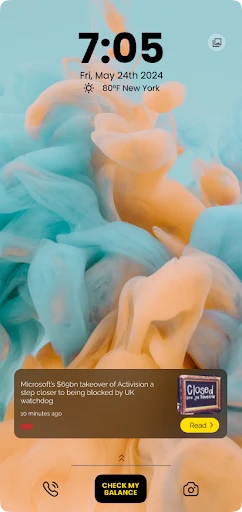


Description
About My SafeLink App Features
My SafeLink is a dedicated mobile application designed to manage SafeLink Wireless accounts, a leading provider of the U.S. government's Lifeline assistance program. The app serves as a convenient digital portal for eligible low-income subscribers, allowing them to oversee their free or discounted wireless service directly from their smartphones. It streamlines account management, providing essential tools to check balances, monitor usage, and access program benefits without the need for frequent calls or website visits. By centralizing control over their Lifeline service, My SafeLink empowers users to maintain consistent and reliable communication, a vital resource in today's connected world.
Chapter 1: Function
The core functionality of the My SafeLink app revolves around putting account control firmly in the user's hands. Primarily, it allows subscribers to check their remaining monthly plan minutes, text messages, and data balance in real-time, preventing unexpected service interruptions. Users can easily view their service end date and the scheduled date for the next monthly replenishment. The app provides access to detailed usage history and enables users to update their personal contact information securely. Furthermore, it offers direct links to add more minutes or services through SafeLink's official channels and facilitates quick access to customer support options. These integrated functions transform the smartphone into a comprehensive service management tool for SafeLink customers.
Chapter 2: Value
The value proposition of My SafeLink lies in its empowerment of a specific user base through convenience, transparency, and enhanced accessibility. For beneficiaries of the Lifeline program, reliable communication is not a luxury but a necessity for job searches, healthcare coordination, family connections, and emergency services. The app delivers significant advantages by demystifying service details; real-time balance tracking helps users budget their limited resources effectively, avoiding overage charges or missed calls. It eliminates barriers like long customer service wait times or the need for computer access, offering a free, intuitive, and always-available management platform. This self-service model fosters independence and reduces administrative friction. Moreover, by ensuring users can easily maintain their account details and service status, the app plays a crucial role in sustaining their eligibility and continuous service. The key advantage is the translation of a critical social benefit into a user-friendly digital experience, thereby amplifying the program's impact by ensuring participants can reliably utilize their communication lifeline.
Chapter 3: Scenarios
The primary target users for My SafeLink are enrolled SafeLink Wireless subscribers under the Lifeline program, often including low-income individuals, seniors on fixed incomes, and participants of federal assistance programs like Medicaid or SNAP. Everyday use cases are practical and essential. A user might open the app daily to check their data balance before browsing for job listings or to ensure they have enough minutes for a scheduled telehealth appointment. Close to the monthly renewal date, a user would verify the replenishment schedule to plan important calls. After contacting family, they might review their usage history to track remaining resources. If moving residences, updating the address through the app ensures uninterrupted service and continued compliance with program rules. In scenarios where extra minutes are needed, the app provides a secure pathway to purchase them. Essentially, for its users, the app integrates into daily routines as a vital tool for managing a key resource—affordable connectivity—supporting communication needs in personal, professional, and emergency contexts.
Uninstall Instructions
For step-by-step guidance on how to safely remove this application from your device, please refer to our 《Uninstall Instructions》 document.
Pros
- real-time location sharing with configurable privacy circles
- one-touch emergency alert sends precise GPS and vital info
- works offline using mesh networking for remote areas
- integrates health metrics from wearables for alerts
- battery-optimized geofencing with minimal background drain
Cons
- requires contact permissions for full network functionality
- mesh networking limited to app users in proximity
- advanced health sync only with specific wearable brands
- geofencing accuracy decreases in dense urban environments
- setup complexity for non-tech-savvy family members
Frequently Asked Questions
What is My SafeLink and what does it do?
My SafeLink is a personal safety and emergency alert application. Its core function is to allow users to quickly notify pre-selected emergency contacts with their real-time location and a call for help by pressing a single button or using a gesture. It also features a timed safety check-in and can work as a discreet personal alarm. The app is designed for everyday personal security, travel safety, and for vulnerable individuals to feel more secure.
Is My SafeLink free to use, or are there in-app purchases?
My SafeLink is free to download and use its core emergency alert and location-sharing features. The app may offer optional premium subscriptions that unlock additional functionalities, such as extended location history, more detailed safety reports, or integration with certain wearable devices. Any in-app purchases are clearly marked within the app's settings or store page.
What devices and systems is My SafeLink compatible with?
My SafeLink is primarily designed for smartphones. It is available for both iOS and Android operating systems. For optimal functionality, including accurate GPS location sharing, a device with an active internet connection (cellular data or Wi-Fi) is required. The app may have specific version requirements, such as iOS 13.0+ or Android 8.0+, which are detailed on its official app store listings.
How does the emergency alert feature work without unlocking the phone?
My SafeLink can be configured to trigger an emergency alert from a locked screen using a specific, rapid hardware button sequence (like pressing the power button multiple times) or through a shake gesture. This function requires the user to grant necessary accessibility or device administration permissions during setup. Once activated, the app will send an alert with your location to your emergency contacts without needing full phone access.
What happens if I trigger a false alarm by accident?
If an emergency alert is triggered accidentally, My SafeLink includes a cancellation countdown (typically 5-10 seconds) before the messages are sent. You can cancel the alert within this window. If the alert has already been sent, you can immediately notify your contacts directly through the app or via your standard messaging to inform them it was a false alarm. It is recommended to inform your emergency contacts about this possibility during your initial setup.
App Info
Technical Info
Recommended For You

SmartWatch & BT Sync Watch App
Communication

AI Clothes Try-On: DressTry
Beauty

GigSmart Get Gigs
Business

Tattoo Simulator Tattoo Maker
Art & Design

Cartoon Comic Strip Maker
Comics
Fuel Forward
Auto & Vehicles

2nd Line+ Phone Number & eSIM
Communication

Anime Avatar Maker & Creator
Beauty

Hexa AI: Logo & Design Creator
Art & Design

Motive Driver
Business

DMV Prueba de Práctica 2024
Auto & Vehicles

Online chat, calls - Gem Space
Communication

Shopify - Your Ecommerce Store
Business

Ancestry: Family History & DNA
Books & Reference

FedEx Mobile
Business

KJV Daily Bible - Verse+Audio
Books & Reference

Snagajob - Jobs Hiring Now
Business

AAWireless for Android Auto™
Auto & Vehicles

Imikimi Photo Frames & Effects
Art & Design

Zoom for Chromebook
Business