
BimmerLink for BMW and MINI
Screenshots




Description
About BimmerLink for BMW and MINI Features – Professional Diagnostics and Vehicle Customization
BimmerLink is a professional-grade diagnostic and vehicle information application designed specifically for BMW and MINI owners. It serves as a powerful bridge between the user and their vehicle's internal systems, offering deep insights that go far beyond standard dashboard readings. By connecting to the car's OBD-II port via a compatible Bluetooth or Wi-Fi adapter, the app unlocks a wealth of real-time data, advanced diagnostics, and coding capabilities. It empowers enthusiasts and DIY mechanics to understand their vehicle's health, perform customizations, and troubleshoot issues with precision, transforming a smartphone or tablet into a sophisticated automotive tool tailored for the BMW and MINI brand experience.
Chapter 1: Function
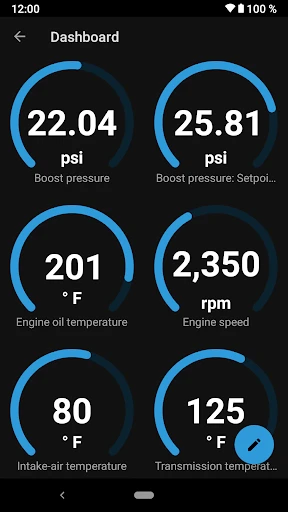
BimmerLink operates by establishing a secure connection with the vehicle's onboard computer systems through a compatible OBD-II adapter. Its core functionality revolves around three key areas. First, it provides comprehensive real-time data monitoring, displaying hundreds of parameters such as precise coolant temperatures, turbo boost pressure, fuel rail pressure, individual wheel speeds, and sensor readings in customizable dashboards and graphs. Second, the app offers advanced diagnostic capabilities, allowing users to read and clear standard and manufacturer-specific fault codes across all control units, including the engine, transmission, ABS, and airbag systems. Third, it enables direct coding and adaptation for specific features, such as resetting service interval lights, registering a new battery, activating hidden functions, or performing component tests like activating the electric water pump or fuel pump. The interface organizes these functions intuitively, making complex vehicle data accessible and actionable.
Chapter 2: Value
The primary value proposition of BimmerLink lies in its empowerment of the vehicle owner, delivering professional-level diagnostic access at a fraction of the cost of dealer-grade tools. Its key advantages are depth, precision, and brand-specific focus. Unlike generic OBD-II scanners, BimmerLink is engineered exclusively for BMW and MINI models, ensuring accurate communication with proprietary systems and displaying data with correct labels and units. This specificity translates into significant cost savings by enabling users to diagnose problems before visiting a mechanic, perform basic maintenance resets themselves, and make informed decisions about repairs. For enthusiasts, the value extends to performance monitoring and customization, allowing them to verify the effects of modifications or track vehicle behavior in real-time. The app's ability to log data is invaluable for diagnosing intermittent issues that a mechanic might not replicate. Furthermore, it fosters a deeper understanding and connection with one's vehicle, demystifying complex automotive systems. By providing transparent access to the car's vital signs, BimmerLink shifts control from the service bay to the owner's hands, promoting self-reliance, reducing maintenance anxiety, and enhancing the overall ownership experience through knowledge and customization.
Chapter 3: Scenarios
BimmerLink primarily targets BMW and MINI owners who possess a technical interest in their vehicles, ranging from DIY home mechanics to performance enthusiasts. A common user is the car owner who prefers to understand and maintain their vehicle independently. They use the app to read and clear a check engine light before deciding on a repair shop, or to reset the service indicator after an oil change. Performance enthusiasts utilize it to monitor engine vitals like intake temperatures and boost pressure during spirited drives, ensuring everything operates within safe limits. For owners of used or older models, the app is a troubleshooting essential, helping to diagnose electrical gremlins, sensor failures, or drivetrain warnings. Another key scenario involves pre-purchase inspections; a potential buyer can use BimmerLink to scan for hidden fault codes in a used vehicle. Additionally, users seeking customization employ its coding features to enable convenience functions like folding mirrors with the key fob or disabling auto start-stop. In everyday use, it serves as an advanced trip computer, providing detailed fuel economy analytics and mechanical health reports, turning every drive into an opportunity to ensure the vehicle is performing at its best.
Uninstall Instructions
For step-by-step guidance on how to safely remove this application from your device, please refer to our 《Uninstall Instructions》 document.
Pros
- enables deep diagnostics beyond standard OBD-II fault codes
- performs advanced adaptations like battery registration
- live data graphing for precise performance monitoring
- activates hidden features via expert mode coding
- direct vehicle communication without a cloud dependency
Cons
- requires a specific compatible OBD adapter purchase
- expert mode presents a steep learning curve
- functionality limited to BMW and MINI vehicles only
- advanced coding carries a risk of module misconfiguration
- lacks automated repair suggestions for found faults
Frequently Asked Questions
What is BimmerLink and what are its core functions?
BimmerLink is a professional diagnostic and vehicle information app specifically designed for BMW and MINI vehicles. Its core functions include reading and clearing fault codes, monitoring live sensor data (like temperatures and pressures), performing adaptations and coding for certain features, and accessing service functions such as resetting oil change reminders. It acts as a mobile interface for interacting with your car's various control units, providing detailed insights typically reserved for professional workshops.
What hardware do I need to use BimmerLink with my car?
To use BimmerLink, you need a compatible OBD2 adapter that supports the specific protocols for BMW/MINI vehicles. The app itself is a paid download. The developer recommends using their own branded adapters (like the Veepeak OBDCheck BLE or OBDLink series) for guaranteed compatibility and performance. A standard generic ELM327 adapter may not support all advanced functions. You must connect the adapter to your car's OBD2 port and pair it with your mobile device via Bluetooth.
Can BimmerLink program new features or remove speed limiters?
BimmerLink is primarily a diagnostic and monitoring tool, not a full-featured coding platform. While it can perform some adaptations and basic coding on certain modules (like enabling hidden menu options or resetting adaptations), it is not designed for extensive feature programming, performance tuning, or removing vehicle limiters. For advanced coding and flashing, the developer offers a separate app called BimmerCode. BimmerLink focuses on diagnostics, data logging, and service operations.
Is BimmerLink free to use or does it have in-app purchases?
BimmerLink is not a free app. It requires a one-time purchase to download from the iOS App Store or Google Play Store. There are no subscription fees or in-app purchases to unlock core diagnostic functions. However, the app is only the software component; you must separately purchase a compatible OBD2 adapter as mentioned previously. The initial app purchase includes all current and future diagnostic features for the supported vehicle models.
Which BMW/MINI models and years are supported by BimmerLink?
BimmerLink supports most BMW and MINI vehicles produced from approximately 1996 onwards that are equipped with an OBD2 diagnostic port. This includes models using the EOBD, OBD2, and especially the BMW-specific K+DCAN and ENET protocols. Support covers a wide range of control units (DME, DDE, EGS, etc.). For the most accurate information, you should consult the official compatibility list on the developer's website, as support can vary by model year and specific electronic architecture.
App Info
Technical Info
Recommended For You

MyWalmart
Business

Glassdoor | Jobs & Community
Business

Email - Email Login
Communication

Rebtel: Recharges And Calls
Communication

Perfect Viewer PDF&DJVU Plugin
Comics

OBD JScan
Auto & Vehicles

Kik — Messaging & Chat App
Communication

Papercopy - Tracer
Art & Design

AI Video - AI Video Generator
Art & Design

Birthday Invitation Card Maker
Art & Design

Videa: AI Video Maker, Effects
Art & Design

Hair Color Changer: Change you
Beauty

Jobber: Field Service Software
Business

AR Draw Sketch: Trace & Paint
Art & Design

Outlined Watch Face
Art & Design

HomeWAV
Communication

Weargram
Communication

Bible Launcher-KJV & Prayer
Books & Reference

Drivers Permit Practice
Auto & Vehicles

Wattpad - Read & Write Stories
Books & Reference