
Telegram
Screenshots
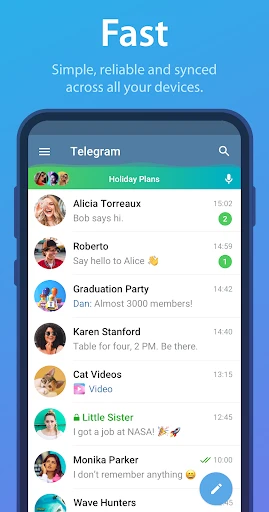


Description
About Telegram Messenger Feature
Telegram is a cloud-based, cross-platform instant messaging service renowned for its emphasis on speed, security, and privacy. Launched in 2013, it allows users to send messages, share media, and make voice and video calls across various devices seamlessly. Unlike many competitors, Telegram operates on a unique combination of a proprietary MTProto protocol for secure communication and a cloud infrastructure that enables access to chats from multiple platforms simultaneously. It has gained significant popularity globally for its robust feature set, including large group capacities, public channels, and an open platform for bot development, positioning itself as more than just a messaging app but a comprehensive social broadcasting and utility tool.
Chapter 1: Function
Telegram's core functionality revolves around fast and secure messaging. Users can send text messages, voice notes, and a wide array of media files, including documents, photos, and videos of up to 2GB in size. It supports one-on-one chats, group chats accommodating up to 200,000 members, and broadcast channels for unlimited audiences. Secret Chats offer end-to-end encryption with self-destruct timers. The platform also features voice and video calls, including group calls. A defining functional aspect is its bot ecosystem, allowing users to interact with automated services for tasks, games, and integrations. All regular chats are cloud-synced, ensuring accessibility from smartphones, tablets, and desktop computers without data loss. Its intuitive interface supports message editing, pinning, and powerful search across all conversations.
Chapter 2: Value
Telegram's primary value proposition lies in its powerful synergy of privacy-focused features, unparalleled flexibility, and a commitment to being free and ad-free. Its security model, while offering cloud-based convenience for most chats, provides optional end-to-end encrypted Secret Chats for users requiring maximum privacy. The app's open API and bot platform foster a vast ecosystem of user-created tools, mini-apps, and automated services, extending its utility far beyond simple messaging. This makes it a valuable platform for communities, content creators, and businesses. The ability to create massive groups and channels transforms it into a potent tool for community building, news dissemination, and public discourse. Furthermore, its cloud-based architecture ensures seamless multi-device synchronization, a significant advantage for users who switch between phone and computer. Unlike many services, Telegram imposes no limits on the size or lifespan of media shared, respecting user data ownership. This combination of scale, security, and an open platform offers distinct advantages for power users, organizations, and anyone seeking a highly customizable and capable communication hub without subscription fees or intrusive advertisements.
Chapter 3: Scenarios
Telegram serves a diverse range of user groups and daily scenarios. For individual users, it is a daily driver for private conversations with friends and family, sharing high-quality media, and making secure calls. Enthusiasts and hobbyists join large public groups and channels dedicated to specific topics like technology, finance, education, or entertainment, using them for real-time discussion and content consumption. Professionals and teams utilize Telegram groups for project coordination, file sharing, and bot-integrated workflows in a less formal setting than corporate email. Content creators, bloggers, and news outlets leverage broadcast channels to distribute updates, articles, and media directly to thousands or millions of subscribers. Activists and individuals in regions with sensitive communications rely on its privacy features for secure information exchange. Furthermore, its cross-platform availability makes it ideal for users who need constant access to their messages across a smartphone, tablet, and desktop PC throughout their day, whether for work, study, or social connection.
Uninstall Instructions
For step-by-step guidance on how to safely remove this application from your device, please refer to our 《Uninstall Instructions》 document.
Pros
- supports massive group chats with up to 200
- 000 members
- client-side encrypted secret chats leave no server trace
- open api enables deep bot and theme customization
- cloud-based access across multiple devices simultaneously
- streaming file previews without full downloads
Cons
- default chats use server-based encryption only
- discoverability relies on manual username sharing
- variable encryption levels may confuse casual users
- large public groups lack native content moderation tools
- self-destruct timer limited to secret chats
Frequently Asked Questions
What is Telegram and what are its core functions?
Telegram is a cloud-based instant messaging app focused on speed and security. Its core functions include sending messages, photos, videos, and files of any type, as well as creating groups for up to 200,000 members and channels for broadcasting to unlimited audiences. It operates on a freemium model, where the basic app is free with no ads, while optional paid features like Telegram Premium offer additional capabilities like larger uploads and exclusive reactions.
Is Telegram free to use, and what are its in-app purchases?
Yes, the core Telegram app is completely free to download and use, with no advertisements. It offers an optional subscription called Telegram Premium, which provides additional features like increased upload limits (up to 4GB files), faster download speeds, exclusive stickers and reactions, advanced chat management tools, and the ability to convert voice messages to text. The free version remains fully functional.
What devices and operating systems does Telegram support?
Telegram has native apps for iOS, Android, macOS, Windows, and Linux. It also offers a fully functional web version accessible from any modern browser. Your messages are synced seamlessly across all your devices due to its cloud-based architecture. There are no specific hardware requirements beyond needing a compatible operating system and an internet connection.
How does Telegram's 'Secret Chat' feature enhance privacy?
Telegram's 'Secret Chats' are end-to-end encrypted conversations that are not stored on Telegram's servers. They offer features like self-destructing messages, prevent forwarding, and screen capture alerts (on some platforms). These chats are device-specific and do not appear in the cloud backup. It's important to note that regular cloud chats use client-server/server-client encryption, not end-to-end by default.
Can I recover my chat history if I switch phones?
Yes, for cloud chats (the default type), your entire message history, media, and files are stored securely in the Telegram cloud and automatically sync when you log into your account on a new device. To recover everything, simply install the app and log in with your phone number. However, locally stored 'Secret Chats' and their data are device-specific and cannot be transferred.
App Info
Technical Info
Recommended For You

Messages: SMS Message Text App
Communication

Workforce Tools
Business

Mirror Plus - HD Mirror app
Beauty

Plus Messenger
Communication

YotePya
Comics

Filtre for Selfie
Beauty

AT&T Visual Voicemail
Communication

FAX App: Send Faxes from Phone
Business

PENUP – Drawing-sharing SNS
Art & Design

SelfComic: Super Saiyan Photo
Comics

Men's Hair Cuts & Hairstyles
Beauty

ThriftBooks: New & Used Books
Books & Reference

Avigilon Alta Open
Business

All Email Login
Communication

FX File Explorer: Plus License
Business

Google Ads
Business

Typology Paris - Skincare
Beauty

starryai - AI Art Generator
Art & Design

مانجا للصغار
Comics

Ai Vista
Art & Design