
Learn how to draw - ArtWorkout
Screenshots

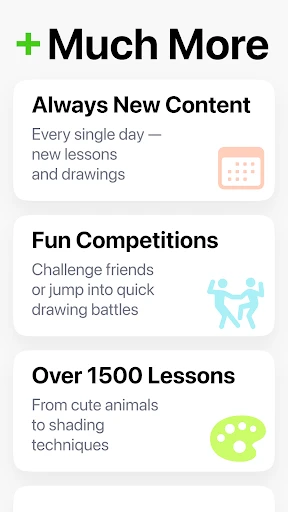


Description
About Learn how to draw - ArtWorkout Features
Learn how to draw - ArtWorkout is a mobile application designed to teach drawing skills through structured, step-by-step tutorials and interactive practice exercises. It positions itself as a personal art coach, suitable for beginners and those looking to improve their foundational drawing abilities. The app breaks down complex subjects into manageable steps, offering a library of lessons ranging from basic shapes and shading to more advanced compositions like animals, portraits, and landscapes. Its core philosophy is based on regular practice, or 'workouts,' to build muscle memory and confidence. With a clean, user-friendly interface, ArtWorkout provides a guided, low-pressure environment for anyone to start their artistic journey directly from their smartphone or tablet.
Chapter 1: Function
ArtWorkout's primary function is to deliver bite-sized, interactive drawing lessons. Each lesson presents a reference image broken down into a sequence of simple lines and shapes. Users trace over these guided steps directly on their device screen, effectively learning proportion, form, and construction. The app features a diverse library of tutorials categorized by difficulty and subject matter, including objects, animals, anime characters, and human figures. Key functionalities include a drawing canvas with basic tools like pencils and erasers, the ability to toggle guidance lines on and off, and progress tracking. It emphasizes repetition, allowing users to redo lessons to refine their technique. The process is intuitive: select a lesson, follow the step-by-step overlay, and complete the drawing, receiving instant visual feedback throughout the exercise.
Chapter 2: Value
The value of ArtWorkout lies in its ability to demystify the drawing process and make art education accessible, affordable, and convenient. Its key advantage is the structured, mechanistic approach that builds fundamental skills from the ground up, reducing the intimidation factor for absolute beginners. Unlike passive video tutorials, ArtWorkout offers active, hands-on practice, reinforcing learning through direct application. The app's vast and regularly updated library provides continuous learning material, ensuring users always have new challenges. It serves as a cost-effective alternative to in-person classes, offering lifetime access for a one-time purchase or through a subscription model. The value extends to psychological benefits, such as improving hand-eye coordination, fostering patience, and providing a creative outlet that promotes mindfulness. By gamifying practice with daily workouts and progress tracking, it encourages consistent habit formation, which is crucial for skill development. Furthermore, its offline capability adds practical value, allowing practice anywhere without an internet connection. In essence, ArtWorkout delivers tangible educational outcomes by translating traditional drawing curriculum principles into an engaging, mobile-first digital experience.
Chapter 3: Scenarios
ArtWorkout primarily targets absolute beginners and hobbyists with little to no formal art training. It is ideal for individuals who have always wanted to learn to draw but felt unsure where to start. Common use cases include students seeking a relaxing after-school hobby, adults looking for a creative break from work, or parents finding an educational activity for children. The app is perfectly suited for daily commutes, waiting periods, or quiet evenings at home, turning spare moments into productive practice sessions. It also serves as a valuable supplementary tool for students in formal art education who need extra practice with specific subjects like perspective or anatomy. Another key scenario is for individuals interested in digital art but who need to strengthen their traditional sketching fundamentals first, using the app as a foundational stepping stone. The simplicity and portability make it a constant companion for anyone aiming to build a consistent drawing habit without the need for extensive physical art supplies or setup time.
Uninstall Instructions
For step-by-step guidance on how to safely remove this application from your device, please refer to our 《Uninstall Instructions》 document.
Pros
- offers guided tutorials for specific objects and styles
- uses timed exercises to build drawing speed and confidence
- provides immediate visual feedback on line accuracy
- structured daily workouts for consistent skill development
- minimal interface reduces friction for daily practice
Cons
- limited creative freedom due to strict tracing templates
- workout format may feel repetitive over extended use
- lacks foundational theory on anatomy or perspective
- requires consistent daily commitment for progression
- advanced artists may find exercises too basic
Frequently Asked Questions
What is ArtWorkout and what does it do?
ArtWorkout is a mobile application in the Education/Art & Design category. Its core function is to teach users how to draw through guided, step-by-step tutorials. It positions itself as a practical drawing coach, offering structured lessons that break down complex subjects into simple lines and shapes. The app provides a library of drawing exercises ranging from basic objects to advanced portraits, focusing on building fundamental sketching skills through repetition and practice.
Is ArtWorkout free to use or does it have in-app purchases?
ArtWorkout operates on a freemium model. The app can be downloaded and used for free, which grants access to a selection of basic drawing lessons and tools. However, to unlock the full library of tutorials, advanced features, and remove advertisements, users must purchase a premium subscription or one-time unlock within the app. The specific pricing and subscription terms are detailed in the app's store listing and within the app's settings menu.
What devices and systems is ArtWorkout compatible with?
ArtWorkout is primarily designed for mobile devices. It is available for download on smartphones and tablets running the Android operating system via the Google Play Store. The app is optimized for touchscreens, utilizing the device's screen for drawing input with a finger or a compatible stylus. For specific minimum system version requirements and optimal performance details, please refer to the technical information section on the app's official store page.
How does the step-by-step drawing tutorial feature work?
The app's core feature presents drawing tutorials in a staged, trace-over method. Each drawing is deconstructed into multiple sequential steps. Users see a faint outline of the next lines on a transparent layer over their own canvas. They trace these lines to complete the step, after which the app reveals the next set of lines. This process repeats until the full drawing is complete. This technique is designed to train muscle memory and understanding of form without requiring prior artistic knowledge.
Can I save and share my drawings created in ArtWorkout?
Yes, ArtWorkout includes functionality to save your completed artwork directly to your device's gallery or internal storage. The app typically provides an export or share button upon finishing a tutorial, allowing you to save the image as a standard photo file (e.g., JPEG or PNG). From your device's gallery, you can then share the drawing to other platforms or social media apps. The app itself does not have a built-in public social network for sharing.
App Info
Technical Info
Recommended For You

FamilySearch Tree
Books & Reference

Mens Hairstyles And Haircuts
Art & Design

When I Work Team Scheduling
Business

DAT One
Business

Temp Mail - Temporary Email
Communication

Telegram
Communication

Gencraft - AI Art Generator
Art & Design

Meeting - Video Conference
Business
CL Theme Card
Auto & Vehicles

Legion Workforce Engagement
Business

Sweet Beauty Camera Fillter
Beauty

Hiya: Spam Blocker & Caller ID
Communication

Chevron
Auto & Vehicles

Knots 3D
Books & Reference

CARFAX Car Care App
Auto & Vehicles

Moonstories
Books & Reference

Clip Studio Paint
Art & Design

Vehicleinfo - RTO Information
Auto & Vehicles

850 OBD-II
Auto & Vehicles
Krita
Art & Design