
AR Drawing: Sketch, Art, Paint
Screenshots
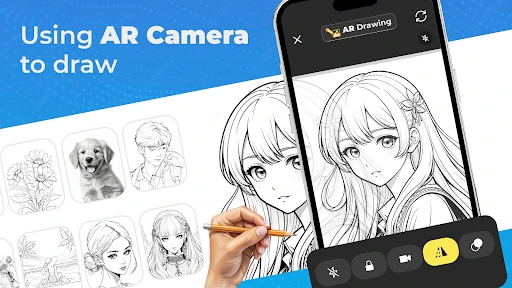

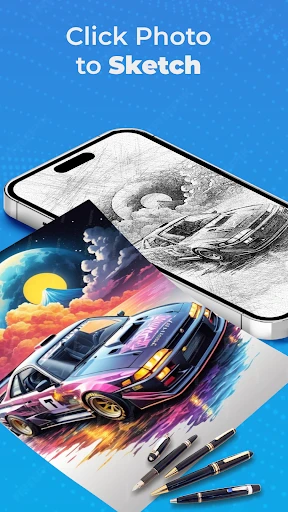


Description
About AR Drawing: Sketch, Art, Paint Feature
AR Drawing: Sketch, Art, Paint is an innovative mobile application that merges the physical and digital worlds to revolutionize the art creation process. By utilizing augmented reality technology, it projects a reference image onto a real-world surface, such as paper or canvas, allowing users to trace and replicate the image with remarkable ease and accuracy. This app is designed to lower the barrier to artistic creation, making drawing and sketching accessible to individuals of all skill levels, from complete beginners to seasoned artists seeking new tools. It serves as a digital art tutor, a creative companion, and a platform for exploring artistic techniques without the intimidation of a blank page.
Chapter 1: Function
The core function of AR Drawing is its augmented reality tracing capability. Users begin by selecting or importing an image from their device's gallery or the app's built-in library. The app then accesses the device's camera and superimposes the chosen image onto the live view of the user's physical drawing surface. By adjusting the transparency and size, users can align the virtual projection perfectly with their paper. The primary function is to enable tracing: as users look at their device's screen, they see both the real-world paper and the overlaid guide, allowing them to sketch the outlines with precision. Additionally, the app provides basic drawing tools for freehand sketching on a digital canvas, color palettes, and layer management features. It also includes tutorials and step-by-step guides for various drawing projects, functioning as an interactive learning platform that bridges the gap between seeing and creating.
Chapter 2: Value
The primary value proposition of AR Drawing lies in its democratization of art. It transforms the daunting task of drawing from imagination into a manageable, guided activity, thereby building user confidence and reducing the initial frustration associated with learning to draw. Its key advantage is the seamless integration of AR technology, which provides a real-time, adjustable guide that is far more intuitive than traditional methods like using a lightbox or grid system. This leads to immediate, satisfying results, encouraging continued practice and skill development. For educators and parents, the app offers immense value as a teaching aid, making art lessons more engaging and accessible. For artists, it serves as a valuable tool for underpainting, composition planning, and exploring complex perspectives quickly. The app also fosters creativity by allowing users to deconstruct and understand the line work of existing images, which is a fundamental learning technique. Unlike static tutorials, the interactive, hands-on tracing experience accelerates muscle memory and hand-eye coordination. By providing a vast library of images ranging from simple shapes to intricate portraits, it caters to diverse interests and skill progression, ensuring long-term utility and user engagement.
Chapter 3: Scenarios
The primary target users for AR Drawing are art enthusiasts at the beginner and intermediate levels, including children, teenagers, and adults who wish to learn drawing but lack formal training. It is equally valuable in educational scenarios, where teachers can use it in classrooms to introduce basic drawing concepts and techniques in a fun, interactive manner. Parents may utilize the app for creative family activities, helping children develop fine motor skills and artistic appreciation. Everyday use cases include individuals seeking a relaxing, meditative hobby at home, using the app to recreate favorite characters, landscapes, or designs for personal enjoyment or to create handmade gifts. Hobbyists, such as bullet journal keepers or crafters, can use it to embellish their projects with precise drawings. Furthermore, social media enthusiasts find value in creating shareable artwork to post on platforms like Instagram or TikTok. The app is also practical for quick concept sketching for designers or illustrators who need to draft ideas rapidly based on reference material. In essence, any scenario where guidance, practice, or creative exploration is desired represents a fitting use case for AR Drawing.
Uninstall Instructions
For step-by-step guidance on how to safely remove this application from your device, please refer to our 《Uninstall Instructions》 document.
Pros
- projects dynamic AR guides onto physical paper for tracing
- extensive library of animated 3D models as drawing subjects
- real-time stroke correction feedback for skill development
- eliminates need for physical stencils or lightboxes
- exports time-lapse videos of the augmented creation process
Cons
- requires stable surface recognition for AR projection to lock
- animated models drain battery faster than static references
- paper must be evenly lit to avoid tracking loss
- complex 3D guides may overwhelm absolute beginners
- AR drawing space constrained by device camera field of view
Frequently Asked Questions
What is AR Drawing and what can I do with it?
AR Drawing: Sketch, Art, Paint is a creative utility app that uses augmented reality (AR) technology to help users draw. Its core function allows you to trace images from your device's screen onto physical paper by overlaying a virtual guide. It positions itself as a tool for learning sketching, painting, and creating art by simplifying the initial outline process.
Is AR Drawing free to use or does it have in-app purchases?
The app is free to download and use with basic functionality. It typically includes optional in-app purchases, such as subscriptions or one-time payments, to unlock premium features like advanced brushes, a larger image library, or removal of advertisements. No additional physical equipment is mandatory, though a phone/tablet stand can improve the tracing experience.
What devices and systems are compatible with AR Drawing?
AR Drawing is compatible with iOS and Android smartphones and tablets that support ARCore (Android) or ARKit (iOS) frameworks. This generally includes mid-to-high-end devices released in recent years. It is designed for a wide user group, from beginners and hobbyists to children interested in learning drawing techniques.
How does the AR tracing feature work in this app?
The app uses your device's camera to display a real-time feed of your drawing surface. You select or import an image, and the app projects it as a semi-transparent overlay onto the live camera view. You then physically trace this projected outline onto your actual paper or canvas, using your device as a guide. It requires stable lighting and camera positioning.
Can I save and share my drawings created in AR Drawing?
Yes, you can save your completed drawings directly to your device's photo gallery. The app also provides options to share your artwork on various social media platforms or via other communication apps installed on your device. Drawings are saved as standard image files (like JPEG or PNG) for easy access and sharing outside the app.
App Info
Technical Info
Recommended For You

Whoscall - Caller ID & Block
Communication

Pashto short stories پښتو قیصی
Comics

Vector Ink: SVG, Illustrator
Art & Design

iSharing: GPS Location Tracker
Communication

Pentacomix
Comics

Power Apps
Business

Dynamic Drive
Auto & Vehicles

TracFone My Account
Communication

Fresha for customers
Beauty

AI Photo Editor: BG Remover
Art & Design

TeamViewer Remote Control
Business

Manga Library - مكتبة المانجا
Comics

Recover Deleted Messages App
Communication

NDI HX Camera: Easy Streaming
Communication

WebNovel
Books & Reference

Virtual Dyno PRO
Auto & Vehicles

Gencraft - AI Art Generator
Art & Design

VoyceMe: Manga and Webtoons
Comics

AniDraw: 2D Draw Animation
Art & Design

Jewelry Women Jewellery Photo
Beauty