
Hush: Android Auto Audio Fix
Screenshots

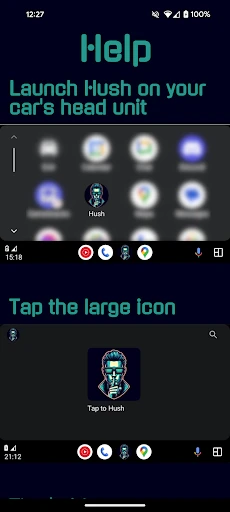
Description
About Hush: Android Auto Audio Fix Feature
Hush: Android Auto Audio Fix is a specialized utility application designed for Android users who experience audio disruptions while using Android Auto in their vehicles. It addresses a common but frustrating issue where other media or notification sounds on the phone interfere with or pause the primary audio playback, such as music or podcasts, over the car's system. The app provides a streamlined, focused solution to ensure a continuous and immersive listening experience during drives. By intelligently managing audio channels and notifications, Hush acts as a dedicated fix, enhancing the reliability of the Android Auto ecosystem without requiring complex configuration from the user.
Chapter 1: Function
The core function of Hush: Android Auto Audio Fix is to silence specific audio interruptions that disrupt playback through Android Auto. When activated, the app operates by automatically muting notification sounds, SMS tones, and other system sound effects from the connected smartphone that would normally cause the main audio stream—like music from Spotify or audiobooks from Audible—to duck in volume or pause momentarily. It does not block notifications entirely; visual alerts and vital communications remain accessible. The application typically features a simple toggle switch to enable or disable the fix, sometimes with additional granular controls to select which sound types to suppress. Its operation is lightweight, running quietly in the background once Android Auto is connected, and it requires no deep integration with the car's head unit, working primarily on the phone's audio management level to maintain a steady audio output.
Chapter 2: Value
The primary value proposition of Hush lies in its singular focus on solving a persistent pain point within the Android Auto experience. For many users, the constant interruption of navigation prompts, message notifications, or app sounds fragmenting their driving soundtrack is a significant nuisance. Hush delivers the key advantage of a seamless, uninterrupted audio journey, thereby increasing safety by reducing distractions and enhancing overall driving pleasure. Its value is further amplified by its simplicity and efficiency; the app is designed to be a set-and-forget tool. Users do not need to delve into complicated Android sound settings or developer options. The direct economic and experiential benefit is the restoration of the intended functionality of Android Auto's infotainment system, ensuring users get full value from their music streaming subscriptions and audio content. Compared to manual phone configuration or enduring the interruptions, Hush offers a dedicated, reliable, and automated solution. It represents a small investment for a dramatically improved quality of life feature, filling a gap that broader platform developers have been slow to address comprehensively. By ensuring continuous playback, it also adds value to the automotive infotainment ecosystem, making the connected car experience more polished and user-centric.
Chapter 3: Scenarios
The primary target users for Hush are daily commuters, long-distance travelers, rideshare drivers, and anyone who regularly uses Android Auto for audio entertainment and navigation. These individuals rely on their in-car system for music, podcasts, and audiobooks and are frequently frustrated by unrelated phone sounds breaking their concentration or enjoyment. A typical use case is a professional driving to work who wants to listen to a continuous morning news podcast without it being paused by every email notification. Another scenario involves a family on a road trip using Android Auto for navigation and shared music playback, where the driver's phone receiving group chat notifications should not interrupt the playlist for all passengers. Rideshare drivers, who need both navigation and passenger entertainment to run smoothly, find particular value in ensuring their music app isn't constantly ducked by other app sounds. The app is also beneficial in situations requiring focused listening, such as following complex driving instructions in an unfamiliar city or enjoying an immersive audiobook. Essentially, Hush is tailored for any real-world driving scenario where maintaining a consistent, controlled audio environment from the Android Auto system is a priority for convenience, safety, and pleasure.
Uninstall Instructions
For step-by-step guidance on how to safely remove this application from your device, please refer to our 《Uninstall Instructions》 document.
Pros
- silences audio ads during navigation automatically
- operates without requiring root access on android
- minimal battery drain due to efficient background service
- integrates seamlessly with android auto's interface
- targets a specific pain point of mixed audio streams
Cons
- limited to android auto's specific ecosystem
- effectiveness varies with app-specific audio routing
- requires accessibility service permission for operation
- no granular control over which apps are muted
- potential conflict with other audio-managing apps
Frequently Asked Questions
What is Hush and what does it do?
Hush is a utility app designed specifically for Android Auto. Its core function is to automatically detect and resolve common audio playback problems, such as no sound, low volume, or stuttering audio, that can occur during Android Auto sessions in cars. It works by managing audio focus and routing to restore normal sound output.
Is Hush completely free to use?
Hush is a free application with no upfront cost. The developer's policy regarding in-app purchases or premium features is not specified in the provided information. It is advisable to check the official listing on the Google Play Store for the most current details on its pricing model and any potential optional purchases.
What devices and Android Auto versions does Hush support?
Hush is developed for Android devices that support Android Auto. It requires a compatible smartphone, a vehicle or head unit with Android Auto functionality, and a proper USB connection or wireless setup. Specific minimum Android OS version requirements should be verified on the app's official Play Store page.
How does Hush fix audio issues in Android Auto?
Hush operates by intervening in the Android Auto audio stack when a problem is detected. It typically attempts to reset the audio session, reclaim audio focus from other apps, and correct the audio routing path without requiring manual intervention from the user, aiming for an automatic fix once launched.
Does Hush require special permissions or settings?
Hush may require permissions related to audio control and notification access to effectively manage audio focus and interactions within Android Auto. It generally does not require additional hardware. Users should grant requested permissions for full functionality and ensure Android Auto is properly set up on their device.
App Info
Technical Info
Recommended For You

Sketch Pro: Draw & Create Art
Art & Design

Mens Hairstyles And Haircuts
Art & Design

ComiQuest - Comic Reader
Comics

Receipt Scanner: Easy Expense
Business

Esports Logo Maker
Art & Design

Anime tv - Watch Anime Online
Comics

Biblia Reina Valera en español
Books & Reference

Blue Letter Bible
Books & Reference

Bible Study - Verse & Audio
Books & Reference

Handshake Jobs & New Careers
Business

Perfect Viewer
Comics

Dreame-Read Romance Stories
Books & Reference

iVerify Basic
Business

Jewelry Women Jewellery Photo
Beauty

Krita
Art & Design

طاقچه؛ کتاب الکترونیکی و صوتی
Books & Reference

Flowbird Parking
Auto & Vehicles

Hallow: Prayer & Meditation
Books & Reference

Sweet Editor Camera Lite
Beauty

Holy Quran - Deeper journey
Books & Reference