
Magic Doodle: Glow Art Drawing
Screenshots

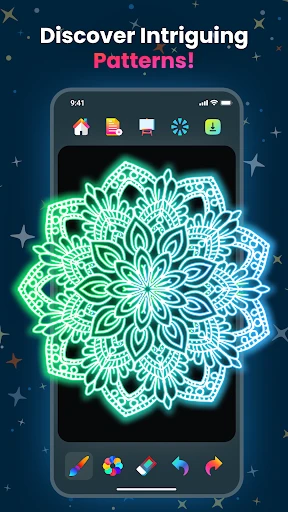
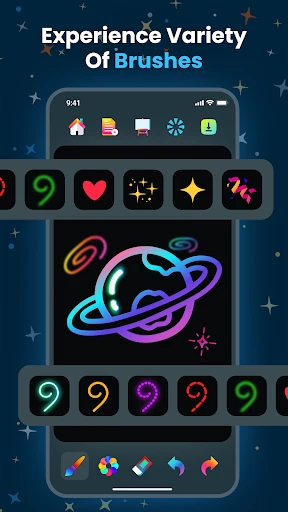
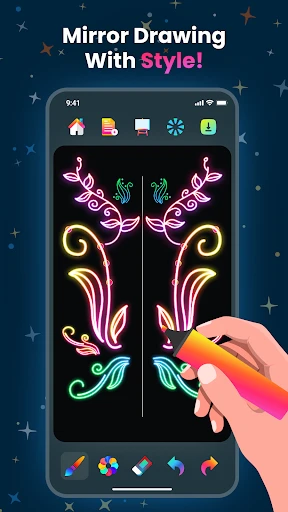

Description
About Magic Doodle: Glow Art Drawing Feature
Magic Doodle: Glow Art Drawing is a creative mobile application designed to transform digital drawing into a luminous, stress-relieving experience. It allows users of all skill levels to create stunning glow-in-the-dark artwork on a virtual canvas using a wide array of vibrant, neon colors and dynamic brush effects. The app simulates the popular physical activity of glow drawing, but with the added convenience and limitless possibilities of a digital platform. With its intuitive interface and mesmerizing visual feedback, Magic Doodle serves not only as an artistic tool but also as a relaxing pastime, enabling users to express their creativity through light and color in a dark-themed environment.
Chapter 1: Function
Magic Doodle: Glow Art Drawing provides a core set of functions centered on luminous digital creation. The primary feature is a drawing canvas with a dark background, where users can paint with brushes that emit a bright, glowing neon effect. The app offers a diverse color palette filled with vivid and fluorescent hues. Users can adjust brush sizes for different detailing needs and often have access to special effects like sparkles, gradients, or multi-touch drawing for symmetrical patterns. A standard undo/redo function allows for easy correction. Many versions include a gallery to save and review completed glow artworks. Some also feature animated backgrounds or the ability to play back the drawing process as a satisfying visual loop. The functionality is designed to be straightforward, ensuring the focus remains on the immersive act of drawing with light.
Chapter 2: Value
The value proposition of Magic Doodle: Glow Art Drawing lies in its unique fusion of artistic expression, technological simplicity, and therapeutic benefits. Its key advantage is accessibility; it demystifies art by providing an engaging, no-mess medium where anyone can create visually impressive glowing artwork without needing traditional artistic skills. The app's core value is the immediate sensory satisfaction and relaxation it offers. The act of watching luminous trails follow one's finger on a dark screen is inherently calming, making it an effective tool for stress relief and mindfulness. This positions it strongly within the market of mental wellness apps. Furthermore, it offers creative value by unlocking a novel aesthetic—neon glow art—that is particularly appealing for creating shareable social media content, custom digital decorations, or simply personal entertainment. Compared to complex graphic software, Magic Doodle excels in its singular, focused experience. It provides a safe, endless supply of 'virtual neon paint,' which is both cost-effective and eco-friendly compared to physical alternatives. The app often operates smoothly on most devices, requiring minimal storage space, which enhances its utility as a reliable on-the-go creative or relaxation outlet. Ultimately, its value is not just in creating art, but in delivering a captivating and soothing user experience through the magical medium of light.
Chapter 3: Scenarios
Magic Doodle: Glow Art Drawing primarily targets a broad user base seeking casual creativity and relaxation. A significant user group includes children and teenagers, who are drawn to the vibrant neon colors and the fun, game-like drawing experience; it serves as a creative digital toy that encourages artistic exploration without pressure. Adults form another key demographic, particularly those looking for a quick mental break from work, a method to alleviate anxiety, or a simple, satisfying hobby before sleep. The app is ideal for short sessions during commutes, waiting times, or as a wind-down ritual in the evening. Artists or hobbyists may also use it for brainstorming ideas with light and color or creating unique digital assets with its distinctive glow effect. In social scenarios, it can be a shared activity among friends or family, with users taking turns to add to a collective luminous drawing. Its everyday use cases are versatile: from a child creating a glowing dinosaur, to a stressed professional doodling abstract patterns to unwind, to a teen designing a glowing signature for their social media profile. The app fits seamlessly into moments that call for effortless, visually rewarding creative expression.
Uninstall Instructions
For step-by-step guidance on how to safely remove this application from your device, please refer to our 《Uninstall Instructions》 document.
Pros
- glow brush physics simulate real neon tube bending
- one-tap symmetry mode for intricate kaleidoscope patterns
- dark canvas preserves device battery during long sessions
- export timelapse videos showing drawing process dynamically
- minimalist gesture controls avoid toolbar distractions
Cons
- limited color blending due to neon simulation focus
- symmetry lines cannot be custom angled or curved
- glow effects render poorly on older LCD screens
- no layer system for complex illustration editing
- free version restricts canvas resolution for exports
Frequently Asked Questions
What is Magic Doodle: Glow Art Drawing?
Magic Doodle: Glow Art Drawing is a mobile art application focused on creating glowing, neon-style drawings and sketches. Its core function is to provide a digital canvas where users can draw with luminous brushes and effects, simulating glow-in-the-dark artwork. It is positioned as an easy-to-use, creative tool for making vibrant digital art, mandalas, or simple doodles for relaxation or decoration, without requiring traditional artistic skills.
Is the app free to use or are there in-app purchases?
The app is typically free to download and use with basic features. However, it includes in-app purchases to unlock premium content such as additional glow brush styles, color palettes, advanced effects, templates, and the removal of advertisements. No additional physical equipment is needed. Some permissions, like storage access for saving images, may be required.
What devices and systems is the app compatible with?
Magic Doodle: Glow Art Drawing is primarily designed for smartphones and tablets. It is commonly available on both Android (via Google Play Store) and iOS (via the Apple App Store) platforms. The specific minimum OS version required can vary, so users should check the current listing on their respective app store for detailed compatibility information regarding their device model and operating system version.
How does the glow drawing feature work technically?
The glow effect is achieved through software rendering that simulates neon and luminous trails. Technically, the app uses brush algorithms that apply semi-transparent, vibrant colors with soft edges and often a blending mode to create the illusion of light emission against a dark canvas background. Features may include adjustable brush size, opacity, color selection from a palette, and sometimes symmetry tools for creating patterned art.
Can I save and share my glow art creations?
Yes, the app allows you to save your completed artwork directly to your device's photo gallery or internal storage. Standard sharing functions are integrated, enabling you to export your images and share them on various social media platforms, messaging apps, or via email. The saved image format is typically a standard PNG or JPEG file, preserving the glowing visual effect as seen on the app's canvas.
App Info
Technical Info
Recommended For You

PDF Pro-View PDF
Business

DSLR HD Camera : 4K HD Camera
Beauty

AniDraw: 2D Draw Animation
Art & Design

Booksy Biz: For Businesses
Beauty

ThinkDiag+
Auto & Vehicles

Inbox Homescreen
Communication

RingCentral
Business
aesthetic background
Art & Design

Thrift Savings Plan
Business

WhatsApp Messenger
Communication

Whistle Express Car Wash
Auto & Vehicles

Tappytoon Manhwa & Novels
Comics

Indeed Job Search
Business

Dayforce
Business

FAB Adblocker Browser:Adblock
Communication

FamilySearch Tree
Books & Reference

AR Drawing - Trace Drawing App
Art & Design

Cheogram (Jabber, Call, Text)
Communication

Билеты ПДД 2025 и Экзамен ПДД
Auto & Vehicles

Print Photo - Print to Size
Art & Design