
HiPaint -Sketch Draw Paint it!
Screenshots


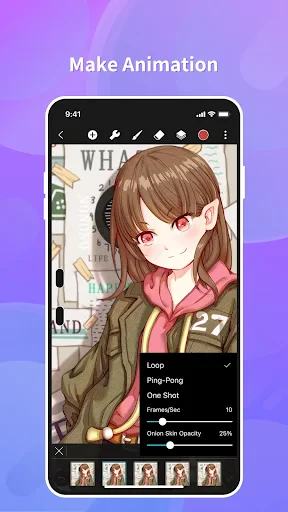

Description
About HiPaint -Sketch Draw Paint it! Feature
HiPaint -Sketch Draw Paint it! is a professional-grade digital painting and sketching application designed for artists, illustrators, and hobbyists. It simulates the experience of traditional drawing with a vast array of realistic brushes, tools, and a responsive canvas. The app bridges the gap between convenience and capability, offering a portable studio that fits in your pocket. With its intuitive interface and powerful feature set, HiPaint empowers users to create stunning artwork, from quick sketches to intricate illustrations, directly on their mobile devices or tablets, making digital art creation accessible anytime, anywhere.
Chapter 1: Function
HiPaint's core functionality centers on providing a comprehensive and realistic digital drawing environment. It boasts an extensive library of brushes that mimic real-world mediums such as pencil, charcoal, ink, oil paint, and watercolor, each with customizable parameters like size, opacity, and flow. The app supports multi-layer management with blending modes, allowing for complex, non-destructive editing. Key tools include precise color pickers, gradient fills, symmetry drawing aids, and perspective guides. Its canvas is highly responsive to pressure sensitivity from compatible styluses, offering natural line variation. Furthermore, HiPaint includes essential utilities like transform tools, text insertion, and a variety of filters and adjustments to finalize artwork. The app supports high-resolution exports in multiple formats, ensuring artwork is ready for print or digital sharing.
Chapter 2: Value
The value proposition of HiPaint lies in its exceptional balance of professional depth and user-friendly accessibility. Its primary advantage is delivering desktop-level painting software capabilities on a mobile platform at a fraction of the cost, democratizing high-quality digital art tools. The app's vast, realistic brush engine stands out, providing an authentic tactile feel that closely rivals physical media, which is crucial for serious artists seeking a seamless transition to digital. The robust layer system with blending modes supports sophisticated artistic workflows typically found in premium software. Another significant value is its offline functionality, enabling creation without dependency on an internet connection. Regular updates introduce new features and optimizations, demonstrating ongoing developer commitment. Compared to many subscription-based alternatives, HiPaint often offers a one-time purchase model, presenting tremendous long-term value. Its lightweight performance ensures smooth operation on various devices, minimizing technical barriers. By consolidating sketching, painting, and editing into one intuitive package, HiPaint saves users time and money, serving as a versatile all-in-one solution that fosters creativity and skill development for artists at all levels.
Chapter 3: Scenarios
HiPaint primarily targets a diverse range of users passionate about visual creation. Professional illustrators and concept artists utilize it for brainstorming, creating drafts, and even producing final pieces on the go, leveraging its professional tools for client work. Hobbyists and art enthusiasts find it perfect for exploring creativity, maintaining daily sketch journals, or relaxing through artistic expression. Students studying art or design use it as a practical, portable supplement to their coursework for practicing techniques and completing assignments. Additionally, graphic designers and content creators employ HiPaint for crafting social media graphics, logos, and custom illustrations directly from their tablets. In everyday scenarios, a user might quickly sketch a landscape during a commute, paint a detailed portrait at a cafe, design a birthday card for a friend, or annotate photos with personalized drawings. Its simplicity also makes it suitable for younger audiences and beginners taking their first steps in digital art, guided by the app's straightforward tools.
Uninstall Instructions
For step-by-step guidance on how to safely remove this application from your device, please refer to our 《Uninstall Instructions》 document.
Pros
- offers over 100 realistic digital brushes including oil and watercolor
- layer system supports blending modes like multiply and overlay
- customizable radial menu provides quick access to favorite tools
- stable performance with large canvases and high layer counts
- one-time purchase unlocks all professional features permanently
Cons
- steep learning curve for the advanced radial menu interface
- lacks cloud sync or native cross-platform project sharing
- no built-in asset library or brush marketplace for downloads
- animation and vector tools are minimal compared to rivals
- interface feels crowded on smaller smartphone screens
Frequently Asked Questions
What is HiPaint and what are its core functions?
HiPaint is a digital drawing and painting application designed for sketching, illustrating, and creating artwork on mobile devices. Its core functions include a comprehensive set of realistic brushes, layers with blending modes, advanced color pickers, and various canvas tools. It is positioned as a versatile mobile studio for both hobbyists and professional artists to create digital art anywhere.
Is HiPaint free to use or does it have in-app purchases?
HiPaint is free to download and use with a foundational set of brushes and tools. The app offers optional in-app purchases, typically in the form of premium brush packs, advanced layer features, or ad removal. These purchases are designed to expand the app's capabilities for users seeking more specialized tools. No mandatory subscription is required for basic functionality.
What devices and operating systems is HiPaint compatible with?
HiPaint is primarily available for Android and iOS devices, including phones and tablets. It is optimized for use with touchscreens and supports stylus input, such as from Apple Pencil or compatible active styluses on Android. For specific system version requirements, users should check the current listing on the Google Play Store or Apple App Store for the most accurate information.
Does HiPaint support pressure sensitivity for drawing?
Yes, HiPaint supports pressure sensitivity, which is a key technical feature for a natural drawing experience. This functionality works with compatible active styluses on supported devices, allowing brush strokes to vary in thickness and opacity based on pressure. For devices without an active stylus, the app may offer alternative controls to simulate pressure effects.
How can I export or share my artwork created in HiPaint?
Artwork created in HiPaint can be exported and shared through standard image formats like PNG or JPEG. The app includes export functions within its menu, allowing you to save images directly to your device's gallery or share them via other installed applications, such as social media or cloud storage services. Export settings typically include options for resolution and background transparency.
App Info
Technical Info
Recommended For You

AI Hairstyle Try On・Wigs・Bangs
Beauty

AutoZen-Car Dashboard&Launcher
Auto & Vehicles

FaceSwap: Aging & Cartoon Me
Beauty

Azar: 1 on 1 Video Chat Online
Communication
Coloring games: speed drawing
Art & Design

Toyota
Auto & Vehicles

Draw Anime: AR Drawing Sketch
Art & Design

Bookmory - reading tracker
Books & Reference

iScanner - PDF Scanner App
Business

OpenSea: NFT marketplace
Art & Design

Receipt Scanner: Easy Expense
Business

Autowini
Auto & Vehicles

Resume Builder - CV Engineer
Business

Chirp Audiobooks
Books & Reference

Virtual Hair Style Changer
Beauty

Public Storage
Business

Alight Mobile
Business

Marvel Unlimited
Comics

Advent Magnificat 2024
Books & Reference
TrueCar Used Cars and New Cars
Auto & Vehicles