
Sound Amplifier
Screenshots


Description
About Sound Amplifier Feature – Enhancing Your Listening Experience
Sound Amplifier is an innovative accessibility application developed by Google, designed to augment and clarify audio from the surrounding environment through a smartphone or connected headphones. It transforms your mobile device into a sophisticated personal hearing assistant, allowing users to filter, boost, and fine-tune sounds in real-time. Primarily integrated into Android's accessibility suite, the app serves as a discreet and powerful tool for anyone needing enhanced auditory perception in various daily situations, from quiet conversations to noisy public spaces.
Chapter 1: Function
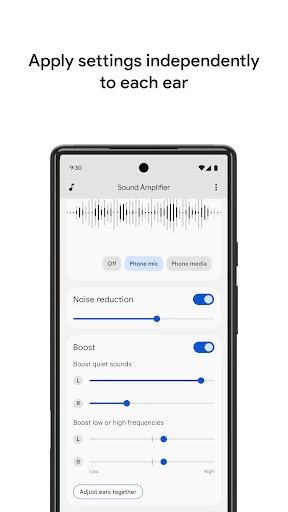
Sound Amplifier's core functionality revolves around real-time audio processing and customization. The app uses the device's microphone to capture environmental sounds, which are then processed and delivered to the user's headphones. Users can adjust two primary sliders: one for overall volume boost and another for fine-tuning background noise reduction. Advanced settings enable control over bass and treble levels, allowing for personalized sound profiles. A key feature is the ability to focus amplification directionally, either on the left or right side, to hone in on specific sound sources. The interface is minimalist and designed for ease of use, often with a persistent notification for quick access. Essentially, it functions as a customizable, software-based hearing enhancer that provides greater control over one's immediate auditory environment.
Chapter 2: Value
The primary value proposition of Sound Amplifier lies in its ability to democratize better hearing, offering a significant advantage in accessibility and daily convenience. Unlike dedicated and often expensive hardware, this app leverages existing smartphone technology, providing a cost-effective and portable solution. Its key advantages include enhanced speech clarity in noisy settings like restaurants or meetings, making conversations more intelligible. For individuals with mild to moderate hearing challenges, it acts as a non-stigmatizing first step, encouraging engagement without the immediate need for clinical hearing aids. The app also offers immense value in learning and media consumption scenarios, allowing users to hear lectures or watch videos clearly without excessive volume that disturbs others. The deep integration with Android ensures a seamless, low-latency experience, and the use of headphones provides a private listening environment. By offering granular control over soundscapes, it empowers users to tailor their auditory experience precisely to their needs, improving focus, safety, and social interaction. It represents a thoughtful application of technology to solve a fundamental human need—clear communication—enhancing quality of life through better listening.
Chapter 3: Scenarios
Sound Amplifier's target user groups are diverse, extending beyond the hearing-impaired community. Its primary users include older adults experiencing age-related hearing decline, who benefit from amplified conversations with family. Students utilize it in large lecture halls to capture the professor's voice clearly, filtering out crowd noise. Professionals employ it in open-plan offices or during conferences to focus on specific speakers. The app is also invaluable in everyday scenarios for anyone needing situational auditory enhancement: a parent listening for a child in another room, a traveler trying to hear airport announcements amidst chaos, or a birdwatcher identifying faint calls in nature. In quiet settings, like watching TV late at night, it allows personal audio amplification through headphones without disturbing others. It serves as a crucial tool for individuals not yet ready for hearing aids, providing a bridge to better hearing. Ultimately, Sound Amplifier fits seamlessly into daily life for anyone seeking greater control and clarity over the sounds around them, promoting inclusivity and connection.
Uninstall Instructions
For step-by-step guidance on how to safely remove this application from your device, please refer to our 《Uninstall Instructions》 document.
Pros
- amplifies ambient sounds through headphones clearly
- customizable frequency filters for hearing enhancement
- works offline without requiring an internet connection
- reduces background noise while boosting speech
- minimal battery drain during continuous use
Cons
- requires compatible wired headphones for best results
- limited to audio routing through device's output only
- no multi-device Bluetooth streaming capability
- interface lacks visual sound waveform displays
- advanced tuning presets need manual configuration
Frequently Asked Questions
What is Sound Amplifier and what does it do?
Sound Amplifier is an accessibility app designed to enhance and clarify audio in your environment. It uses your device's microphone to amplify nearby sounds, filter background noise, and adjust frequencies. This core function helps users hear conversations, television, or other ambient sounds more clearly through headphones, without requiring a separate hearing aid. It is positioned as a personal sound enhancement tool.
Is Sound Amplifier completely free to use?
Yes, Sound Amplifier is a free application with no in-app purchases or subscription fees. It functions using your smartphone's existing hardware and does not require any additional paid equipment. However, for optimal use, you will need a pair of wired or wireless headphones to listen to the amplified audio privately and safely.
What devices and systems are compatible with this app?
Sound Amplifier is primarily available for Android devices. Its availability and feature set depend on the specific Android OS version. It is not available for iOS. The app is designed to work on phones and tablets that meet the system requirements. For the most accurate and current information on compatible devices, please check the official Google Play Store listing.
How does Sound Amplifier differ from a hearing aid?
Sound Amplifier is a software-based sound enhancement tool for smartphones, not a certified medical device. It is intended for situational assistance and cannot replace a professionally fitted hearing aid for individuals with hearing loss. Its features include basic amplification, noise reduction, and tone adjustment, but it lacks the clinical calibration and advanced processing of dedicated medical hearing aids.
Why is there a delay or echo in the amplified sound?
Audio processing latency can cause a slight delay or echo, which is a common technical characteristic of digital sound processing. This can vary based on your device's hardware, Bluetooth headset connection, and selected filter settings. Using wired headphones typically minimizes latency. Reducing background noise filters may also improve responsiveness. The app's performance is dependent on your specific device's capabilities.
App Info
Technical Info
Recommended For You

Beauty Makeup Editor & Camera
Beauty

Flyers, Poster Maker, Design
Business

Minicraft Crafting Building
Comics

JobStack for Work | Job Search
Business

Samsung Accessory Service
Communication

WhenToWork Employee Scheduling
Business

GIF Sticker & WAsticker
Communication

@Voice Aloud Reader (TTS)
Books & Reference

Volvo Cars
Auto & Vehicles

Livensa: AI Video Maker
Art & Design

Easy hairstyles step by step
Beauty

WoAD
Communication

Video Call
Communication

Sling: Employee Scheduling App
Communication

ParkMobile: Park. Pay. Go.
Auto & Vehicles

Al Quran Kareem: القران الكريم
Books & Reference

Circuit Color
Books & Reference

BOMTOON - 正版授權網漫
Comics

KJV Daily Bible - Verse+Audio
Books & Reference

Hangouts
Communication