
Video Call
Screenshots
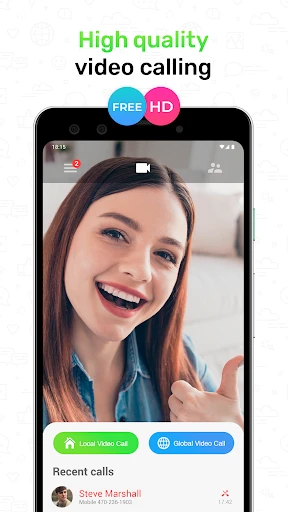


Description
About Video Call App Feature
The Video Call app is a modern communication tool designed to facilitate real-time, face-to-face interaction over the internet. It transcends the limitations of traditional voice calls and text messaging by enabling users to see and hear each other, fostering a more personal and engaging connection. Widely adopted for both personal and professional use, these applications have become integral to daily life, allowing people to maintain relationships, collaborate on work, and share experiences regardless of geographical distance. By leveraging smartphone cameras and microphones, video call apps deliver a seamless and intuitive communication experience directly to the user's device.
Chapter 1: Function
The core function of a Video Call app is to establish a live audio-visual connection between two or more participants. Upon launching the app, users can initiate or receive calls by selecting contacts from an integrated list or entering a specific meeting ID. The app utilizes the device's camera to capture video and the microphone for audio, transmitting this data in real-time over an internet connection. Key operational features typically include a toggle to mute/unmute audio, switch between front and rear cameras, and turn the video feed on or off. For group conversations, the app often provides a gallery or speaker view to display multiple participants simultaneously. Additional functional staples are in-call text chat for sharing links or quick messages, screen sharing capabilities for presentations or technical support, and recording options to archive important discussions. The interface is designed for simplicity, ensuring that these powerful communication tools are accessible with just a few taps.
Chapter 2: Value
The primary value proposition of a Video Call app lies in its ability to collapse distance and create a sense of physical presence, which is invaluable in today's globalized and often remote world. For personal users, the app delivers profound emotional value by allowing families and friends to share life's moments—from casual catch-ups to milestone celebrations—as if they were in the same room, thereby strengthening bonds and reducing feelings of isolation. In the professional realm, it drives significant operational efficiency. It enables remote team collaboration, client meetings, and job interviews without the need for costly and time-consuming travel, directly contributing to productivity gains and reduced overhead. The key advantages of leading video call platforms include high-definition video and audio quality that ensures clear communication, robust end-to-end encryption that protects user privacy and meeting security, and exceptional reliability with minimal latency or drops. Furthermore, features like virtual backgrounds, meeting scheduling integrations, live captions, and large participant capacities cater to diverse needs, from individual users to large enterprises. This combination of connectivity, convenience, and feature-rich performance makes the video call app an indispensable tool for meaningful and effective communication across all spheres of life.
Chapter 3: Scenarios
Video call apps serve a wide array of target user groups and are embedded in numerous everyday scenarios. The most common users include remote workers and distributed corporate teams who rely on these apps for daily stand-up meetings, project brainstorming sessions, and company-wide announcements. Freelancers and consultants use them to interface with clients across different time zones. Educational institutions and tutors employ video calls for virtual classrooms, one-on-one tutoring, and study groups, making learning accessible. On a personal level, the apps are used by families with members living abroad for regular check-ins, by friends separated for university or work to maintain their social circle, and by individuals in long-distance relationships. Healthcare providers have also adopted telehealth video consultations for patient follow-ups and preliminary diagnoses. Everyday use cases range from informal activities like virtual coffee chats, online book club meetings, and watching movies together remotely, to more formal occasions such as conducting remote job interviews, hosting webinars, providing online fitness coaching, and even celebrating birthdays or holidays with loved ones who cannot be physically present. The technology has become a versatile backbone for maintaining both professional continuity and personal connections in a digitally connected world.
Uninstall Instructions
For step-by-step guidance on how to safely remove this application from your device, please refer to our 《Uninstall Instructions》 document.
Pros
- optimizes video clarity in low-light conditions
- background noise suppression during group calls
- one-tap switch between portrait and landscape modes
- stable connection under fluctuating 3G/4G signals
- real-time gesture triggers for in-call effects
Cons
- high frame rate mode drains battery rapidly
- screen sharing limited to 3 participants maximum
- echo cancellation fails with certain bluetooth devices
- manual network priority setting required for congestion
- landscape mode crops peripheral participants on tablets
Frequently Asked Questions
What is the core function of Video Call?
Video Call is a communication application focused on real-time video and audio conversations. Its primary function is to connect users for face-to-face interaction over the internet. The app provides stable, high-quality video and audio streaming, allowing for personal chats, family gatherings, or remote meetings. It positions itself as a straightforward tool for visual communication without complex social media features.
Is Video Call free to use, and are there in-app purchases?
The basic functionality of Video Call is free. Users can download the app and initiate standard video calls without any subscription fee. The app may offer optional in-app purchases for advanced features, such as extended group call participant limits, cloud recording, or custom virtual backgrounds. There is no requirement for additional physical equipment beyond a standard smartphone or computer with a camera and microphone.
What devices and systems are compatible with Video Call?
Video Call is designed for broad compatibility. It is available on major mobile platforms, including iOS and Android smartphones and tablets. A web version or dedicated desktop application is typically available for Windows and macOS computers. The app requires a stable internet connection and a device with a front-facing camera and microphone. It is generally suitable for all age groups, focusing on personal and professional communication.
How many people can join a group call on Video Call?
The standard group call capacity for Video Call varies by plan. The free version typically supports a limited number of participants, such as 4 to 8 people, in a single video call session. To host calls with more participants, such as for larger meetings or webinars, a premium subscription or one-time in-app purchase may be required to unlock higher limits, which can often accommodate dozens of participants.
What should I do if I experience poor call quality or connection issues?
For connection issues, first check your internet stability and switch between Wi-Fi and mobile data if possible. Ensure the app has permissions for the camera and microphone. Closing other background applications can free up device resources. If problems persist, standard troubleshooting includes updating the app to the latest version, restarting your device, or consulting the official support section within the app for specific error codes and network guidelines.
App Info
Technical Info
Recommended For You

Spam Call Blocker for Android
Communication

Everand: Ebooks and audiobooks
Books & Reference

Workvivo
Business

ComiQuest - Comic Reader
Comics

Online chat, calls - Gem Space
Communication

Sweet Camera Selfie
Beauty

Rebtel: Recharges And Calls
Communication

NIV Bible
Books & Reference

Pentacomix
Comics

Knots 3D
Books & Reference

Nice Miner: Bitcoin Miner Hash
Business

Webfic - Fantastic Reading
Books & Reference

Madison Reed App - Hair Color
Beauty

My SafeLink
Communication

Al Quran Sharif for Muslim
Books & Reference

Learn to Draw Cartoon
Comics

Mirror Study Bible
Books & Reference

AirTalk Wireless
Business

inCarDoc Pro | OBD2
Auto & Vehicles

VIN Check Report for Used Cars
Auto & Vehicles