
WhenToWork Employee Scheduling
Screenshots

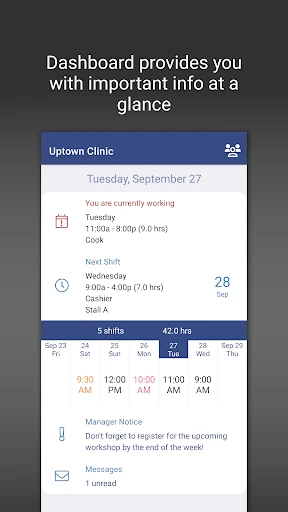


Description
About WhenToWork Employee Scheduling Feature - Streamlining Workforce Management
WhenToWork Employee Scheduling is a dedicated online platform designed to simplify the complex task of creating and managing work schedules. It serves as a centralized hub for managers and employees, facilitating seamless shift planning, availability communication, and time tracking. By moving away from error-prone manual methods like spreadsheets or paper schedules, WhenToWork introduces automation and transparency into the scheduling process. The app aims to reduce administrative overhead, minimize scheduling conflicts, and empower employees with greater control over their work hours, ultimately fostering a more efficient and harmonious workplace environment for businesses of various sizes, particularly in retail, hospitality, and service industries.
Chapter 1: Function
WhenToWork's core functionality revolves around intuitive shift scheduling and management. Managers can swiftly create schedules using a drag-and-drop interface on a visual calendar, assigning employees to shifts based on roles, departments, and required hours. The system allows for setting recurring shift patterns and copying existing schedules to save time. A central feature is the employee availability module, where staff can submit their preferred working times and time-off requests directly through the app. The platform automatically highlights conflicts and ensures shift coverage meets business demands. Once published, schedules are instantly accessible to all employees via web or mobile devices. Furthermore, the app includes tools for shift swaps, cover requests, and messaging, enabling staff to self-manage changes within manager-set parameters, keeping the schedule dynamic and current without constant manual intervention.
Chapter 2: Value
The primary value proposition of WhenToWork lies in its ability to transform scheduling from a tedious administrative chore into a strategic, efficient process. Its key advantage is the significant time savings it offers managers; by automating schedule creation and updates, it can reduce scheduling time by up to 75 percent compared to manual methods. This efficiency directly translates to lower labor costs through optimized staffing, preventing both overstaffing and understaffing. The platform enhances operational accuracy by eliminating double-bookings and oversights, thereby reducing costly errors. For employees, WhenToWork delivers substantial value by promoting work-life balance. The transparent system and ability to communicate availability and swap shifts empower staff, leading to increased satisfaction, reduced absenteeism, and lower turnover rates. The real-time accessibility of schedules from any device ensures everyone is always informed of the latest changes, improving communication and accountability across the team. Additionally, its reporting features provide managers with insights into labor costs and hours worked, supporting better budgeting and forecasting. As a cloud-based solution, it requires no software installation and offers reliable data security, making it a cost-effective and scalable tool for businesses seeking to modernize their workforce management.
Chapter 3: Scenarios
WhenToWork is ideally suited for managers and business owners in industries with variable shift-based workforces, such as restaurants, cafes, retail stores, healthcare facilities, call centers, and fitness studios. For a restaurant manager, the app is indispensable for coordinating waitstaff, hosts, and kitchen crews across lunch, dinner, and weekend shifts, easily handling complex rotations and last-minute changes. Retail store supervisors use it to align staff schedules with peak shopping hours, sales events, and seasonal demand, ensuring optimal floor coverage. The app also profoundly benefits the employees themselves, particularly students, part-time workers, and those with familial responsibilities. A university student working part-time can seamlessly submit exam week unavailability and pick up extra shifts during breaks. A parent can coordinate their work schedule around childcare by requesting specific shifts and arranging swaps with colleagues through the app's messaging system. Furthermore, multi-location business owners or district managers utilize WhenToWork to oversee and standardize scheduling practices across different sites from a single dashboard, ensuring consistency and compliance. In essence, any environment where managing multiple employee shifts is routine finds significant utility in this centralized, collaborative scheduling tool.
Uninstall Instructions
For step-by-step guidance on how to safely remove this application from your device, please refer to our 《Uninstall Instructions》 document.
Pros
- visual drag-and-drop interface simplifies shift assignment
- real-time availability input reduces scheduling conflicts
- automated shift swap board streamlines staff changes
- multi-location support centralizes complex scheduling
- mobile access allows on-the-go schedule checks
Cons
- initial setup for complex rules requires time investment
- limited native payroll integration for larger enterprises
- offline functionality restricted for schedule updates
- advanced reporting needs separate export steps
- interface feels dated compared to newer SaaS tools
Frequently Asked Questions
What is WhenToWork Employee Scheduling?
WhenToWork is a cloud-based employee scheduling application designed for managers and businesses. Its core function is to simplify the creation, management, and communication of work schedules for hourly and shift-based employees. It allows managers to build schedules online, while employees can view their shifts, request time off, and swap shifts from their own devices, aiming to reduce scheduling conflicts and improve team coordination.
Is WhenToWork free to use, or are there in-app purchases?
WhenToWork operates on a subscription model and is not a free application. It typically offers tiered pricing plans based on the number of users or employees scheduled. There may be a free trial period for new accounts, but ongoing use requires a paid subscription. The app itself does not feature traditional in-app purchases; all core scheduling functionalities are accessed through the subscription. For specific pricing, please visit the official WhenToWork website.
How do employees access and interact with the schedule?
Employees access their schedules through a dedicated employee portal, available via web browser or the companion mobile app (where offered). They can view published shifts, submit availability, request time off, and potentially swap shifts with co-workers if the manager enables that feature. Notifications for new schedules or shift changes are often sent via email or SMS, keeping the team updated in real time without relying on paper schedules or group texts.
What are the common technical issues users might encounter?
Common issues can include login problems due to incorrect credentials, difficulty viewing schedules on certain mobile browsers, or notification delays. Since it's a web-based service, a stable internet connection is required. Schedule conflicts or permission errors usually require resolution by the account administrator (manager). For technical support, users should contact their organization's schedule administrator first or refer to the help resources within their company's specific WhenToWork account portal.
Can I use WhenToWork without an internet connection?
Core schedule creation and publishing for managers, as well as real-time viewing and shift requests for employees, require an active internet connection as WhenToWork is a cloud-based platform. Some limited functionality, such as viewing a previously loaded schedule, might be available in a mobile app with caching, but any changes or updates cannot be synced until the device reconnects to the internet. It is not designed for full offline operation.
App Info
Technical Info
Recommended For You

Gospel Library
Books & Reference

Fonto - story font for IG
Art & Design

Beauty Camera - Selfie Camera
Beauty

Shipt: Shopper and Driver
Business

Conversations (Jabber / XMPP)
Communication

Power Apps
Business

AirTalk Wireless
Business

Car Launcher Pro
Auto & Vehicles

Cryptoguru: Trading Simulator
Business

Avatar Maker - Avatar Creator
Comics

League of Comic Geeks
Comics

AutoScout24: Buy & sell cars
Auto & Vehicles

Video AI - AI Hug & Kiss Maker
Art & Design

Color Analysis - Dressika
Beauty

All Document Reader:PDF Viewer
Business

AI Video Generator - Clips AI
Art & Design

WoAD
Communication

Manobook - Los Besos de Jacob
Books & Reference

Mirror App - Beauty Mirror
Beauty

GlobalComix: Comic Book Reader
Comics